also @ TechSpot: Microsoft backtracks: Drops daily check-ins, used games restrictions on Xbox One

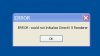
DirectX error message

Discussion in 'Gaming' started by Doctor Gallop, Mar 7, 2013.

Post New Reply
  1. Doctor Gallop TechSpot Enthusiast Posts: 122

    I downloaded a demo game but when I went to launch it I got a pop up window saying error.
    Is there something I should update or is my PC just too old? I am running Windows XP.
    I went to the Microsoft support site and downloaded Direct X 9c Runtime....but still get the error pop up when I try to launch the demo.

    error message.jpg
  2. JC713 TechSpot Evangelist Posts: 3,449   +306

    What game demo are you trying to download?
  3. Doctor Gallop TechSpot Enthusiast Posts: 122

    What game demo are you trying to download?[/quote]

    I did not seem to have any problem downloading and installing it....But it throws up that error message when I try to play it.
    its called Pain Killer.
    I have gone to the same site [ File Planet ] and downloaded the same demo with no problems on another computer.
  4. LukeDJ TechSpot Booster Posts: 317   +66

    A quick Google suggests that quite a few people had your problem. This seemed to work for a few them, might be worth a try.

    1. download / install 3D-Analyze (http://www.3dfxzone.it/files?object=3dfx&objid=100)
    2. select painkiller.exe
    3. check Emulate HW TnL
    4. check Force SW TnL Caps
    5. click run
  5. Doctor Gallop TechSpot Enthusiast Posts: 122

    Downloaded and ran 3D-Analyze but it showed no problem.