UPDATE: I solve the problem. The problem was that the motherboard had some glitches and I just bought the same motherboard and it fix the problem. Thanks alot for the informations on trying to figure out whats the problem with my computer.
I have a
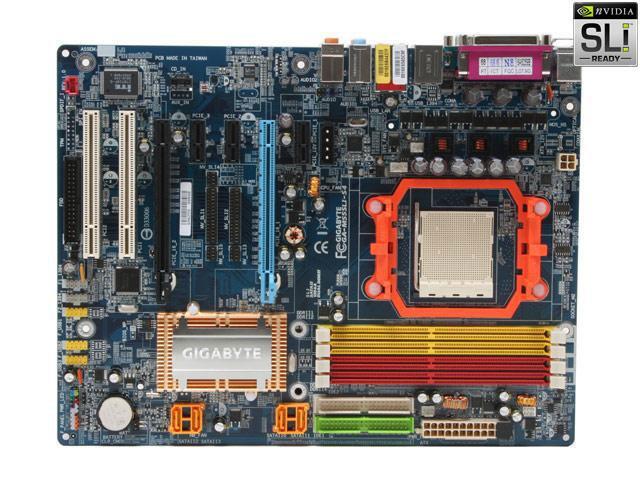
Gigabyte GA-M55SLI-S4 NVIDIA® nForce™ 4 SLI
Socket AM2 ATX Motherboard
I always leave my Pc on all night and day and now just 3 days ago, when I left my Pc alone, doing nothing and go play my PS3 and came back, the screen was off while the PC is still on. When I go and try to move the mouse so the screen video could come up, it doesn't do nothing. When I try rebooting the computer, it have no boot and no video.
Leave my PC on all night and day and reboot my Pc was fine day by day. But I shut it off from time to time,hen I not using it to go somewhere.
Does anyone know whats the problem? Did I destroy my CPU or motherboard. I checked my CPU and it look like there is no problem with it. When I disconnect the power cable for my video card, I don't hear no beeping sound ( it suppose to beep ). Also taking off the ram and boot my pc again, still no beep sound.
The video card is ok because I put my 7900 GTX in my brother computer it show video. Is there something when the video card is always sitting on that one thing that say Gigabyte heat sink stuff. Don't it heat that thing up and mess up the motherboard? I also tried to reset the CMOS to default. I still doesn't boot up. So doesn't anyone know an answer for my problem? Thanks for reading this.
I have a
Gigabyte GA-M55SLI-S4 NVIDIA® nForce™ 4 SLI
Socket AM2 ATX Motherboard
I always leave my Pc on all night and day and now just 3 days ago, when I left my Pc alone, doing nothing and go play my PS3 and came back, the screen was off while the PC is still on. When I go and try to move the mouse so the screen video could come up, it doesn't do nothing. When I try rebooting the computer, it have no boot and no video.
Leave my PC on all night and day and reboot my Pc was fine day by day. But I shut it off from time to time,hen I not using it to go somewhere.
Does anyone know whats the problem? Did I destroy my CPU or motherboard. I checked my CPU and it look like there is no problem with it. When I disconnect the power cable for my video card, I don't hear no beeping sound ( it suppose to beep ). Also taking off the ram and boot my pc again, still no beep sound.
The video card is ok because I put my 7900 GTX in my brother computer it show video. Is there something when the video card is always sitting on that one thing that say Gigabyte heat sink stuff. Don't it heat that thing up and mess up the motherboard? I also tried to reset the CMOS to default. I still doesn't boot up. So doesn't anyone know an answer for my problem? Thanks for reading this.