You are using an out of date browser. It may not display this or other websites correctly.
You should upgrade or use an alternative browser.
You should upgrade or use an alternative browser.
How do you Format a RAW USB Flash Drive under WinXP
- Thread starter richelm
- Start date
Tribal-Phoenix
Posts: 76 +0
noone of those advice helped... using kill disk it jurt gave me an error for every sector, windows management thing said it was write protected too, all this crap happened after i used truecrypt to make an encrypted partition on my usb. any advices ?
help me to format my falsh USB disk
i have a 512meg Joger falsh disk that i can not format it! i use a software named "HP USB Disk Storage Format Tool" but when i want to format it i recive a error "the disk is write protected" even i can not format it via win XP SP2!! please help me! ia cant delete files or copy a file in it!! :dead:
i have a 512meg Joger falsh disk that i can not format it! i use a software named "HP USB Disk Storage Format Tool" but when i want to format it i recive a error "the disk is write protected" even i can not format it via win XP SP2!! please help me! ia cant delete files or copy a file in it!! :dead:
Tribal-Phoenix
Posts: 76 +0
Okay, so I've got a weird situation. I did something to my USB drive (not even sure what) and here's what happens. When I plug it in to my computer, the computer finds it, but doesn't allow me to do anything with it. I've tried the killdisk thing and the drive is 'unavailable' or something. and the HP fixer said there was no room on the drive (and it also recognized it as a 0, yes zero, mb drive. I've tried the computer management thingy and it's not even listed, though if you open My Computer, its listed there. And to top it all off, whatever's wrong with it causes my computer to freak out because once its plugged in, svchost.exe freaks out and is doing something to take up anywhere between 40-80 percent of my CPU power.
ANY help would be a god send. Thank you!!!
ANY help would be a god send. Thank you!!!

Tedster
Posts: 5,746 +14
Hello, I tried KillDisk but this get stuck after recognition of USB devices, do you know how to work around ? Thanks.
Pls Help me..
I've got the same problem as u guyz got. I've a brand new 512MB MP3 USB FLash drive which is not even worth a penny now. I botched up by formatting it. Now it shows only 242 MB. I've tried all the methods that you guys have mentioned. But None of those helped. I've tried Killdisk., Hp software(Which was the culprit). and Disk management in Win Xp.
Hope u guyz can Sort out..!
Thnx in advance..
I've got the same problem as u guyz got. I've a brand new 512MB MP3 USB FLash drive which is not even worth a penny now. I botched up by formatting it. Now it shows only 242 MB. I've tried all the methods that you guys have mentioned. But None of those helped. I've tried Killdisk., Hp software(Which was the culprit). and Disk management in Win Xp.
Hope u guyz can Sort out..!
Thnx in advance..
Tedster
Posts: 5,746 +14
Tempo said:I have a similar. My Sony VAIO 2GB USB Flash was in FAT format. Since it was making errors (files and folders could not be opened, or opened with data as 0's), I re-formatted it in FAT32. I tried to copy about 1.5GB of data onto it, but not everything was copied. Then I tried to re-format it again but the message "Insert a disk in drive E:" appeared. In Windows Explorer it appears as a removable drive, but when one clicks on it, that insert disk message appears.
I DO NOT need to recover any data from it. All I want is to totally erase/kill all the files on it before returning it to the seller because there are some sensitive data among the files copied onto this USB Flash. Any low-cost/free solution would be whole-heartedly appreciated. Many thanks in advance!
hi. i also have the same problem.mine is a sony vaio 1GB usb flash. the problem with my device is that the files gets corrupted everytime. When I go to computer management, there is a 1GB partition and a unallocated 127GB! I guess that's the root of the problem since the device is recognized as having 128GB in total. Then I deleted the 1GB partition...and as a result, I have an unallocated 128GB. I can't partition and format it anymore. When I tried killdisk and other software, I figured that the firmware might be busted.
i have an LG flashdrive, and whenever i plug it in, it says "please insert a disk into drive F". the first time i used on my pc, it was working fine, and after my friend returned it to me, it was giving this message, although it detects the usb but when i try to open it from my computer, this is what happens.
i tried the method which you mentioned but it doesnt work, after pressing F10 and enter, it doesnt give me any instructions, but i went to the administrative tools, and then disk management, on right clicking, it has no format option
what to do? please tell me and in an easy way
i tried the method which you mentioned but it doesnt work, after pressing F10 and enter, it doesnt give me any instructions, but i went to the administrative tools, and then disk management, on right clicking, it has no format option
what to do? please tell me and in an easy way

Mictlantecuhtli
Posts: 4,049 +13
What does it have then? Is there even a partition to format?isk said:i went to the administrative tools, and then disk management, on right clicking, it has no format option
Tedster
Posts: 5,746 +14
that's what stickies are for!Haus said:Nice knowledge of Windows... didn't even know that utility exsisted. Thanks a bunch!
Flash Memory with half memory space after formatted
I accidentally formatted my Mp3(1gb) player in Windows Xp. And now it have just 512mb of memory available, I have no idea how the disk space diminished, I would like to know where is the other 512mb and how can I recover that. Thanks a lot.
I accidentally formatted my Mp3(1gb) player in Windows Xp. And now it have just 512mb of memory available, I have no idea how the disk space diminished, I would like to know where is the other 512mb and how can I recover that. Thanks a lot.
Tedster said:if you have read and followed everything the sticky says, then your usb is junk. Toss it.
yup, but I still don't want to lose hope. I strongly believe that a firmware update will fix the version and thus the actual size of the unpartitioned space. All we have to do is find the firmware update.
plz post any such drivers for kingston...
have kingston 128 mb usb 2 flash data traveler. once formatted on xp and the capacity reduced to 120 mb and then to 119 mb.
tried all things to regain the lost capacity. nothing works out.
tried active killdisk, diskeeper lite, disk management, format, partitioning utilities, u name it.
just havent got the "drivers" to regain my lost drive capcity from kingston.
if anyone has such a driver, can u plsz post it here for download or email me...
any reply appreciated,
thanks.
have kingston 128 mb usb 2 flash data traveler. once formatted on xp and the capacity reduced to 120 mb and then to 119 mb.
tried all things to regain the lost capacity. nothing works out.
tried active killdisk, diskeeper lite, disk management, format, partitioning utilities, u name it.
just havent got the "drivers" to regain my lost drive capcity from kingston.
if anyone has such a driver, can u plsz post it here for download or email me...
any reply appreciated,
thanks.
i forgot to mention that my 128 mb kingston worked fine in 98 se with full 128 mb. On xp, all hell broke loose... xp said- it cant read any data and format it. So, formatted it. then it all went like 128 -> 120 -> 119 mb. Now i have stopped formatting as i am tired of formatting and it stays the same 119 mb (thank god, no reductions now...)
IS THERE ANY RELATION THAT 98 SOLVES THE PROBLEM AND XP CREATES SUCH A PROBLEM ON USB DRIVES ??? will soon try on 98 machine again at my computer class. If it solves the problemm, i will post it here.
IS THERE ANY RELATION THAT 98 SOLVES THE PROBLEM AND XP CREATES SUCH A PROBLEM ON USB DRIVES ??? will soon try on 98 machine again at my computer class. If it solves the problemm, i will post it here.
Man you rock
I run on this forum while tyring to find solution for my USB 128mb. I accidentaly forgot it in a PC and turned it off!!
When i wanted to acces it again all my data was lost and i couldnt format it.
I managed to recover my data using this tool http://www.runtime.org/gdb.htm It is awesome very user friendly and it works perfect. After trying ****loads of data recovery tools and dos programs it helped me in no time.
After that i wanted to use my USb again and you ppl kicked in to help
Thank you very much
Regards
Phantasm66 said:try partitioning it and formatting it using disk administrator, which you will find if you select computer management from administrative tools.
I run on this forum while tyring to find solution for my USB 128mb. I accidentaly forgot it in a PC and turned it off!!
When i wanted to acces it again all my data was lost and i couldnt format it.
I managed to recover my data using this tool http://www.runtime.org/gdb.htm It is awesome very user friendly and it works perfect. After trying ****loads of data recovery tools and dos programs it helped me in no time.
After that i wanted to use my USb again and you ppl kicked in to help
Thank you very much
Regards
Thank you thank you it worked great I now have my flash drive back.....MetroidFan2002 said:Here is a detailed explanation of what worked for me, I had the same problem you did.
1. Assume ALL FILES ARE LOST on the drive. You're SOL on these files (you may be able to recover the contents of many of them after the procedure, but don't get your hopes up)
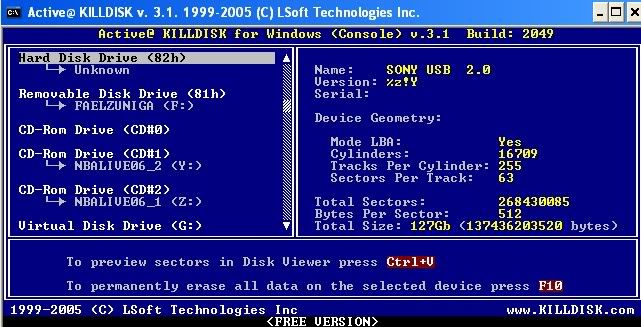
2. Download the free Active Kill Disk from http://www.killdisk.com/
3. Unzip and run Active Kill Disk. It will display the message that it supports "[ONE PASS ZEROES]" method only. Remember this.
4. Press enter to bypass the startup screen.
5. Scroll down the list to view your drives. Also, open up My Computer so that you know which drive letter your USB Key ISN'T. You will probably find a message of a drive not being ready, if you find this message, highlight that drive, otherwise highlight the drive that does not have the drive letters of the workable drives of your computer.
For example, in addition to my main hard drive C: I also have a big hard drive E:. These show up as fine since it was my USB key (which is on F:, but that doesn't matter now) that was damaged.
6. Press F10 and press enter to erase the disk (using that [One Pass Zeroes] method mentioned earlier
7. Go into the Administrative Tools (this guide is assuming Windows XP) and select Computer Management. Double-click on Disk Management.
8. Go down the list of disks until you find the new healthy partition of the USB drive. Right click it and say format. Format it whatever you want. If after the attempted format it says something like "I can't do this because the partition is write-protected," ignore this message.
9. Go down to a green icon on the taskbar with an arrow on it, click it and say to remove your usb drive. After it says you can remove it, do so.
10. Insert your USB drive again. Even though disk management said you couldn't format it, it did most of the reformatting and you will be able to recover any undamaged files from the combination of reformatting/erasing.
11. Once you save any files that you can, reformat the USB drive (you won't have any errors this time) from My Computer. Remember that the reformatting will erase all the files on the drive. Once this reformat is complete you'll have your USB drive working again!
Similar threads
- Replies
- 25
- Views
- 349


- Replies
- 16
- Views
- 164
Latest posts
-
 Assassin's Creed Black Flag Resynced: 50 GPU Benchmark
- Steve replied
-
LG and Alienware monitors caught auto-installing Windows adware
- Nintenboy01 replied


-
TechSpot is dedicated to computer enthusiasts and power users.
Ask a question and give support.
Join the community here, it only takes a minute.