My computer has been running slowly lately and I checked out task manager and noticed that there was iexplore.exe running taking up 100k+ Memory. My main browser is Firefox, and I also noticed that iexplore.exe is running under the User Name System instead of my name. Also, every time I end the process, it comes right back in under 5 seconds. Please help me get rid of this!
You are using an out of date browser. It may not display this or other websites correctly.
You should upgrade or use an alternative browser.
You should upgrade or use an alternative browser.
Solved I believe I have been hit by iexplore.exe virus. Done with 8-step
- Thread starter Storhm
- Start date
- Status
- Not open for further replies.

Broni
Posts: 56,041 +516
Download Bootkit Remover to your Desktop.
- You then need to extract the remover.exe file from the RAR using a program capable of extracing RAR compressed files. If you don't have an extraction program, you can use 7-Zip: http://www.7-zip.org/
- After extracing remover.exe to your Desktop, double-click on remover.exe to run the program (Vista/7 users,right click on remover.exe and click Run As Administrator.
- It will show a Black screen with some data on it.
- Right click on the screen and click Select All.
- Press CTRL+C
- Open a Notepad and press CTRL+V
- Post the output back here.
Broni
Posts: 56,041 +516
You're welcome 
Open Notepad
Copy and paste following text into Notepad:
Go FILE > SAVE AS and in the dropdown box select SAVE AS TYPE to ALL FILES
Then in the FILE NAME box type fix.bat.
Save fix.bat to your Desktop.
Run fix.bat by double clicking.
You may see a black box appear; this is normal.
When done, run remover.exe again and post its output.
Open Notepad
Copy and paste following text into Notepad:
Code:
@ECHO OFF
START remover.exe fix \\.\PhysicalDrive0
EXITThen in the FILE NAME box type fix.bat.
Save fix.bat to your Desktop.
Run fix.bat by double clicking.
You may see a black box appear; this is normal.
When done, run remover.exe again and post its output.
Er same thing, when I open fix.bat, I get this:
Bootkit Remover version 1.0.0.1
(c) 2009 eSage Lab
www.esagelab.com
Restoring boot code at \\.\PhysicalDrive0...
ERROR: No standard boot code found for your OS.
You can restore boot code only for Windows XP, Server 2003, Vista, Server 2008 a
nd Windows 7
Press any key to quit...
Bootkit Remover version 1.0.0.1
(c) 2009 eSage Lab
www.esagelab.com
Restoring boot code at \\.\PhysicalDrive0...
ERROR: No standard boot code found for your OS.
You can restore boot code only for Windows XP, Server 2003, Vista, Server 2008 a
nd Windows 7
Press any key to quit...
Broni
Posts: 56,041 +516
If you have Vista DVD...
start with step 2
If you don't have Vista DVD...
1. Create Vista Recovery Disc.
Option 1:
http://www.c4consulting.com.au/soluctions/vista/VISTA SOLUCTIONS.htm
Option 2:
Download Vista Recovery Disc iso image: http://neosmart.net/blog/2008/windows-vista-recovery-disc-download/
Burn it to CD, or DVD: http://neosmart.net/wiki/display/G/Burning+ISO+Images+to+a+CD+or+DVD
2. Boot from created disk.
At first screen click on Repair your computer:

This will bring you to a new screen where the repair process will look for all Windows Vista installations on your computer. When done you will be presented with the System Recovery Options dialog box:

After this, it will present you with a list of options including startup repair, system restore and command prompt:
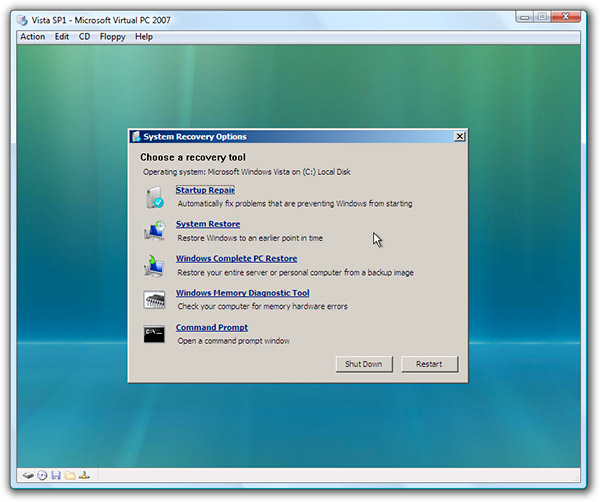
Select Command Prompt
Type in:
bootrec /FixMbr
and then press Enter
Once completed then type Exit, press Enter and restart computer.
start with step 2
If you don't have Vista DVD...
1. Create Vista Recovery Disc.
Option 1:
http://www.c4consulting.com.au/soluctions/vista/VISTA SOLUCTIONS.htm
Option 2:
Download Vista Recovery Disc iso image: http://neosmart.net/blog/2008/windows-vista-recovery-disc-download/
Burn it to CD, or DVD: http://neosmart.net/wiki/display/G/Burning+ISO+Images+to+a+CD+or+DVD
2. Boot from created disk.
At first screen click on Repair your computer:
This will bring you to a new screen where the repair process will look for all Windows Vista installations on your computer. When done you will be presented with the System Recovery Options dialog box:
After this, it will present you with a list of options including startup repair, system restore and command prompt:
Select Command Prompt
Type in:
bootrec /FixMbr
and then press Enter
Once completed then type Exit, press Enter and restart computer.
Okay never mind, I'm using ImgBurner and I'm looking at the log when I pressed write and I get this:
W 22:28:31 Failed to Write Sectors 0 - 31 - Reason: Power On, Reset, or Bus Device Reset Occurred
W 22:28:31 Retrying (1 of 20)...
W 22:28:42 Retry Failed - Reason: Not Ready To Ready Change - Medium May Have Changed
W 22:28:42 Retrying (2 of 20)...
It's just stuck at Retrying (2 of 20)
PS. Before downloading ImgBurner, I tried my NTI CD & DVD-Maker 7, at about 0.05 bytes, it ejected my disc and I had some error.
W 22:28:31 Failed to Write Sectors 0 - 31 - Reason: Power On, Reset, or Bus Device Reset Occurred
W 22:28:31 Retrying (1 of 20)...
W 22:28:42 Retry Failed - Reason: Not Ready To Ready Change - Medium May Have Changed
W 22:28:42 Retrying (2 of 20)...
It's just stuck at Retrying (2 of 20)
PS. Before downloading ImgBurner, I tried my NTI CD & DVD-Maker 7, at about 0.05 bytes, it ejected my disc and I had some error.
Broni
Posts: 56,041 +516
Excellent
The rootkit seems to be gone
We need to run some other scans to see, if something else is not lurking there.
Please download ComboFix from Here or Here to your Desktop.
**Note: In the event you already have Combofix, this is a new version that I need you to download. It is important that it is saved directly to your desktop**
Make sure, you re-enable your security programs, when you're done with Combofix.
DO NOT make any other changes to your computer (like installing programs, using other cleaning tools, etc.), until it's officially declared clean!!!
The rootkit seems to be gone
We need to run some other scans to see, if something else is not lurking there.
Please download ComboFix from Here or Here to your Desktop.
**Note: In the event you already have Combofix, this is a new version that I need you to download. It is important that it is saved directly to your desktop**
- Please, never rename Combofix unless instructed.
- Close any open browsers.
- Close/disable all anti virus and anti malware programs so they do not interfere with the running of ComboFix.
- Very Important! Temporarily disable your anti-virus, script blocking and any anti-malware real-time protection before performing a scan. They can interfere with ComboFix or remove some of its embedded files which may cause "unpredictable results".
- Click on this link to see a list of programs that should be disabled. The list is not all inclusive. If yours is not listed and you don't know how to disable it, please ask.
NOTE 2. If Combofix asks you to update the program, always do so.- Close any open browsers.
- WARNING: Combofix will disconnect your machine from the Internet as soon as it starts
- Please do not attempt to re-connect your machine back to the Internet until Combofix has completely finished.
- If there is no internet connection after running Combofix, then restart your computer to restore back your connection.
- Double click on combofix.exe & follow the prompts.
- When finished, it will produce a report for you.
- Please post the "C:\ComboFix.txt"
Make sure, you re-enable your security programs, when you're done with Combofix.
DO NOT make any other changes to your computer (like installing programs, using other cleaning tools, etc.), until it's officially declared clean!!!
Broni
Posts: 56,041 +516
Looks good
Uninstall Combofix:
Go Start > Run [Vista users, go Start>"Start search"]
Type in:
Combofix /Uninstall
Note the space between the "Combofix" and the "/Uninstall"
Click OK (Vista users - press Enter).
Restart computer.
=====================================================================
Download OTL to your Desktop.
* Double click on the icon to run it. Make sure all other windows are closed and to let it run uninterrupted.
* Under the Custom Scan box paste this in:
netsvcs
drivers32 /all
%SYSTEMDRIVE%\*.*
%systemroot%\system32\Spool\prtprocs\w32x86\*.dll
%systemroot%\system32\*.wt
%systemroot%\system32\*.ruy
%systemroot%\Fonts\*.com
%systemroot%\Fonts\*.dll
%systemroot%\system32\spool\prtprocs\w32x86\*.tmp
%systemroot%\*. /mp /s
/md5start
/md5stop
CREATERESTOREPOINT
%systemroot%\system32\*.dll /lockedfiles
%systemroot%\Tasks\*.job /lockedfiles
%systemroot%\System32\config\*.sav
%systemroot%\system32\user32.dll /md5
%systemroot%\system32\ws2_32.dll /md5
%systemroot%\system32\ws2help.dll /md5
HKEY_LOCAL_MACHINE\SOFTWARE\Policies\Microsoft\Windows\WindowsUpdate\AU
HKEY_LOCAL_MACHINE\SOFTWARE\Microsoft\Windows\CurrentVersion\WindowsUpdate\Auto Update\Results\Install|LastSuccessTime /rs
* Click the Quick Scan button. Do not change any settings unless otherwise told to do so. The scan wont take long.
Uninstall Combofix:
Go Start > Run [Vista users, go Start>"Start search"]
Type in:
Combofix /Uninstall
Note the space between the "Combofix" and the "/Uninstall"
Click OK (Vista users - press Enter).
Restart computer.
=====================================================================
Download OTL to your Desktop.
* Double click on the icon to run it. Make sure all other windows are closed and to let it run uninterrupted.
* Under the Custom Scan box paste this in:
netsvcs
drivers32 /all
%SYSTEMDRIVE%\*.*
%systemroot%\system32\Spool\prtprocs\w32x86\*.dll
%systemroot%\system32\*.wt
%systemroot%\system32\*.ruy
%systemroot%\Fonts\*.com
%systemroot%\Fonts\*.dll
%systemroot%\system32\spool\prtprocs\w32x86\*.tmp
%systemroot%\*. /mp /s
/md5start
/md5stop
CREATERESTOREPOINT
%systemroot%\system32\*.dll /lockedfiles
%systemroot%\Tasks\*.job /lockedfiles
%systemroot%\System32\config\*.sav
%systemroot%\system32\user32.dll /md5
%systemroot%\system32\ws2_32.dll /md5
%systemroot%\system32\ws2help.dll /md5
HKEY_LOCAL_MACHINE\SOFTWARE\Policies\Microsoft\Windows\WindowsUpdate\AU
HKEY_LOCAL_MACHINE\SOFTWARE\Microsoft\Windows\CurrentVersion\WindowsUpdate\Auto Update\Results\Install|LastSuccessTime /rs
* Click the Quick Scan button. Do not change any settings unless otherwise told to do so. The scan wont take long.
- When the scan completes, it will open two notepad windows: OTL.txt and Extras.txt. These are saved in the same location as OTL.
- Please copy (Edit->Select All, Edit->Copy) the contents of these files, one at a time, and post them back here.
- Status
- Not open for further replies.
Similar threads
- Replies
- 0
- Views
- 498
- Replies
- 31
- Views
- 515

- Replies
- 15
- Views
- 3K

Latest posts
-
Ex-Google staff claim terminations over Israeli contract protest were illegal
- Theinsanegamer replied
-
Hyped Rabbit R1 AI device faces harsh criticism in first reviews
- Mr Majestyk replied
-
-
Nvidia thinks its GPUs are better for onboard AI than NPUs
- Mr Majestyk replied
-
 Nvidia GeForce GTX 1080 Ti Revisit: Is this the GOAT?
- ddferrari replied
-
TechSpot is dedicated to computer enthusiasts and power users.
Ask a question and give support.
Join the community here, it only takes a minute.