
Microsoft has previewed a major refresh to its freely downloadable Windows Live Essentials suite, which includes Photo Gallery, Movie Maker, Messenger, Mail, Sync and others. According to CNET, Redmond hopes the overhaul will make Windows more appealing to consumers during this year's holiday season since no significant updates are planned for the OS itself.
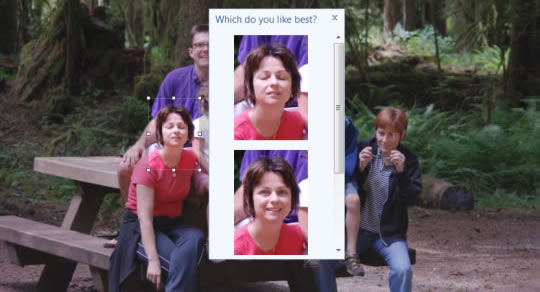
The revamped version of Photo Gallery will add facial recognition to make life easier when it comes to managing and organizing tons of photos. Photo Gallery will also receive new editing tools, such as Photo Fuse, which lets you take the best parts from similar pictures and fuse them together. This feature is demonstrated in the image above, where a woman swaps her face in a group shot.
Movie Maker will get new themes, the ability to import photo caption data from Photo Gallery, export HD videos, and you'll be able to upload content directly to Facebook, and other sites. Mail will let you manage multiple email accounts, calendars, RSS feeds, contacts and newsgroups in one place. It'll also let you send up to 10GB of photos per email, chat via IM in the inbox, and more.
New Sync features include the ability to share unlimited numbers of files in P2P fashion across Macs and PCs – although, there is a 2GB cap on cloud storage. Among other things, that online storage can be used to hold data you want to synchronize while other machines in the network are powered off. Once turned on, they'll automatically download the information.
It's reported that some if not all of the new Windows Live applications will be strictly available on Windows Vista and 7 only, but not Windows XP. Microsoft is really talking up its freshly polished software, suggesting for instance that the new Photo Gallery is better than Apple's iPhoto "hands down." The beta is expected to rollout in the coming weeks, and we'll reserve judgment until then.
https://www.techspot.com/news/39180-microsoft-reveals-updated-windows-live-essentials-suite.html


