I'm trying to port forward but I'm failing at it. So I have a Netgear WGR614 Router, and a Westell 610015 Modem. I gave myself a static IP, then tried port forwarding, didn't work. So I tried setting it to bridge mode, but it won't let me back on the internet. BUT, I can't use bridge mode because I have 3 other computers in the house that use wireless. So is there any other way to port forward? Thanks in advance.
You are using an out of date browser. It may not display this or other websites correctly.
You should upgrade or use an alternative browser.
You should upgrade or use an alternative browser.
Netgear port forwarding
- Thread starter xDecker
- Start date
D
DelJo63
You don't need bridge mode, but guess you've alread regressed back to infrastructure mode.
For the setup
a) disable any WiFi on the modem itself
b) this forces connections to the router
c) place your port forward in the router ->to->the static IP address of the system dessired.
What 'service' are you port forwarding? Sometimes there are more than just one port required
For the setup
Code:
modem===router - - - wired or wireless connectionsb) this forces connections to the router
c) place your port forward in the router ->to->the static IP address of the system dessired.
What 'service' are you port forwarding? Sometimes there are more than just one port required
D
DelJo63
make sure you are getting a connection to the ROUTER and not the modem;
it makes a difference!
you need not forward port 80
it makes a difference!
port 80 is a browser port for outbound, and unless you are hosting a webserver,The required ports are 9528, 9958 and 5816 TCP
you need not forward port 80
- Thread Starter
- #5
make sure you are getting a connection to the ROUTER and not the modem;
it makes a difference!
port 80 is a browser port for outbound, and unless you are hosting a webserver,
you need not forward port 80
How exactly would I do that?
D
DelJo63
you need control of the router.
wire a connection to the router from any PC.
use your browser and access the config page using the router IP address.
now you can config the router wifi and set
Disconnect the wired connection, and make a connectin to the new SSID (and you can see it is the Router). Now the PF will be to your device alone AND comes only from the ROUTER.
wire a connection to the router from any PC.
use your browser and access the config page using the router IP address.
now you can config the router wifi and set
- SSID
- Channel
- and Encryption key
- as well as the port forwarding
Disconnect the wired connection, and make a connectin to the new SSID (and you can see it is the Router). Now the PF will be to your device alone AND comes only from the ROUTER.
- Thread Starter
- #7
Is there another way to do this? If I do it that way I will only be able to use the internet on one computer. I have multiple computers in the house with a big family so we all use the internet.
What about the "bridge mode". If I do that, will I be able to use multiple computers or only one?
Is there any other way to do this?
What about the "bridge mode". If I do that, will I be able to use multiple computers or only one?
Is there any other way to do this?
D
DelJo63
that is not true.Is there another way to do this? If I do it that way I will only be able to use the internet on one computer. I have multiple computers in the house with a big family so we all use the internet.
The only thing you capture is the ports being forwarded, which is an issue regardless of the equipment. Once a port is forwarded, by definition, no other computer can use that port effectively.
D
DelJo63
Westell 610015 Modem suggests Bridge Mode, but it is assuming that BOTH the modem and the router have connections.
Make everyone connect to the Router and everything will be just find
Make everyone connect to the Router and everything will be just find
Code:
modem --- one connection---router--->all users- Thread Starter
- #11
Westell 610015 Modem suggests Bridge Mode, but it is assuming that BOTH the modem and the router have connections.
Make everyone connect to the Router and everything will be just find
Code:modem --- one connection---router--->all users
On bridge mode, wifi is not useable correct? Also, I'm the only one with internet access? If that's correct, then bridge mode is out. I will do the other one but I need a tutorial on how to do it.
D
DelJo63
ONLY from the modem - - you're going to use the ROUTEROn bridge mode, wifi is not useable correct?
not at all. the router gives NAT and DHCP service as well as the WiFi - - everyone playsAlso, I'm the only one with internet access?
Make life simple. Just make sure everone connects to the new SSID you setup on the router and all will be fineIf that's correct, then bridge mode is out.
D
DelJo63
D
DelJo63
depends upon the wifi speed of the modem vs. the router.So can you give me a tutorial to set this up? Will it change the connection speed at all also?
Hi xDecker,
You know what, i want to get this straight.
1 - You have internet on your Pc/Modem and you want to be shared to the rest through you Netgear router, right?
2 - You have other services you want other to share through certain ports like server and the rest, right?
3 - According to you modem its an ADSL or DSL, are you connected to it with a cable or wireless or from your router?
If am correct, then i think that all you have to do is simple.
According to your modem its an ADSL modem and i think it has a LAN port.
Now with the Static IPs you put in your pc, write them down on a paper or somewhere, the put you computer to automatically get IPs. if all is good then that is ok
Now the setup.
Like Jobeard told you up there.
do the following
Get a cable and connect it to port 1 or 2 on your Router and to your pc,
Make sure you remove the static ip.
Go to you browser and type http://192.168.1.1
If all is good then you will get a page and i want you to configure it like what you see in this snapshot below.
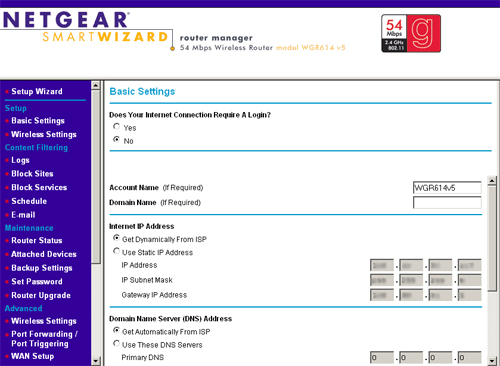
this is under your Basic Settings.
When that is finished, click Wireless Settings which is just above or Below the Basic Settings.
Change the Name SSID to your requirements say like Robin, that is what others will see as the wireless name.
Then the region according to you country or area (Optional).
For the Security options, you can select where it says WPA-PSK ****,
When that is enabled, you will be prompted to enter a Passphrase same as a password for you wireless clients.
For every page you finish configuring make sure you click Apply.
When you are done with all that, disconnect the cable from pc and connect that Lan cable to you LAN RJ-45 port or your Modem in something like this below.
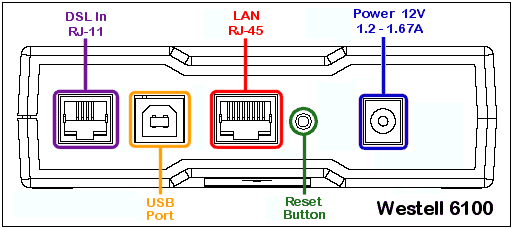
So that makes it connect and get the IPs from the Modem automatically and you are good to go.
If you don't understand a certain area, please let us know.
Hope that helps
You know what, i want to get this straight.
1 - You have internet on your Pc/Modem and you want to be shared to the rest through you Netgear router, right?
2 - You have other services you want other to share through certain ports like server and the rest, right?
3 - According to you modem its an ADSL or DSL, are you connected to it with a cable or wireless or from your router?
If am correct, then i think that all you have to do is simple.
According to your modem its an ADSL modem and i think it has a LAN port.
Now with the Static IPs you put in your pc, write them down on a paper or somewhere, the put you computer to automatically get IPs. if all is good then that is ok
Now the setup.
Like Jobeard told you up there.
do the following
Get a cable and connect it to port 1 or 2 on your Router and to your pc,
Make sure you remove the static ip.
Go to you browser and type http://192.168.1.1
If all is good then you will get a page and i want you to configure it like what you see in this snapshot below.
this is under your Basic Settings.
When that is finished, click Wireless Settings which is just above or Below the Basic Settings.
Change the Name SSID to your requirements say like Robin, that is what others will see as the wireless name.
Then the region according to you country or area (Optional).
For the Security options, you can select where it says WPA-PSK ****,
When that is enabled, you will be prompted to enter a Passphrase same as a password for you wireless clients.
For every page you finish configuring make sure you click Apply.
When you are done with all that, disconnect the cable from pc and connect that Lan cable to you LAN RJ-45 port or your Modem in something like this below.
So that makes it connect and get the IPs from the Modem automatically and you are good to go.
If you don't understand a certain area, please let us know.
Hope that helps
- Thread Starter
- #17
When you are done with all that, disconnect the cable from pc and connect that Lan cable to you LAN RJ-45 port or your Modem in something like this below.
Thank you for that nice little tutorial. I understand all but this part. You want me to unhook the ethernet cord from my computer, and hook it into the spot in the modem? Also, what do I put for Channel?
Yes, then reason for that is to change the Internet signal back to the router from the modem so you will it like this
Modem ==> Router ==> Wireless Clients
Hoping that even you computer uses wireless, if it doesn't, then get another cable and hook it in the router the to your pc...
Modem ==> Router ==> Wireless Clients
Hoping that even you computer uses wireless, if it doesn't, then get another cable and hook it in the router the to your pc...
Similar threads


- Replies
- 2
- Views
- 73
Latest posts
-
The Steam Machine now has official Windows drivers
- The Talking Tech replied
-
 Australia's teen social media ban stumbles as platforms skip age checks
- OortCloud replied


-
TechSpot is dedicated to computer enthusiasts and power users.
Ask a question and give support.
Join the community here, it only takes a minute.