You are using an out of date browser. It may not display this or other websites correctly.
You should upgrade or use an alternative browser.
You should upgrade or use an alternative browser.
No help yet to my post #597631
- Thread starter NeedHelpNow
- Start date
OP
NeedHelpNow
Posts: 17 +0
- Thread Starter
- #3
Here is a fresh hijack this log.
Summary of problems:
I want to thank you in advance for anything you can do to help me. I have been trying since Monday to fix this on my own by reading other's threads, but I have not been successful.
I began on Monday by clicking something which immediately set off my virus alerts. I had multiple trojans, including smitfraud, trojan-ace-x, trojan-downloader-zlob, trojan-downloader.vb.axa, trojan.unclassified/gts. I seem to have been able to remove these, but have the pop ups for PC-Antispyware , Downloader, and "Protection Control". I have run McAfee, SpySweeper, PCTools SpyDoctor, Spybot S&D, SuperAntispyware, CCleaner, Malwarebytes, TrendMicro Online.
One thread re: PC-Antispyware said to run LSPFix, reboot in safemode, run superantispyware, reboot, then run malwarebytes, reboot. I've done this, it comes up clean, then I get the PC-Antispyware , Downloader, and "Security System Protection Control Panel" pop-ups. I just ran a hijack this log. See below.
I am also getting a pop up that says "System Integrity Scan Wizard"
I am also getting a notice to install new hardware when I log on. For program, it says "unknown". I haven't installed anything new.
Summary of problems:
I want to thank you in advance for anything you can do to help me. I have been trying since Monday to fix this on my own by reading other's threads, but I have not been successful.
I began on Monday by clicking something which immediately set off my virus alerts. I had multiple trojans, including smitfraud, trojan-ace-x, trojan-downloader-zlob, trojan-downloader.vb.axa, trojan.unclassified/gts. I seem to have been able to remove these, but have the pop ups for PC-Antispyware , Downloader, and "Protection Control". I have run McAfee, SpySweeper, PCTools SpyDoctor, Spybot S&D, SuperAntispyware, CCleaner, Malwarebytes, TrendMicro Online.
One thread re: PC-Antispyware said to run LSPFix, reboot in safemode, run superantispyware, reboot, then run malwarebytes, reboot. I've done this, it comes up clean, then I get the PC-Antispyware , Downloader, and "Security System Protection Control Panel" pop-ups. I just ran a hijack this log. See below.
I am also getting a pop up that says "System Integrity Scan Wizard"
I am also getting a notice to install new hardware when I log on. For program, it says "unknown". I haven't installed anything new.

kritius
Posts: 2,077 +0
Download and Run ComboFix
- Download this file from either of the two below listed places :
HERE or HERE
- Then double click combofix.exe & follow the prompts.
- When finished, it shall produce a log for you. Attach that log in your next reply
OP
NeedHelpNow
Posts: 17 +0
- Thread Starter
- #5
I ran combo fix
I ran, it rebooted, it said it was preparing a log, when I came back to check on it again, the combo fix window was gone, and there was no log there. I have searched and can't locate it. Any suggestions???
I ran, it rebooted, it said it was preparing a log, when I came back to check on it again, the combo fix window was gone, and there was no log there. I have searched and can't locate it. Any suggestions???
kritius
Posts: 2,077 +0
its usually C:\ComboFix.txt I hae to head out now, ill look over the log when I get back. If you cant find it,
Then redownload combofix to your desktop and run it again.
- Click START then RUN
- Now type Combofix /u in the runbox and click OK
-
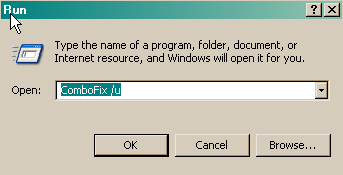
- When shown the disclaimer, Select "2"
Then redownload combofix to your desktop and run it again.
OP
NeedHelpNow
Posts: 17 +0
OP
NeedHelpNow
Posts: 17 +0
kritius
Posts: 2,077 +0
COMBOFIX-Script
- Please open Notepad (Start -> Run -> type notepad in the Open field -> OK) and copy and paste the text present inside the code box below:
File::
C:\WINDOWS\system32\bkbsfurc.exe
C:\WINDOWS\system32\ovqfqzgt.exe
C:\WINDOWS\system32\bkbsfurc.exe
C:\WINDOWS\system32\orqtivsn.exe
C:\Documents and Settings\All Users\Application Data\atwtixml\kzqvupal.exe
Folder::
C:\Documents and Settings\All Users\Application Data\atwtixml
Registry::
[HKEY_CURRENT_USER\SOFTWARE\Microsoft\Windows\CurrentVersion\Run]
"xkomwtix"=-
"bopvedee"=-
"cwjgbfer"=-
[HKEY_LOCAL_MACHINE\software\microsoft\windows\currentversion\policies\explorer\run]
"2k0u0xUioM"=-
[HKEY_CURRENT_USER\software\microsoft\windows\currentversion\policies\explorer\run]
"2k0u0xUioM"=- - Save this as CFScript.txt and change the "Save as type" to "All Files" and place it on your desktop.

- Very Important! Temporarily disable your anti-virus, script blocking and any anti-malware real-time protection before following the steps below. They can interfere with ComboFix or remove some of its embedded files which may cause "unpredictable results".
- Referring to the screenshot above, drag CFScript.txt into ComboFix.exe.
- ComboFix will now run a scan on your system. It may reboot your system when it finishes. This is normal.
- When finished, it shall produce a log for you. Attach the log in your next reply along with a fresh HijackThis log.
OP
NeedHelpNow
Posts: 17 +0
- Thread Starter
- #11
Logs attached
Here is the combofix log and I did 2 hijack now logs, one right after combo fix, then i rebooted and did another. ...thank you so much for helping me!!!!
Here is the combofix log and I did 2 hijack now logs, one right after combo fix, then i rebooted and did another. ...thank you so much for helping me!!!!
kritius
Posts: 2,077 +0
COMBOFIX-Script
Run HijackThis
Fix entries using HiJackThis
O4 - HKCU\..\Policies\Explorer\Run: [2k0u0xUioM] C:\Documents and Settings\All Users\Application Data\atwtixml\kzqvupal.exe
O24 - Desktop Component 0: (no name) - https://www.victoriassecret.com/images/common/navbar/logo.gif?
Delete Files and Folders
***DO NOT USE MSCONFIG TO BOOT INTO SAFE MODE***
- Please open Notepad (Start -> Run -> type notepad in the Open field -> OK) and copy and paste the text present inside the code box below:
Code:File:: C:\Documents and Settings\All Users\Application Data\atwtixml\kzqvupal.exe Folder:: C:\Documents and Settings\All Users\Application Data\atwtixml Registry:: [HKEY_LOCAL_MACHINE\software\microsoft\windows\currentversion\policies\explorer\run] "2k0u0xUioM"=- [HKEY_CURRENT_USER\software\microsoft\windows\currentversion\policies\explorer\run] "2k0u0xUioM"=- - Save this as CFScript.txt and change the "Save as type" to "All Files" and place it on your desktop.
- Very Important! Temporarily disable your anti-virus, script blocking and any anti-malware real-time protection before following the steps below. They can interfere with ComboFix or remove some of its embedded files which may cause "unpredictable results".
- Referring to the screenshot above, drag CFScript.txt into ComboFix.exe.
- ComboFix will now run a scan on your system. It may reboot your system when it finishes. This is normal.
- When finished, it shall produce a log for you. Copy and paste the contents of the log in your next reply.
Run HijackThis
Fix entries using HiJackThis
- Launch HiJackThis
- Click the Do a system scan only button
- Put a check next to the entries listed below (if they are still there)
O4 - HKCU\..\Policies\Explorer\Run: [2k0u0xUioM] C:\Documents and Settings\All Users\Application Data\atwtixml\kzqvupal.exe
O24 - Desktop Component 0: (no name) - https://www.victoriassecret.com/images/common/navbar/logo.gif?
- IMPORTANT: Do NOT click fix until you exit all browser sessions including the one you are reading in right now
- Click the Fix checked button and close HiJackThis
- Reboot HijackThis if necessary
Delete Files and Folders
- Right Click on the start button and chose explore
- Show all hidden files and folders, see how HERE
- Navigate to the following files and folders and delete them(if still present)
- Empty the recycle bin.
***DO NOT USE MSCONFIG TO BOOT INTO SAFE MODE***
OP
NeedHelpNow
Posts: 17 +0
- Thread Starter
- #13
Attached are new logs
I ran combofix & saved log per instructions.
Ran hijack this, the first two files were not there (the 2 "04" files listed above), the 024 was there, and I checked and fixed.
I followed the stops to show hidden files, and looked for "C:\Documents and Settings\All Users\Application Data\atwtixml" in reg mode & safe mode, but it wasn't there.
I ran new hijack this log for you after I rebooted from safe mode.
The virus pop ups seem to be gone (I haven't been using this computer other than trying to fix though). When I initially log on, I am still getting the "new hardware installed" pop up, source unknown.
I ran combofix & saved log per instructions.
Ran hijack this, the first two files were not there (the 2 "04" files listed above), the 024 was there, and I checked and fixed.
I followed the stops to show hidden files, and looked for "C:\Documents and Settings\All Users\Application Data\atwtixml" in reg mode & safe mode, but it wasn't there.
I ran new hijack this log for you after I rebooted from safe mode.
The virus pop ups seem to be gone (I haven't been using this computer other than trying to fix though). When I initially log on, I am still getting the "new hardware installed" pop up, source unknown.
kritius
Posts: 2,077 +0
Just the one entry to fix,
Fix entries using HiJackThis
I would like you to do an online scan so that we can what else may be in your system,
Run Kaspersky online scanner
With the exception of Internet Explorer, which must be used for this scan, keep ALL programs closed
Note: It is recommended to disable onboard antivirus program and antispyware programs while performing scans to speed up scan time and to make sure there are no conflicts.
Do not go surfing while your resident protection is disabled!
Once the scan is finished remember to re-enable resident antivirus protection along with whatever antispyware application you use.
Do an online scan with Kaspersky Online Scanner in Internet Explorer. You will be prompted to install and run an ActiveX component from Kaspersky, Click Yes.
Note for Internet Explorer 7 users: If at any time you have trouble with the accept button of the licence, click on the Zoom tool located at the right bottom of the IE window and set the zoom to 75%. Once the licence accepted, reset to 100%.
We'll see what Kaspersky has to say, dont get worried or delete anything it finds though.
Fix entries using HiJackThis
- Launch HiJackThis
- Click the Do a system scan only button
- Put a check next to the entries listed below
- IMPORTANT: Do NOT click fix until you exit all browser sessions including the one you are reading in right now
- Click the Fix checked button and close HiJackThis
- Reboot HijackThis if necessary
I would like you to do an online scan so that we can what else may be in your system,
Run Kaspersky online scanner
With the exception of Internet Explorer, which must be used for this scan, keep ALL programs closed
Note: It is recommended to disable onboard antivirus program and antispyware programs while performing scans to speed up scan time and to make sure there are no conflicts.
Do not go surfing while your resident protection is disabled!
Once the scan is finished remember to re-enable resident antivirus protection along with whatever antispyware application you use.
Do an online scan with Kaspersky Online Scanner in Internet Explorer. You will be prompted to install and run an ActiveX component from Kaspersky, Click Yes.
Note for Internet Explorer 7 users: If at any time you have trouble with the accept button of the licence, click on the Zoom tool located at the right bottom of the IE window and set the zoom to 75%. Once the licence accepted, reset to 100%.
- The program will launch and then start to download the latest definition files.
- Once the scanner is installed and the definitions downloaded, click Next.
- Now click on Scan Settings
- In the scan settings make sure that the following are selected:
o Scan using the following Anti-Virus database:
o Extended (If available, otherwise use standard)
o Scan Options:
o Scan Archives
o Scan Mail Bases - Click OK
- Under select a target to scan, select My Computer
- The scan will take a while so be patient and let it run.
- Please do not use your computer while the scan is running. Once the scan is complete it will display if your system has been infected.
- Click the Save Report As... button (see red arrow below)

- In the Save as... prompt, select Desktop
- In the File name box, name the file
- In the Save as type prompt, select Text file (see below)

- Include the report in your next post.
We'll see what Kaspersky has to say, dont get worried or delete anything it finds though.
OP
NeedHelpNow
Posts: 17 +0
- Thread Starter
- #15
Kapersky & New Hijack this log attached
I haven't closed kapersky, but didn't fix anything yet.
I haven't closed kapersky, but didn't fix anything yet.
OP
NeedHelpNow
Posts: 17 +0
- Thread Starter
- #16
I just noticed mcafee was turned back on
partway into the scan. I had disabled it but not long enough. Let me know if you need me to re-run Kaspersky w/out McAfee.
partway into the scan. I had disabled it but not long enough. Let me know if you need me to re-run Kaspersky w/out McAfee.
kritius
Posts: 2,077 +0
Ok just a few things to do,
Fix entries using HiJackThis
Delete Files and Folders
C:\Documents and Settings\Melia Renee\Desktop\Melia's Music\Top of Charts - 2004 (strap).wma<---------This File
C:\QooBox\Quarantine<---------The contents of this Folder NOT THE FOLDER
If that does not work then repeat the process in safe mode. See how to boot into Safe mode HERE.
***DO NOT USE MSCONFIG TO BOOT INTO SAFE MODE***
Now Go to Start-Settings-Control Panel, click on Add remove Programs. If any of the following programs are listed there, click on the program to highlight it, and click on remove. Then close the Control Panel.
Fix entries using HiJackThis
- Launch HiJackThis
- Click the Do a system scan only button
- Put a check next to the entries listed below
- IMPORTANT: Do NOT click fix until you exit all browser sessions including the one you are reading in right now
- Click the Fix checked button and close HiJackThis
- Reboot HijackThis if necessary
Delete Files and Folders
- Right Click on the start button and chose explore
- Show all hidden files and folders, see how HERE
- Navigate to the following files and folders and delete them(if still present)
C:\Documents and Settings\Melia Renee\Desktop\Melia's Music\Top of Charts - 2004 (strap).wma<---------This File
C:\QooBox\Quarantine<---------The contents of this Folder NOT THE FOLDER
- Empty the recycle bin.
If that does not work then repeat the process in safe mode. See how to boot into Safe mode HERE.
***DO NOT USE MSCONFIG TO BOOT INTO SAFE MODE***
Now Go to Start-Settings-Control Panel, click on Add remove Programs. If any of the following programs are listed there, click on the program to highlight it, and click on remove. Then close the Control Panel.
- Button Manager v1.836
OP
NeedHelpNow
Posts: 17 +0
- Thread Starter
- #18
Ok
I was able to find and complete everything you posted. I rebooted. I saved the Hijack this log from step one, before reboot. Upon reboot, the found new hardware still popped up.
I was able to find and complete everything you posted. I rebooted. I saved the Hijack this log from step one, before reboot. Upon reboot, the found new hardware still popped up.
OP
NeedHelpNow
Posts: 17 +0
- Thread Starter
- #20
When I boot up
a "Found New Hardware Wizard" pops up. it says:
Welcome to the found new hardware Wizard
This wizard helps you install software for:
unknown
If your hardware came with an installation cd or floppy disk, insert it now.
What do you want the wizard to do:
- install the software automatically (recommended)
- install from a list or specific location (advanced)
Click next to continue
Then it has a next and cancel button.
I don't know what this is for, and it only started once I had the viruses.
I can't thank you enough for all of your help!!!!!!
a "Found New Hardware Wizard" pops up. it says:
Welcome to the found new hardware Wizard
This wizard helps you install software for:
unknown
If your hardware came with an installation cd or floppy disk, insert it now.
What do you want the wizard to do:
- install the software automatically (recommended)
- install from a list or specific location (advanced)
Click next to continue
Then it has a next and cancel button.
I don't know what this is for, and it only started once I had the viruses.
I can't thank you enough for all of your help!!!!!!
OP
NeedHelpNow
Posts: 17 +0
- Thread Starter
- #22
Thank you thank you thank you!!!
I found the Button Manager v1.836 in the add/delete and I deleted it. Everything is running really well now!!! No virus alert pop ups any more. Just the new hardware alert, which i just cancel out of. I didn't want to click next to see what it was, cuz curiousity got me into this mess in the first place. Was what I had bad? should I remove any of the programs I have? Which Anti-virus, spyware, malware programs do u recommend I get/keep?
I currently have:
McAfee (Always on)
Webroot Spysweeper (always on)
SuperAntispyware (always on)
Spybot Search & Destroy
Spyware Doctor
CCleaner
Malwarebytes Anti-malware
I found the Button Manager v1.836 in the add/delete and I deleted it. Everything is running really well now!!! No virus alert pop ups any more. Just the new hardware alert, which i just cancel out of. I didn't want to click next to see what it was, cuz curiousity got me into this mess in the first place. Was what I had bad? should I remove any of the programs I have? Which Anti-virus, spyware, malware programs do u recommend I get/keep?
I currently have:
McAfee (Always on)
Webroot Spysweeper (always on)
SuperAntispyware (always on)
Spybot Search & Destroy
Spyware Doctor
CCleaner
Malwarebytes Anti-malware
kritius
Posts: 2,077 +0
You had something quite new and the only way that we have been able to fully get rid of it was with ComboFix, however all the CFScripts that we write are personal to the computers we are working on and therefore take time.
We can get rid of some of the programs now, as you are all clean ill also put some advice in as well, The tools you listed above are fine to keep and can be very handy.
Please download OTMoveIt2 and save it to desktop.
Note: If you receive a warning from your firewall or other security programs regarding OTMoveIt2 attempting to contact the internet, please allow it to do so.
Re-enable system restore with instructions from tutorial above
Here are some additional utilities that will enhance your safety
Stand Up and Be Counted ---> Malware Complaints <--- where you can make difference!
The site offers people who have been (or are) victims of malware the opportunity to document their story and, in that way, launch a complaint against the malware and the makers of the malware.
Also, please read this great article by Tony Klein So How Did I Get Infected In First Place
Happy surfing and stay clean!
We can get rid of some of the programs now, as you are all clean ill also put some advice in as well, The tools you listed above are fine to keep and can be very handy.
Please download OTMoveIt2 and save it to desktop.
- Double-click OTMoveIt2.exe.
- Click the CleanUp! button.
- Select Yes when the "Begin cleanup Process?" prompt appears.
- If you are prompted to Reboot during the cleanup, select Yes.
- The tool will delete itself once it finishes, if not delete it by yourself.
Note: If you receive a warning from your firewall or other security programs regarding OTMoveIt2 attempting to contact the internet, please allow it to do so.
- Disable and Enable System Restore. - If you are using Windows XP or Vista then you should disable and re-enable system restore to make sure there are no infected files found in a restore point.
You can find instructions on how to enable and re-enable system restore here:
Windows XP System Restore Guide
or
Windows Vista System Restore Guide
Re-enable system restore with instructions from tutorial above
- Make your Internet Explorer more secure - This can be done by following these simple instructions:
- From within Internet Explorer click on the Tools menu and then click on Options.
- Click once on the Security tab
- Click once on the Internet icon so it becomes highlighted.
- Click once on the Custom Level button.
- Change the Download signed ActiveX controls to Prompt
- Change the Download unsigned ActiveX controls to Disable
- Change the Initialize and script ActiveX controls not marked as safe to Disable
- Change the Installation of desktop items to Prompt
- Change the Launching programs and files in an IFRAME to Prompt
- Change the Navigate sub-frames across different domains to Prompt
- When all these settings have been made, click on the OK button
- If it prompts you as to whether or not you want to save the settings, press the Yes button.
- Next press the Apply button and then the OK to exit the Internet Properties page.
- Update your AntiVirus Software - It is imperitive that you update your Antivirus software at least once a week (Even more if you wish). If you do not update your antivirus software then it will not be able to catch any of the new variants that may come out.
- Visit Microsoft's Windows Update Site Frequently - It is important that you visit http://www.windowsupdate.com regularly. This will ensure your computer has always the latest security updates available installed on your computer. If there are new updates to install, install them immediately, reboot your computer, and revisit the site until there are no more critical updates.
- Install Spybot - Search and Destroy - Install and download Spybot - Search and Destroy with its TeaTimer option.
This will provide real-time spyware & hijacker protection on your computer alongside your virus protection. You should also scan your computer with program on a regular basis just as you would an anti virus software. A tutorial on installing & using this product can be found here:
Instructions for Spybot S & D
- Install SpywareBlaster - SpywareBlaster will added a large list of programs and sites into your Internet Explorer settings that will protect you from running and downloading known malicious programs.
A tutorial on installing & using this product can be found here:
Using SpywareBlaster to protect your computer from Spyware and Malware
- Update all these programs regularly - Make sure you update all the programs I have listed regularly. Without regular updates you WILL NOT be protected when new malicious programs are released.
Here are some additional utilities that will enhance your safety
- MVPS Hosts file <= The MVPS Hosts file replaces your current HOSTS file with one containing well know ad sites etc. Basically, this prevents your computer from connecting to those sites by redirecting them to 127.0.0.1 which is your local computer
- Comodo BOCLEAN <= Stop identity thieves from getting personal information. Instantly detects well over 1,000,000 unique, variant and repack malware in total. And it's free.
- Winpatrol <= Download and install the free version of Winpatrol. a tutorial for this product is located here:
Using Winpatrol to protect your computer from malicious software
Stand Up and Be Counted ---> Malware Complaints <--- where you can make difference!
The site offers people who have been (or are) victims of malware the opportunity to document their story and, in that way, launch a complaint against the malware and the makers of the malware.
Also, please read this great article by Tony Klein So How Did I Get Infected In First Place
Happy surfing and stay clean!
Similar threads
- Replies
- 23
- Views
- 415

- Replies
- 3
- Views
- 34


Latest posts
-
 AMD X870 Motherboard Roundup: 53 Motherboards Tested
- ddferrari replied


-
TechSpot is dedicated to computer enthusiasts and power users.
Ask a question and give support.
Join the community here, it only takes a minute.