also @ TechSpot: Codemasters announces £125,000 special edition of GRID 2

Overclocking E8400 Suggestions

Discussion in 'Overclocking, Cooling and Modding' started by smu122, Jun 15, 2009.

  1. smu122 Newcomer, in training Posts: 70

    I was hoping to overclock my processor slightly... not too extreme, buy i dont think i have the required hardware. I have the stock intel heatsink and the RAM might be too cheap?

    http://i36.photobucket.com/albums/e14/smu52/CPUZ/CPU.jpg
    http://i36.photobucket.com/albums/e14/smu52/CPUZ/MB.jpg
    http://i36.photobucket.com/albums/e14/smu52/CPUZ/Memory1.jpg
    http://i36.photobucket.com/albums/e14/smu52/CPUZ/Memory2.jpg

    Would it be safe to increase FSB just a little, in the pictures, I increased the FSB from 1333 stock to 1338. And my idle CPU is 50C and reaches 70C during Call of Duty 4
    I have a 650W CoolerMaster PowerSupply. I mostly use my PC for gaming. Thanks
  2. EXCellR8 The Conservative Posts: 2,273

    The E8400 is a fairly easy CPU to overclock; you should get better results if you drop the multiplier and raise the FSB. Setting the FSB speed a mere 5mhz faster isn't going to produce anything noticeable performance wise. The most important aspect of overclocking is the voltage and finding the correct settings for such as well as RAM timings and DRAM ratios. Now that probably sounds confusing but with a little digging you will be able to familiarize yourself more with the process. Having said that, there are plenty of overclocking resources on the net; a lot for the E8400 alone. Since every processor, mobo, and RAM stick will perform differently, this is the best way to start.
  3. hellokitty[hk] I'm a TechSpot Evangelist Posts: 4,001   +31

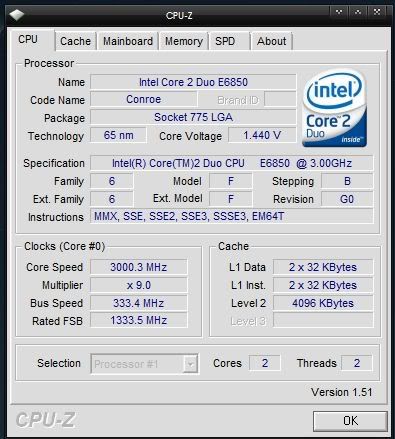
    CPU-Z says you have an E6850...?
    Yes you don't have good RAM, but that shouldn't matter for any light overclocking. and +fsb isn't going to help much

    .
    That is very high e8400, though it says E6850.
  4. smu122 Newcomer, in training Posts: 70

    Can i lower DRAM to minimum, and slowly raise FSB until i reach 3.2Ghz? Also, while running ORTHOS, my cpu temperatures are at 85C. Is this safe?
  5. hellokitty[hk] I'm a TechSpot Evangelist Posts: 4,001   +31

    You probably don't even need to touch your DRAM, just leave it default.

    No no no, 85 is very high for an E8400 (CPUZ says E6850 might I reiterate) at 3.2ghz. Did you put your cooler on properly?
  6. smu122 Newcomer, in training Posts: 70

    I reattacthed my heatsink, and it reaches 77C during ORTHOS. Should i just run cpu at stock?

    Also put cpu back to stock, and the same temps are reached during stress test. Should i buy a new heatsink now?
     
  7. hellokitty[hk] I'm a TechSpot Evangelist Posts: 4,001   +31

    How exactly did you apply the thermal compound?
  8. smu122 Newcomer, in training Posts: 70

    I first removed the old rusty residue with an alcohol swab and q tip. Then put a small dab in the middle, then spread with a card. The layer is very thin.
  9. hellokitty[hk] I'm a TechSpot Evangelist Posts: 4,001   +31

    Sounds good, but normal E8400 usage temperature is UNDER 60 degrees stock... 70+ is really high for a 45nm processor especially at such low overclocks.
  10. smu122 Newcomer, in training Posts: 70

    Could my heatsink be the problem? Not spinning fast enough?
  11. hellokitty[hk] I'm a TechSpot Evangelist Posts: 4,001   +31

    Doesn't sound likely, I honestly can't tell why your temperatures are so high. They are very high.

    EDIT: YOUR CORE VOLTAGE IS 1.52v!!!
    Turn this down to default, that is frying your processor!!
  12. smu122 Newcomer, in training Posts: 70

    Should i go to bios and load defualts?
  13. hellokitty[hk] I'm a TechSpot Evangelist Posts: 4,001   +31

    You can do that, but you can also just set the voltage to default. Probably safer to load defaults.

    Is there a reason why your core voltage was so high??
    So is your processor an E8400 or E6850 and how do you know?
  14. HaMsTeYr TechSpot Enthusiast Posts: 385

    Butting in, from what i heard you get better real world performance from setting your fsb synchronous to your ram. I.E if you have DDR2 800 ram you get best performance running it at 400 FSB.

    You'd probably want to check out your processor again though... something don't sit right with me and 1.52 voltage and 50-70 celcius temps.

    Still, if you're even going to consider overclocking, try getting a custom heatsink. They're dirt cheap these days so theres no real excuse not having one :p

    http://www.tomshardware.com/forum/240001-29-howto-overclock-quads-duals-guide

    One of my favourite overclocking guides. It doesn't just apply to Quaddies so rest assured.
  15. hellokitty[hk] I'm a TechSpot Evangelist Posts: 4,001   +31

    Because you need an expensive heatsink for 1333 fsb to 1338 fsb!
  16. HaMsTeYr TechSpot Enthusiast Posts: 385

    since when? he's only running his at 334.5 o.o
  17. smu122 Newcomer, in training Posts: 70

    My apologies, its a E6850 Checked order conformation
  18. HaMsTeYr TechSpot Enthusiast Posts: 385

    hmm have you resetted your bios and checked the new voltages and temperatures? I'm guessing with a proper heatsink you could go to 3.6Ghz easily at 400FSB... though mind the temperatures and make sure you don't turn off the overheating safety (forgot what its called)
  19. smu122 Newcomer, in training Posts: 70

    Does this look better?


    [IMG]

    Idle temps are around 45C.... And load temps are around 70 after 5 minutes so thats better
  20. HaMsTeYr TechSpot Enthusiast Posts: 385

    looking much better. my advice on overclocking would be to first set your ram to synchronous, 1:1 ratio with your FSB. Then start raising your FSB little by little, making sure you have your motherboard's overclock safety features on and trying to get into windows each time.

    Also, i'd run Prime95 for at least a whole day before i stick to a clock speed o.o