OK here is a diagram..I hope it helps.
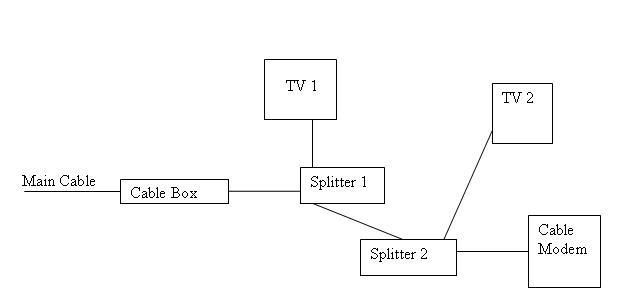
1) Main Cable Line Goes directly into cable box (The reason for this is because I have 2 TV's that need to share the one box).
2) Wire Out of cable box gets split (Splitter 1)
3) One wire goes into TV 1 (in living room)
4) One wire goes into bedroom where it connects with Splitter 2 (I need to split the wire because I need to connect it to both TV 2 & My Cable Modem....this is a seperate room than where TV 1 is).
PROBLEM: TV1 and TV2 both work fine. I am able to use the cable box for both and its great. The problem is that my cable modem is not getting a signal. What can I do? I know this is a crude drawing so please excuse the appearance, but hopefully someone can give me help with how to get everything working. Please ask questions if you don't fully get it. I figure this is a networking problem because my cable modem isn't working. If this should be in a different section of the forum, or a different forum all together, please let me know. Thank you all for your help.
1) Main Cable Line Goes directly into cable box (The reason for this is because I have 2 TV's that need to share the one box).
2) Wire Out of cable box gets split (Splitter 1)
3) One wire goes into TV 1 (in living room)
4) One wire goes into bedroom where it connects with Splitter 2 (I need to split the wire because I need to connect it to both TV 2 & My Cable Modem....this is a seperate room than where TV 1 is).
PROBLEM: TV1 and TV2 both work fine. I am able to use the cable box for both and its great. The problem is that my cable modem is not getting a signal. What can I do? I know this is a crude drawing so please excuse the appearance, but hopefully someone can give me help with how to get everything working. Please ask questions if you don't fully get it. I figure this is a networking problem because my cable modem isn't working. If this should be in a different section of the forum, or a different forum all together, please let me know. Thank you all for your help.


