also @ TechSpot: Study suggests majority of Windows 8 users ignore Metro apps

Problems after html/infected.webpage.gen virus

Discussion in 'Virus and Malware Removal' started by bkfuhrer, Mar 1, 2010.

  1. bkfuhrer Newcomer, in training Posts: 76

    Avira caught this one while my son was on wikipedia. I have completed the 8 steps and scans are coming clean but my computer has been experiencing slugishness and random crashes. You guys graciously helped me on a previous occasion so I am returning with the hope you can straighten out this poor computer again...
    Thank you

    Attached Files:

  2. Broni Malware Annihilator Posts: 39,357   +175

    Please download ComboFix from Here or Here to your Desktop.

    **Note: In the event you already have Combofix, this is a new version that I need you to download. It is important that it is saved directly to your desktop**
    1. Please, never rename Combofix unless instructed.
    2. Close any open browsers.
    3. Close/disable all anti virus and anti malware programs so they do not interfere with the running of ComboFix.
      • Very Important! Temporarily disable your anti-virus, script blocking and any anti-malware real-time protection before performing a scan. They can interfere with ComboFix or remove some of its embedded files which may cause "unpredictable results".
      • Click on this link to see a list of programs that should be disabled. The list is not all inclusive. If yours is not listed and you don't know how to disable it, please ask.
      NOTE1. If Combofix asks you to install Recovery Console, please allow it.
      NOTE 2. If Combofix asks you to update the program, always do so.
      • Close any open browsers.
      • WARNING: Combofix will disconnect your machine from the Internet as soon as it starts
      • Please do not attempt to re-connect your machine back to the Internet until Combofix has completely finished.
      • If there is no internet connection after running Combofix, then restart your computer to restore back your connection.
    4. Double click on combofix.exe & follow the prompts.
    5. When finished, it will produce a report for you.
    6. Please post the "C:\ComboFix.txt" along with a new HijackThis log for further review.
    **Note: Do not mouseclick combofix's window while it's running. That may cause it to stall**

    Make sure, you re-enable your security programs, when you're done with Combofix.

    DO NOT make any other changes to your computer (like installing programs, using other cleaning tools, etc.), until it's officially declared clean!!!
  3. bkfuhrer Newcomer, in training Posts: 76

    Thank you for your prompt reply. I downloaded Combo fix, disabled Avira, Threatfire, Commodo and Spyware Blaster but Combo fix will not load up for some reason. It looks like it wants to, I get a little rectangular box with green loading bars running, the icon briefly appears in the taskbar then poof- it's gone and nothing happens. I should add that I'm on a dial-up connection...
  4. Broni Malware Annihilator Posts: 39,357   +175

    Rename combofix.exe to combofix.com and try again.
  5. bkfuhrer Newcomer, in training Posts: 76

    Nope, sorry. It is giving an identical response. I wonder if I should uninstall it and do a clean reinstall in case it became corrupted somehow? But I won't do anything until I hear your reply...
  6. Broni Malware Annihilator Posts: 39,357   +175

    Please download and run the below tool named Rkill (courtesy of BleepingComputer.com) which may help allow other programs to run.

    There are 4 different versions. If one of them won't run then download and try to run the other one.

    Vista and Win7 users need to right click Rkill and choose Run as Administrator

    You only need to get one of these to run, not all of them. You may get warnings from your antivirus about this tool, ignore them or shutdown your antivirus.

    * Rkill.com
    * Rkill.scr
    * Rkill.pif
    * Rkill.exe

    * Double-click on the Rkill desktop icon to run the tool.
    * If using Vista or Windows 7 right-click on it and choose Run As Administrator.
    * A black DOS box will briefly flash and then disappear. This is normal and indicates the tool ran successfully.
    * If not, delete the file, then download and use the one provided in Link 2.
    * If it does not work, repeat the process and attempt to use one of the remaining links until the tool runs.
    * Do not reboot until instructed.
    * If the tool does not run from any of the links provided, please let me know.

    Once you've gotten one of them to run then try to immediately run Combofix.
     
  7. bkfuhrer Newcomer, in training Posts: 76

    Successfully downloaded and ran the program from the first link, unfortunately there was no change in Combo fix....
  8. Broni Malware Annihilator Posts: 39,357   +175

    Delete your Combofix file.
    Download fresh one from HERE
    I renamed the file for a reason.
  9. bkfuhrer Newcomer, in training Posts: 76

    Aaaargh, I hate to tell you this, but it's the same story. I might add that after your first post I checked for an old version of combo fix using the start/run button and entering combofix /u.... It did not find a previous version. Now I tried this after your last post telling me to delete it and again it didn't find it so I tried renaming back from combofix.com to combofix.exe and it still didn't delete so I threw it in the trash and flushed.
    I want to thank you for your patience, I feel like I have a lifeline out there...
  10. Broni Malware Annihilator Posts: 39,357   +175

  11. bkfuhrer Newcomer, in training Posts: 76

    Crud! After about 2 hrs of scanning with GMER it suddenly crashed! I was unable to get a log... Windows error reporting states that it is a "stop error" related to a driver problem. Shall I try again?
  12. Broni Malware Annihilator Posts: 39,357   +175

    Download TDSSKiller and save it to your Desktop.
    Extract its contents to your desktop and make sure TDSSKiller.exe (the contents of the zipped file) is on the Desktop itself, not within a folder on the desktop.
    Go to Start > Run (Or you can hold down your Windows key and press R) and copy and paste the following into the text field. (make sure you include the quote marks) Then press OK.

    "%userprofile%\Desktop\TDSSKiller.exe" -l C:\TDSSKiller.txt -v

    If it says "Hidden service detected" DO NOT type anything in. Just press Enter on your keyboard to not do anything to the file.
    When it is done, a log file should be created on your C: drive called TDSSKiller.txt please copy and paste the contents of that file here.
  13. bkfuhrer Newcomer, in training Posts: 76

    Finally I'm able to give you a log :)

    Attached Files:

  14. Broni Malware Annihilator Posts: 39,357   +175

    Download Combofix again, if it's missing (my post # 8) and try to run it again.
    If it still doesn't work, try to run it from Safe Mode.
  15. bkfuhrer Newcomer, in training Posts: 76

    I finally got it to run but only in Safe mode so I was unable to download the recovery console but I finally have a log for you!
  16. Broni Malware Annihilator Posts: 39,357   +175

    The log is missing :)
  17. bkfuhrer Newcomer, in training Posts: 76

    Ooops, sorry

    Attached Files:

  18. Broni Malware Annihilator Posts: 39,357   +175

    Very good :)

    Restart in normal mode and....


    With malware infections being as they are today, it's strongly recommended to have the Windows Recovery Console pre-installed on your machine before doing any malware removal.

    The Windows Recovery Console will allow you to boot up into a special recovery (repair) mode. This allows us to more easily help you should your computer have a problem after an attempted removal of malware. It is a simple procedure that will only take a few moments of your time.


    Go to Microsoft's website => http://support.microsoft.com/kb/310994

    Select the download that's appropriate for your Operating System

    [IMG]


    Download the file & save it as it's originally named.


    ---------------------------------------------------------------------

    Transfer all files you just downloaded, to the desktop of the infected computer.

    --------------------------------------------------------------------


    Disable your AntiVirus and AntiSpyware applications, usually via a right click on the System Tray icon. They may otherwise interfere with our tools

    [IMG]


    • Drag the setup package onto ComboFix.exe and drop it.

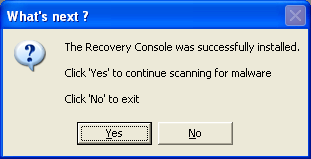
    • Follow the prompts to start ComboFix and when prompted, agree to the End-User License Agreement to install the Microsoft Recovery Console.


      [IMG]


    • At the next prompt, click 'Yes' to run the full ComboFix scan.

    • When the tool is finished, it will produce a report for you.
    Please post the C:\ComboFix.txt, and fresh HijackThis log in your next reply.
  19. bkfuhrer Newcomer, in training Posts: 76

    I am submitting a new hjt log as I have to go to work soon (noon, PST time) and you may want one....

    Attached Files:

  20. bkfuhrer Newcomer, in training Posts: 76

    Oops, I posted before I read your most recent post...