J
jtickner1
Hi, I was just wondering if anyone could assist me in figuring out which of these SpeedFan temps is my GPU.
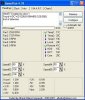
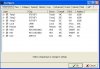
The 2 pictures I have uploaded show the Temperatures and the Chip of each temperature it's monitoring.
Temp 1 - I don't know
Temp 2 - I don't know
Temp 3 - I don't know
Local (LM90 Chip) - I don't know
Remote (LM90 Chip) - I have a feeling this may be it
HD0 - HDD
HD1 - HDD
Core - CPU
Would be great if someone could help me out as I think my GPU's fan is starting to fail and I would like to monitor the temperatures.
Thanks
The 2 pictures I have uploaded show the Temperatures and the Chip of each temperature it's monitoring.
Temp 1 - I don't know
Temp 2 - I don't know
Temp 3 - I don't know
Local (LM90 Chip) - I don't know
Remote (LM90 Chip) - I have a feeling this may be it
HD0 - HDD
HD1 - HDD
Core - CPU
Would be great if someone could help me out as I think my GPU's fan is starting to fail and I would like to monitor the temperatures.
Thanks