also @ TechSpot: Huawei Ascend P6 smartphone is the thinnest in the world at 6.18mm

Strange Kingston USB issue

Discussion in 'Storage and Networking' started by Ritwik7, Apr 17, 2010.

  1. Ritwik7 TechSpot Chancellor Posts: 2,281   +6

    Hi LookinAround.

    Thanks for all those inputs. My semester examinations are coming up so I wont be messing around with the system for now. However, once they're over I intend to do a fresh install of the OS. If the drive refuses to work after that then I might consider a BIOS update. :)
  2. LookinAround TechSpot Chancellor Posts: 7,699   +40

    Sounds like a very wise approach! Good luck on all those exams! :)
  3. Ritwik7 TechSpot Chancellor Posts: 2,281   +6

    Thank you! :)
  4. Ritwik7 TechSpot Chancellor Posts: 2,281   +6

    Hi guys!

    Another update on the "Curse of the Kingston".

    Re-installed Windows 7 (x64). This time I used AHCI. Installed the motherboard chipset drivers provided by ASUS instead of using the Windows 7 generic drivers.

    The USB drive still failed to function properly. :(
  5. LookinAround TechSpot Chancellor Posts: 7,699   +40

    Hey Ritwik!

    Thanks for the update. Are you going to try the BIOS update too?

    I'd guess the BIOS update as best 50/50 chance of fixing the mysterious Kingston problem but I'd be inclined to do it more so based on the release notes "Improves System stability" but, in any case, that's up to you.

    I would, however, also recommend installing the vendor's network driver (i vaguely recall from one of the threads that you said you were using a generic network driver)
  6. Archean TechSpot Paladin Posts: 5,749   +29

    @LA
    First of all sorry for delay in response, but as I said I've been extremely busy at work lately; and whenever I had bit of spare time, I just couldn't motivate myself to do this :rolleyes: .

    I have tried to run devcon as per your recommendations/instructions. However, I ran into issues with regard to devcon's (x64 version) compatibility with windows 7. I received error "The image C:\Windows\System32\devcon.exe is valid, but is for machine type other than the current machine". :confused:

    Anyway, when I tried to run it with x86 version it worked alright. I have attached the log for your review.

    Lastly, Thankyou for your much valued efforts to help. Regards

    Edit:
    Disregard my comment about x64 version, as it is IA64 (I'm assuming its for Itanium based machines) not x64.

    Attached Files:

     
  7. LookinAround TechSpot Chancellor Posts: 7,699   +40

    No worries. This is just a "curiosity excursion" for both of us (as i understand you currently have things working?) so we can both keep it low priority is OK. And should it become too much work for either, is cool if either one calls it quits :)

    Thank you!! See, I've already learned something during our excursion. I've never actually used the IA64 version myself so would have made the same mistake! :)

    Other points
    1. Did you ever apply any Win7 updates for your drivers? Now i don't remember where i found it, but i had downloaded a Win7 driver patch. I uploaded it now to my DropBox account.
    ==> Also, i looked (but maybe didn't find?) Huwaeii's actual support site for this device? is there a link?

    2. If we were to try uninstall/reinstall the drivers on your current Win7 installed partition do you know if would work? or fail?

    I also want to minimize any chance/impact of you having a Win7 system without working Huwaei drivers. So also want to understand our "testing sandbox" setup.
    • Would you want to first create a clone image of the working partition before we start?
    • Or would you want to install a new Win7 partition on your machine to be used as "our sandbox" so you can easily boot into our test environment or a Win7 partition you know you can still use when needed?
    • Or other approach you may want to do?

    3. The devcon output file you attached doesn't show any surprises on quick glance
    > Each of the mulitple interfaces in your "Composite Device" appears to have installed OK and their driver status is OK
    > Also, appears Windows only found one suitable driver for each interface (so doesn't look like your problem would have anything to do with Windows having multiple and different driver candidates to choose from)

    I'd guess next steps would be
    1. Uninstalling all the drivers
    2. Turn on device manager trace logs then reinstall the drivers to get a trace where everything works OK
    3. Then we'd want to also create a trace file where the reinstall fails and also then run another devcon script so i could look at/compare the data for the two cases

    The trace logs will probably be too large to upload on TechSpot so we can swap them either on file sharing site or private email. In any case, when you have the time, answer my questions above and then i lay out instructions for next steps
  8. Archean TechSpot Paladin Posts: 5,749   +29

    I haven't applied that patch frankly.

    Once windows 7 is installed with the device attached, it works without any issues, even if you uninstall and then reinstall drivers.

    I will make room for an additional partition to install a fresh copy of windows 7 (just want to start from zero so we do not have any thing else interfering with this).

    My feeling is its not the driver issue, its rather windows is unable to somehow detect 'Wireless Broadband' connectivity of this device during PnP handshake. By the way, in this scenario the driver is installed without any issues, its only when I open the Mobile Partner (its front end interface) to connect the device to ISP that it says "Device is not Detected".

    Now I think, more appropriate approach right now would be install a fresh copy, and apply that windows patch, then connect the device and see how things go. What is your views on this?

    By the way, this issue occurs both on x86 and x64 versions of Win7.
  9. LookinAround TechSpot Chancellor Posts: 7,699   +40

    quick update... i'm trying to figure out why i can't get Device Manager traces to work in Win 7. Will post again when i have more news...
  10. Archean TechSpot Paladin Posts: 5,749   +29

    Hmm its sort of similar for me....
  11. LookinAround TechSpot Chancellor Posts: 7,699   +40

    AH HA!!! I got it! :approve:

    MS moved stuff around in Windows 7. AND! : i also found, by default Windows is already doing basic (vs. verbose) device logging! (at least so i found for my Windows 7 Pro install)

    So before we do anything else: Do you see a file C:\Windows\inf\setupapi.dev.log on your currently installed system?

    /* edit */
    Oh. and just saw you posted at same time... Not sure what you mean.... by "Hmm its sort of similar for me.... "
  12. Archean TechSpot Paladin Posts: 5,749   +29

    I am at work, and on this notebook I have the file you've asked me to look for, I believe it should be case as well on my desktop (at home). And I was talking about DM traces as well.
  13. LookinAround TechSpot Chancellor Posts: 7,699   +40

    Cool. Any remote chance you might also have backed up the installation where things didn't work? so maybe there'd be a copy of that file as well for the case in question? (a long shot but figured i'd ask)... in any event, off to bed.. check in w/you tommorrow
  14. Archean TechSpot Paladin Posts: 5,749   +29

    No, because I reinstalled the OS with the device attached, however, last night i've created a partition for new installation again (without the device attached); so i will get back to you on this one as soon as I have some time to do this. Thanks and Regards
  15. LookinAround TechSpot Chancellor Posts: 7,699   +40

    Hi Archean

    Things to do (at your convenience and whenever you have the time)

    First, about DM Trace Logging
    Output file
    As you found, DM trace output log for Win7 is C:\Windows\inf\setupapi.dev.log
    ==> Ignore any other setupapi files you see

    Setting the Verbosity Level
    Trace verbosity level is controlled by HKLM\SOFTWARE\Microsoft\Windows\CurrentVersion\Setup\LogLevel
    ==> Pls tell me the LogLevel default value for both your current + your new Win7 installations (i'm guessing should be the same)

    Looks like Win7 sets a default verbosity level so DM is always writing basic trace data
    ==> When we do traces we'll increase the verbosity (I'll give you the value)
    ==> When we're all done with our project, you might want to turn it off entirely so it's not constantly writing to your disk. (And i assume MS has limited its max size - which was a problem once upon a time in XP!)

    Normally, each time we want to start collecting new trace data, pls delete the current C:\Windows\inf\setupapi.dev.log file
    ==> Windows will simply open a new one the next time it writes data
    ==> And that way we can reduce all junk we don't need in the file plus what we can find what we're looking for near the start of the file

    Also note: if you run a cleaner tool like CCleaner, depending on how its configured, it might remove all Windows log files (including the DM trace log) as junk. So fyi to either change its config or be careful when you run CCleaner vs. when you are collecting and saving data (save files with an .old extension vs. a .log extension to be safe)

    For now why don't you do this:
    1. On your current good install, save a copy of the current log file
    2. Then do the rest on new install, put the code below into .reg file and run it to set log level and reboot
      Code:
      Windows Registry Editor Version 5.00
      [HKEY_LOCAL_MACHINE\SOFTWARE\Microsoft\Windows\CurrentVersion\Setup]
      "LogLevel"=dword:020060ff
    3. Install devcon and the devcon .bat file
    4. Delete the current log file. Install the patch. Save a copy of current log file. Run devcon script and save copy of output
    5. Delete the logfile. Install your device drivers (but don't open the device yet). Save a copy of current logfile. Run devcon script and save copy of output
    6. Delete the logfile. Now open the device as before. You still have a problem? Then save a copy of logfile and run devcon script again and save output
  16. Archean TechSpot Paladin Posts: 5,749   +29

    Well, I had plans for tonight to install a new copy of win7 to try out your proposals; however; as I was preparing to do so my system crashed totally out of blue. Ironically with a BSOD + 3 beeps :( anyway, despite having it set to record minidumps, it didn't record anything; nor it was willing to send any signal to display. So I ended up disassembling the whole system; then putting it back together, long and the short of it is, after about hour or so I figured out one more of my RAM modules probably was causing this; so I took it out and the system booted normally. Now, this is really strange, this is second kingston module which has died in last 8 months; so I am left with 4GB of RAM :mad:.
    However, I do remember the error code was 0x7E with APCI.SYS as the process which caused it.

    I have DDR2-667 MHz modules, which aren't available here anymore; and I am unsure whether swapping the remaining good ones along with buying couple of more 2GB sticks of 800MHz modules is worth spending money on (i.e. ROI).

    Anyway, I guess what time I had allocated for this task is gone for now; I will do it ASAP when I get some time and I hope this thing will hold.
  17. LookinAround TechSpot Chancellor Posts: 7,699   +40

    One never knows what terror lurks around the next corner within a Windows PC :p I'm in the middle of my own (small) disaster myself..

    I bought a new XFX Radeon HD 5450 graphics card. It worked (somewhat) in XP. It also worked (somewhat) in Win7 till i thought to try a fresh clean Win 7 reinstall plus a Dell BIOS update. So, now every HD 5450 driver i try (old or new) simply BSODs on install. So... i can only work in my Win 7 boot with generic video drivers at the moment (so the display is "useable" but not convenient)... So no need to hurry on my part! :haha:

    I'll probably get a different graphics card in next few days (and P.S.: stay away from that new Radeon HD 5450!)
  18. Archean TechSpot Paladin Posts: 5,749   +29

    Such is life ........... but I think probability is in your case it may be a hardware issue. Perhaps a bad graphic card?? I am using a Radeon HD 5770 (which i bought couple of months ago), and I am satisfied with its performance.

    Talking of BIOS updates, I am bit more cautious about these now, reason being last time around when i updated same type motherboard to latest bios, I ended up where I couldn't reboot my system at all it would be stuck at black screen endlessly, so every time i needed to do that, i would have to power off system and then turn it back on. Later on, on Intel forums I found out that the latest BIOS update had that bug (and I was bit lazy to downgrade to previously working BIOS), anyway I got that motherboard replaced in warranty due to other hardware issues, hence, my issue has been 'luckily' resolved ;).
  19. LookinAround TechSpot Chancellor Posts: 7,699   +40

    This is actually the first time i had occasion to change an add-on graphics card. (Actually, this is my first desktop in ages! - Till now, i was always running laptops with docking stations)

    A couple basic questions

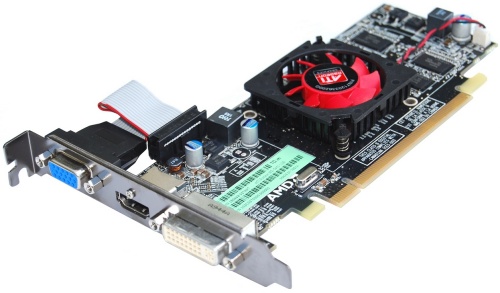
    1) The RD 5450 quick install guide (the only install guide) mentioned connecting power to its 6-pin connector. But i never saw anything that looked like a connector on the back of the card for power... Did i miss it? Hmmm.. Looking at the card, I didn't see anything that looked like it and looking at the card's pic again (below), i thought all the connectors on the bottom of the card fit into the chassis slot... or if i open my computer up will i find one of those connectors on the bottom of the card isn't in the chassis slot and is, in fact, missing a power connection??
    [IMG]

    2) Also, i need a low profile card. The instructions didn't say but it seemed to use the low profile bracket, i simply disconnected the VGA connector to the board, switched to the low profile bracket, and inserted the card with the VGA connector open. I assume that shouldn't be an issue?

    /* edit */
    Oh. maybe i answered my own question as looking closer at the pic it looks like the first connector closest to the bracket is actually shorter then the rest!! so probably isn't sitting in the slot at all...
  20. Archean TechSpot Paladin Posts: 5,749   +29

    It doesn't require any 'external' power source i.e. 6 pin (75W) connector usually needed for middle/higher end models. However according to AMD/ATI you need 400W PSU.

    Lastly that first connector isn't actually needed to sit in the slot, it probably is there to hold it the card in stay aligned position (if someone know better, correction will be highly appreciated).