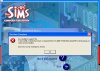
I just bought the Sims Complete Collection and when I click the install button on the install wizard, it tells me that I don't have enough space on . and that I need 3600 MB of free space to install, and then kicks me out of the installer.
I have 13.6GB of free space on C: and I don't know why it would fail to recognize that. I've uninstalled a lot of excess programs and defragmented my computer, I've ran countless virus scans and spyware scans and I still get this error.
I'm really starting to get ticked off, but anything you could do to help would be GREATLY appreciated.
BTW: In the screenshot I was using a Windows theme, but upon realizing that might mess with my computer I uninstalled it and it still won't let me install the sims.
I've attached a screenshot of the error message and my DirectX Diagnostic of my computer specs.
Cheers
Dhargk
I have 13.6GB of free space on C: and I don't know why it would fail to recognize that. I've uninstalled a lot of excess programs and defragmented my computer, I've ran countless virus scans and spyware scans and I still get this error.
I'm really starting to get ticked off, but anything you could do to help would be GREATLY appreciated.
BTW: In the screenshot I was using a Windows theme, but upon realizing that might mess with my computer I uninstalled it and it still won't let me install the sims.
I've attached a screenshot of the error message and my DirectX Diagnostic of my computer specs.
Cheers
Dhargk