You are using an out of date browser. It may not display this or other websites correctly.
You should upgrade or use an alternative browser.
You should upgrade or use an alternative browser.
Trouble with 160GB SATA Drive
- Thread starter saik0pod
- Start date

Samstoned
Posts: 1,009 +0

I think that the solution to this is very simple. Have you put a jumper across the 2 outer most pins on the back of the new drive? That will make it run at SATA I. Yes that is slower than SATA II but you will not notice the difference with normal everyday use. Plus it eliminates the SATA I/SATA II dilemma and helps to eliminate the possibility of a bad drive. And if it still doesn't work it has cost you nothing.
If you really want to add SATA II then this PCI card from your post above would work:
http://cgi.ebay.com/4-Port-Serial-A...ryZ74941QQssPageNameZWDVWQQrdZ1QQcmdZViewItem
The other two ebay links would let you setup an external drive.
It would help to resolve this faster if people helping you knew exactly what your setup is. Be specific on specs and what model and revision of mobo you have and the date and version of the BIOS.
I know that you have said that the BIOS is up to date but just to be sure, what is the date and version of the BIOS?
And you probably already know you can update your MSI BIOS online. Look at the bottom of this page for the live update link:
http://global.msi.com.tw/index.php?func=downloaddetail&type=bios&maincat_no=1&prod_no=150
One last thing. All this info is in the manuals that came with the hardware.
RTFM!
If you really want to add SATA II then this PCI card from your post above would work:
http://cgi.ebay.com/4-Port-Serial-A...ryZ74941QQssPageNameZWDVWQQrdZ1QQcmdZViewItem
The other two ebay links would let you setup an external drive.
It would help to resolve this faster if people helping you knew exactly what your setup is. Be specific on specs and what model and revision of mobo you have and the date and version of the BIOS.
I know that you have said that the BIOS is up to date but just to be sure, what is the date and version of the BIOS?
And you probably already know you can update your MSI BIOS online. Look at the bottom of this page for the live update link:
http://global.msi.com.tw/index.php?func=downloaddetail&type=bios&maincat_no=1&prod_no=150
One last thing. All this info is in the manuals that came with the hardware.
RTFM!
- Thread Starter
- #29
I've read the manual and it doesnt say much. All my bios settings are correct because my 80GB sata drive is working 100%. MY bios is up to date since I do a LiveUpdate everyday (A program that came with the msi board that downloads updates for the board). This is my exact setup
PSU: Turbo Cool 850 SSI ETX 2.0 24P
Motherboard: MSI Neo2-P Platinum Edition 865PE
CPU: Pentium 4 Extreme Edition Socket 478 3.4GHz
RAM: 512 x 4 SmartTech DDR2 RAM
HD: 1 80GB WD-WMAM9 Western Digital 7.2k SATA
VCARD: ATi Radeon X1650 Pro 512MB DDR2 AGP 8x
If you need more info just post and ill give it
PSU: Turbo Cool 850 SSI ETX 2.0 24P
Motherboard: MSI Neo2-P Platinum Edition 865PE
CPU: Pentium 4 Extreme Edition Socket 478 3.4GHz
RAM: 512 x 4 SmartTech DDR2 RAM
HD: 1 80GB WD-WMAM9 Western Digital 7.2k SATA
VCARD: ATi Radeon X1650 Pro 512MB DDR2 AGP 8x
If you need more info just post and ill give it
For sure now that your mobo supports only SATA I. So now you just need to connect the two outermost pins on the jumper block on the back of the drive.
This is from Seagate manual:
"Serial ATA drives are designed for easy installation. It is usually not necessary to set any jumpers on the drive for proper operation; however, if you connect the drive and receive a “drive not detected” error, your SATA-equipped motherboard or host adapter may use a chipset that does not support SATA speed autonegotiation. If you have a motherboard or host adapter that does not support autonegotiation:
•Install a jumper as shown in Figure 3 below to limit the data transfer rate to 1.5 Gbits per second (and leave the drive connected to the SATA-equipped motherboard or host adapter that doesn’t support autonegotiation)
or
•Install a SATA host adapter that supports autonegotiation, leave the drive jumper block set to “Normal operation” (see Figure 3 below), and connect the drive to that adapter. This option has the benefit of not limiting the drive to a 1.5 Gbits/sec transfer rate."
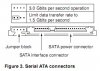
Believe me you won't notice the difference between SATA I and II. 1.5 GB a second is still fast! For instance the average broadband connection downloads at 1.5 Megabytes per second! Well 1.5 Gb/sec is 1000 times faster than 1.5 Mb/sec. Your current motherboard would not benefit from having SATA II as transfer rates on the board are slower that newer boards and chipsets.
This is from Seagate manual:
"Serial ATA drives are designed for easy installation. It is usually not necessary to set any jumpers on the drive for proper operation; however, if you connect the drive and receive a “drive not detected” error, your SATA-equipped motherboard or host adapter may use a chipset that does not support SATA speed autonegotiation. If you have a motherboard or host adapter that does not support autonegotiation:
•Install a jumper as shown in Figure 3 below to limit the data transfer rate to 1.5 Gbits per second (and leave the drive connected to the SATA-equipped motherboard or host adapter that doesn’t support autonegotiation)
or
•Install a SATA host adapter that supports autonegotiation, leave the drive jumper block set to “Normal operation” (see Figure 3 below), and connect the drive to that adapter. This option has the benefit of not limiting the drive to a 1.5 Gbits/sec transfer rate."
Believe me you won't notice the difference between SATA I and II. 1.5 GB a second is still fast! For instance the average broadband connection downloads at 1.5 Megabytes per second! Well 1.5 Gb/sec is 1000 times faster than 1.5 Mb/sec. Your current motherboard would not benefit from having SATA II as transfer rates on the board are slower that newer boards and chipsets.


Cinders
Posts: 867 +13
Please do not purchase that SATA II controller card. It has a PCI-X interface and will not fit/work on your motherboard. All you should need to do is follow the example in the picture in crawdoogie's last post, and your drive should work. If you need to buy anything at all, it may be a jumper to to short the pins on the back of your drive.
- Thread Starter
- #33
Alright I will try to purchase some jumpers, However the most puzzling thing that really confuses me.
When I first plugged that 160GB sata drive into my computer, it worked 100% it was detected by Bios and Windows. The only thing I dont get is, when I partitioned the 160GB drive, it just magically stopped getting detected by the bios. That is wierd <- Thanks for the guides and tips!
When I first plugged that 160GB sata drive into my computer, it worked 100% it was detected by Bios and Windows. The only thing I dont get is, when I partitioned the 160GB drive, it just magically stopped getting detected by the bios. That is wierd <- Thanks for the guides and tips!
Samstoned
Posts: 1,009 +0
exactly some failed to get that
so I don't believe it's from the jumper condition
if it is it's a firmware error could have damaged the board on the drive
I've installed some sata 2's on a few sata1 boards without jumper they where not 160gb only 80
being a new drive don't waste anymore of your time RMA start fresh
read that manual
so I don't believe it's from the jumper condition
if it is it's a firmware error could have damaged the board on the drive
I've installed some sata 2's on a few sata1 boards without jumper they where not 160gb only 80
being a new drive don't waste anymore of your time RMA start fresh
read that manual
- Thread Starter
- #35
Ok so I tried the jumper thing, didn't work. However I contacted SeaGate and they agreed to replace my drive. Also the place I purchased the drive (eBay). The seller agreed to reship me another 160GB no expense to me. Looks like to me I will have 2 160GB hard drives in the next few days. Hopefully this time I will not mess it up by partitioning the drive without formatting it. Also I will stay away from Partition Magic FOREVER.
Didou said:Please do not confuse Megabit & Megabyte.
Yes I really screwed that speed comparison up didn't I? 1.5Gbits is not 1000 times 1.5 Mbytes. Its around 125 times (isn't it?) Back to basic math for me. The point I was trying to make was that upgrading an older mobo to SATA II would be pointless. Yeah that was a really bad example!
Samstoned
Posts: 1,009 +0
yes from disk manager xp will do it, if a little slow
just walk away from machine for awhile don't try to do anything else on the other drives
I have used acronis more times than I can count never messed up a format or a convert
when you get the replacement drive from seagate it will come with disc to format don't over look this
again I can't say it enough read the MB manual about sata 1 and 2 jumpers
and if you have more than 2 channels be careful witch you use
good luck
:chef:
just walk away from machine for awhile don't try to do anything else on the other drives
I have used acronis more times than I can count never messed up a format or a convert
when you get the replacement drive from seagate it will come with disc to format don't over look this
again I can't say it enough read the MB manual about sata 1 and 2 jumpers
and if you have more than 2 channels be careful witch you use
good luck
:chef:

captaincranky
Posts: 20,423 +9,389
Ummmmm........
150 MBS = 1.5Gbs the SATA 1 transfer speed. I'm gonna call it a hundred times for want of a better explanation. 1.5 goes into a hundred and fifty how many times? Capital "B" = Byte, lower case "b" = bit. I'm sorry, that's just rubbing it in isn't it?
Incidentally, your signature quote is the funniest thing I've heard in a week and a half, or so.
crawdoogie said:Yes I really screwed that speed comparison up didn't I? 1.5Gbits is not 1000 times 1.5 Mbytes. Its around 125 times (isn't it?) Back to basic math for me. The point I was trying to make was that upgrading an older mobo to SATA II would be pointless. Yeah that was a really bad example!
150 MBS = 1.5Gbs the SATA 1 transfer speed. I'm gonna call it a hundred times for want of a better explanation. 1.5 goes into a hundred and fifty how many times? Capital "B" = Byte, lower case "b" = bit. I'm sorry, that's just rubbing it in isn't it?
Incidentally, your signature quote is the funniest thing I've heard in a week and a half, or so.
captaincranky said:150 MBS = 1.5Gbs the SATA 1 transfer speed. I'm gonna call it a hundred times for want of a better explanation. 1.5 goes into a hundred and fifty how many times? Capital "B" = Byte, lower case "b" = bit. I'm sorry, that's just rubbing it in isn't it?
Incidentally, your signature quote is the funniest thing I've heard in a week and a half, or so.
Hey it was late when I wrote that! Hmmm if 8 bits = 1 Byte then how come 1.5 Gb = 150 MB a factor of 10. Is it that 1 MB = 1024 bytes not a 1000 bytes? Crap I knew all this 20 years ago! That's the problem-I'm old and tired.
- Thread Starter
- #41
Ok I purchased a Samsung SH-S183 18x DVD±RW Lightscribe DVD Burner on Ebay, but I just noticed it was SATA. Is this going to be a problem for me? Will I still be able to use the DVD-Burner? The specs are here:
http://cgi.ebay.com/ws/eBayISAPI.dl...item=350013185740&_trksid=p3984.cWON.m313.lVI
ALso, can someone suggest me a SATA II PCI Adapter so I may use SATA II and have more Sata inputs.
http://cgi.ebay.com/ws/eBayISAPI.dl...item=350013185740&_trksid=p3984.cWON.m313.lVI
ALso, can someone suggest me a SATA II PCI Adapter so I may use SATA II and have more Sata inputs.
captaincranky
Posts: 20,423 +9,389
Gosh Darn it, it's supposed to be confusing ...it's a computer...., Right.....?
I think that decimal mathematics are being used to describe binary devices in this case. It makes sense to present it to us (the customer) in this way. The other alternative is the confusion of this thread.
Still, 100 times 1 GB is a hundred Gigabytes, hard to argue with that, is it not?
Face it, if we all understood that 4GB equals 2 to the 32nd power, then everybody would quit asking "why doesn't XP home recognize all of the 4GB of RAM I just installed". So where's the fun in that?
crawdoogie said:Hey it was late when I wrote that! Hmmm if 8 bits = 1 Byte then how come 1.5 Gb = 150 MB a factor of 10. Is it that 1 MB = 1024 bytes not a 1000 bytes? Crap I knew all this 20 years ago! That's the problem-I'm old and tired.
I think that decimal mathematics are being used to describe binary devices in this case. It makes sense to present it to us (the customer) in this way. The other alternative is the confusion of this thread.
Still, 100 times 1 GB is a hundred Gigabytes, hard to argue with that, is it not?
Face it, if we all understood that 4GB equals 2 to the 32nd power, then everybody would quit asking "why doesn't XP home recognize all of the 4GB of RAM I just installed". So where's the fun in that?
captaincranky
Posts: 20,423 +9,389
To Be Fixed..or not be Fixed....That is the question....
I'm not exactly sure where this thread is, (as to which problems are/aren't solved), so I'm not exactly sure what to suggest.
However, to use a SATA drive as volume storage, just set the BIOS to "Configure SATA as IDE". XP will configure it as a volume automatically. As to the DVD drive I don't know if that will operate as IDE. The PCI to SATA card is a natty issue, since opinions on that type of card are like lightning and never really strike twice in the same place. I've wimped out on the issue, as I don't use RAID, just run as IDE and operate the extra drives as volumes. Every drive I've stuffed in has worked this way. The only problem I had was when I tried to Install Windows with all the drives connected. The BIOS "auto-configured" itself to SATA RAID. I simply disconnected the extra drives, restarted the PC, and plugged the extra drive in after the OS install. Perfect.
If I think I may have something that might be hampering the computer from recognizing the drive, (IE, MBR or bad format, or bad partition) I use a drive scrubbing program to bring the drive back to "out of the box" condition, and start over.
You really needed a suggestion before this, and I would have said; "don't buy a SATA optical drive". A DVD burner can't possibly transfer anywhere near as much information as the SATA interface can transmit. Plus, what do you do with the perfectly good IDE controllers on your mobo?
E-Bay, "shop victoriously"!
I'm not exactly sure where this thread is, (as to which problems are/aren't solved), so I'm not exactly sure what to suggest.
However, to use a SATA drive as volume storage, just set the BIOS to "Configure SATA as IDE". XP will configure it as a volume automatically. As to the DVD drive I don't know if that will operate as IDE. The PCI to SATA card is a natty issue, since opinions on that type of card are like lightning and never really strike twice in the same place. I've wimped out on the issue, as I don't use RAID, just run as IDE and operate the extra drives as volumes. Every drive I've stuffed in has worked this way. The only problem I had was when I tried to Install Windows with all the drives connected. The BIOS "auto-configured" itself to SATA RAID. I simply disconnected the extra drives, restarted the PC, and plugged the extra drive in after the OS install. Perfect.
If I think I may have something that might be hampering the computer from recognizing the drive, (IE, MBR or bad format, or bad partition) I use a drive scrubbing program to bring the drive back to "out of the box" condition, and start over.
You really needed a suggestion before this, and I would have said; "don't buy a SATA optical drive". A DVD burner can't possibly transfer anywhere near as much information as the SATA interface can transmit. Plus, what do you do with the perfectly good IDE controllers on your mobo?
E-Bay, "shop victoriously"!
Similar threads

- Replies
- 3
- Views
- 1K

Latest posts
-
LG and Alienware monitors caught auto-installing Windows adware
- Watzupken replied


-
TechSpot is dedicated to computer enthusiasts and power users.
Ask a question and give support.
Join the community here, it only takes a minute.