So this only started to happen recently where I would want to go to a site and the page goes blank and says that it is "waiting for www.google-analytics.com". It is then just stuck on that loading screen. I'm not good with computers or any of the technical stuff, but I have been searching for a solution and can't find one. Could someone please help me?
You are using an out of date browser. It may not display this or other websites correctly.
You should upgrade or use an alternative browser.
You should upgrade or use an alternative browser.
Inactive "Waiting for www.google-analytics.com..." pages won't load on my Firefox
- Thread starter chanlao
- Start date
- Thread Starter
- #5
Ah, thank you! It works, but I'm wondering if this actually gets to the root of the problem and stops it. Because sometimes I'll get a pop-up with gugle-analytics when visiting a page or link that is not related to my search. Is this not some sort of virus?

Bobbye
Posts: 16,313 +36
You are misspelling this- right? gugle-analytics I don't think the analytics is a matter of malware. It appears that it can be used in a business environment to track traffic on a web site.
On the other hand, if you are using the Google search and are being redirected to a page other than what you requested, that could be caused by malware.
If you would like us to check the system for malware, please follow the steps in the Preliminary Virus and Malware Removal thread HERE.
When you have finished, leave the logs for review in your next reply .
Please do not use any other cleaning programs or scans while I'm helping you, unless I direct you to. Do not use a Registry cleaner or make any changes in the Registry.
On the other hand, if you are using the Google search and are being redirected to a page other than what you requested, that could be caused by malware.
If you would like us to check the system for malware, please follow the steps in the Preliminary Virus and Malware Removal thread HERE.
When you have finished, leave the logs for review in your next reply .
Please do not use any other cleaning programs or scans while I'm helping you, unless I direct you to. Do not use a Registry cleaner or make any changes in the Registry.
- Thread Starter
- #8
No, its actually spelled "gugle" which is why I'm a little worried. [When I click a link, a separate window opens with "results.gugle.com" in the web address bar] As for the 8-step removal instructions, I have a question about step 4. How do I know if my operating system is Windows 7 64-bit or not?
Bobbye
Posts: 16,313 +36
Lots of complaints about this>gugle
Most of the site that come up using the search string "results.gugle.com" were low rated sites. The few others I checked indicated this was mostly in Firefox and many were from the Macs.
A search for just the word "gugle" found this:
My thought on this would be why would you need a search widget in a search engine!
To find out if your computer is running 32-bit or 64-bit Windows, do the following
1. Open System by clicking the Start button Picture of the Start button, clicking Control Panel, clicking System and Maintenance, and then clicking System.
2. Under System, you can view the system type.
Most of the site that come up using the search string "results.gugle.com" were low rated sites. The few others I checked indicated this was mostly in Firefox and many were from the Macs.
A search for just the word "gugle" found this:
Gugle is a free Google search Widget.You can choose the result language in the preferences dialog: English, German, French, Spanish, Portuguese, Italian, and more! Gugle widget allows you to search for specific stuff on web, using the Google searching engine.
Requirements: Yahoo Widget Engine
My thought on this would be why would you need a search widget in a search engine!
To find out if your computer is running 32-bit or 64-bit Windows, do the following
1. Open System by clicking the Start button Picture of the Start button, clicking Control Panel, clicking System and Maintenance, and then clicking System.
2. Under System, you can view the system type.
- Thread Starter
- #10
Ok, I think I've completed the 8-steps correctly (hopefully). Thanks again for doing this!  Attached are the DDS logs.
Malwarebytes' Anti-Malware 1.46
www.malwarebytes.org
Database version: 4052
Windows 6.1.7600
Internet Explorer 8.0.7600.16385
9/14/2010 1:26:38 PM
mbam-log-2010-09-14 (13-26-38).txt
Scan type: Quick scan
Objects scanned: 120168
Time elapsed: 3 minute(s), 46 second(s)
Memory Processes Infected: 0
Memory Modules Infected: 0
Registry Keys Infected: 0
Registry Values Infected: 0
Registry Data Items Infected: 0
Folders Infected: 0
Files Infected: 0
Memory Processes Infected:
(No malicious items detected)
Memory Modules Infected:
(No malicious items detected)
Registry Keys Infected:
(No malicious items detected)
Registry Values Infected:
(No malicious items detected)
Registry Data Items Infected:
(No malicious items detected)
Folders Infected:
(No malicious items detected)
Files Infected:
(No malicious items detected)
Attached are the DDS logs. Malwarebytes' Anti-Malware 1.46
www.malwarebytes.org
Database version: 4052
Windows 6.1.7600
Internet Explorer 8.0.7600.16385
9/14/2010 1:26:38 PM
mbam-log-2010-09-14 (13-26-38).txt
Scan type: Quick scan
Objects scanned: 120168
Time elapsed: 3 minute(s), 46 second(s)
Memory Processes Infected: 0
Memory Modules Infected: 0
Registry Keys Infected: 0
Registry Values Infected: 0
Registry Data Items Infected: 0
Folders Infected: 0
Files Infected: 0
Memory Processes Infected:
(No malicious items detected)
Memory Modules Infected:
(No malicious items detected)
Registry Keys Infected:
(No malicious items detected)
Registry Values Infected:
(No malicious items detected)
Registry Data Items Infected:
(No malicious items detected)
Folders Infected:
(No malicious items detected)
Files Infected:
(No malicious items detected)
Attachments
Bobbye
Posts: 16,313 +36
On 9/12/2010, Microsoft Antimalware identified this threat on your system:
http://go.microsoft.com/fwlink/?linkid=37020&name=Rogue:Win32/FakeXPA&threatid=2147610319
It has several aliases, a common one being Antivirus 2010. The instructions for the removal are on the site above. Did you get an alert for this? Do anything about it?
The message was:
The additional errors in the Event log note that in order to be protected, the program needs to be kept updated. Please do that now. Then scan with the program and follow any screen prompts for removal. Security programs-or any other programs that get security updates such as Java and Adobe cannot protect a system unless updates are current.
==========================================
You have both McAfee and Avast running. Please remove one of them. Multiple AV programs cause cause more multiple vulnerability.
============================================
The following programs are outdated. Update each and then uninstall all earlier versions:
Java: Check this site .Java Updates Get the most current update. Uninstall any earlier versions in Add/Remove Programs.
Adobe Reader: Visit this Adobe Reader site and make sure you have the most current update. Uninstall any earlier updates as they are vulnerabilities.
====================================
After you update and scan with Microsoft Antimalware, please Run Eset NOD32 Online AntiVirus scan HEREhttp://www.eset.eu/online-scanner
http://go.microsoft.com/fwlink/?linkid=37020&name=Rogue:Win32/FakeXPA&threatid=2147610319
It has several aliases, a common one being Antivirus 2010. The instructions for the removal are on the site above. Did you get an alert for this? Do anything about it?
The message was:
9/12/2010 2:10:35 PM, Error: Microsoft Antimalware [1008] - Microsoft Antimalware has encountered an error when taking action on spyware or other potentially unwanted software. For more information please see the following: http://go.microsoft.com/fwlink/?linkid=37020&name=Rogue:Win32/FakeXPA&threatid=2147610319 User: NT AUTHORITY\SYSTEM Name: Rogue:Win32/FakeXPA ID: 2147610319 Severity: Severe Category: Trojan Path: Action: Remove Error Code: 0x80508023 Error description: The program could not find the spyware and other potentially unwanted software on this computer. Status: Signature Version: AV: 1.89.1515.0, AS: 1.89.1515.0 Engine Version: 1.1.6103.0
The additional errors in the Event log note that in order to be protected, the program needs to be kept updated. Please do that now. Then scan with the program and follow any screen prompts for removal. Security programs-or any other programs that get security updates such as Java and Adobe cannot protect a system unless updates are current.
==========================================
You have both McAfee and Avast running. Please remove one of them. Multiple AV programs cause cause more multiple vulnerability.
============================================
The following programs are outdated. Update each and then uninstall all earlier versions:
Java: Check this site .Java Updates Get the most current update. Uninstall any earlier versions in Add/Remove Programs.
Adobe Reader: Visit this Adobe Reader site and make sure you have the most current update. Uninstall any earlier updates as they are vulnerabilities.
====================================
After you update and scan with Microsoft Antimalware, please Run Eset NOD32 Online AntiVirus scan HEREhttp://www.eset.eu/online-scanner
- Tick the box next to YES, I accept the Terms of Use.
- Click Start
- When asked, allow the Active X control to install
- Disable your current Antivirus software. You can usually do this with its Notification Tray icon near the clock.
- Click Start
- Make sure that the option "Remove found threats" is Unchecked, and the option "Scan unwanted applications" is checked
- Click Scan
- Wait for the scan to finish
- Re-enable your Antivirus software.
- A logfile is created and located at C:\Program Files\EsetOnlineScanner\log.txt. Please include this on your post.
Bobbye
Posts: 16,313 +36
Eset identified one entry so run this for removal:
Please download OTMovit by Old Timer and save to your desktop.
====================================
Please follow with this:
Please download ComboFix from Here and save to your Desktop.
Note: Do not mouseclick combofix's window while it's running. That may cause it to stall.
Note: Make sure you re-enable your security programs, when you're done with Combofix..
Please download OTMovit by Old Timer and save to your desktop.
- Double-click OTMoveIt3.exe to run it. (Vista users, please right click on OTMoveit3.exe and select "Run as an Administrator")
- Copy the file paths below to the clipboard by highlighting ALL of them and pressing CTRL + C (or, after highlighting, right-click and choose Copy):
Code::Processes :Services :Files C:\SWSetup\AOLIMS\setup.exe :Commands [purity] [emptytemp] [start explorer] [Reboot] - Return to OTMoveIt3, right click in the "Paste Instructions for Items to be Moved" window and choose Paste.
- Click the red Moveit! button.
- A log of files and folders moved will be created in the c:\_OTMoveIt\MovedFiles folder in the form of Date and Time (mmddyyyy_hhmmss.log). Please open this log in Notepad and post its contents in your next reply.
- Close OTMoveIt3
====================================
Please follow with this:
Please download ComboFix from Here and save to your Desktop.
[1]. Do NOT rename Combofix unless instructed.
[2].Close/disable all anti virus and anti malware programs so they do not interfere with the running of ComboFix.
[3].Close any open browsers.
[4]. Double click combofix.exe & follow the prompts to run.- NOTE: Combofix will disconnect your machine from the Internet as soon as it starts. The connection is automatically restored before CF completes its run. If it does not, restart your computer to restore your connection.
[5]. If Combofix asks you to install Recovery Console, please allow it.
[6]. If Combofix asks you to update the program, always allow. - Please do not attempt to re-connect your machine back to the Internet until Combofix has completely finished.
[7]. A report will be generated after the scan. Please paste the C:\ComboFix.txt[/b] in next reply.
Note: Do not mouseclick combofix's window while it's running. That may cause it to stall.
Note: Make sure you re-enable your security programs, when you're done with Combofix..
Bobbye
Posts: 16,313 +36
Sorry- didn't realize you have a 64bti OS. Run this instead:
- Download OTL from either of the links below and save it to your desktop.
Link 1
Link 2
- Double click the OTL icon to run it.

- The opened console will resemble this:
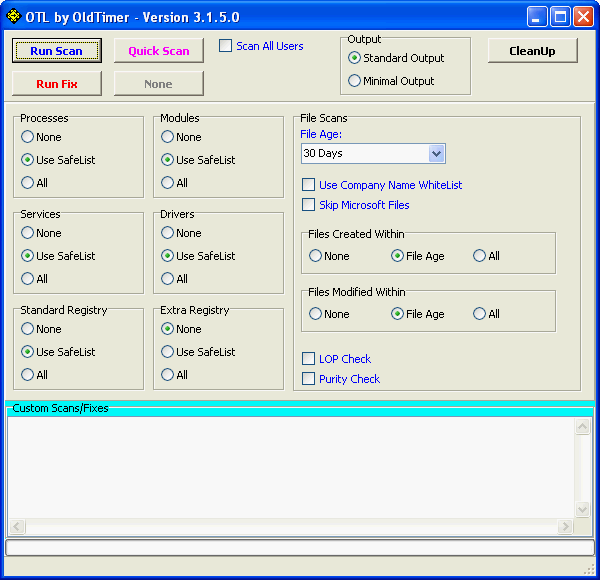
- Set Output at the top to Minimal Output.
- Check the boxes beside LOP Check and Purity Check.
- Copy the entries in the Codebox below> Paste in the Custom Scan box.
Code:netsvcs %SYSTEMDRIVE%\*.exe /md5start eventlog.dll scecli.dll netlogon.dll cngaudit.dll sceclt.dll ntelogon.dll logevent.dll iaStor.sys nvstor.sys atapi.sys IdeChnDr.sys viasraid.sys AGP440.sys vaxscsi.sys nvatabus.sys viamraid.sys nvata.sys nvgts.sys iastorv.sys ViPrt.sys eNetHook.dll ahcix86.sys KR10N.sys nvstor32.sys ahcix86s.sys nvrd32.sys symmpi.sys adp3132.sys mv61xx.sys /md5stop %systemroot%\*. /mp /s %systemroot%\system32\*.dll /lockedfiles %systemroot%\Tasks\*.job /lockedfiles %systemroot%\system32\drivers\*.sys /lockedfiles %systemroot%\System32\config\*.sav CREATERESTOREPOINT - Click the Quick Scan button. Do not change any settings unless otherwise told to do so. The scan wont take long.
Make sure all other windows are closed and to let it run uninterrupted. - When the scan completes, it will open two notepad windows. OTListIt.Txt and Extras.Txt. These are saved in the same location as OTL.
- Please copy (Edit->Select All, Edit->Copy) the contents of these files, one at a time, and post it with your next reply. You may need two posts to fit them all in.
Bobbye
Posts: 16,313 +36
I lost the thread! Please accept my apology. I must have accidentally deleted notice of your reply. It the problem still "waiting for www.google-analytics.com"? Has there been any change?
Further investigating gives this information:
1. This is most likely cause by a Firefox extension. To prevent such entries:
Add the Firefox extension AdBlockPlus: https://addons.mozilla.org/en-US/firefox/addon/1865/
Then, to that, add the Easy List which is a filter for it: http://easylist.adblockplus.org/
Reboot the computer after putting both of these on.
Please run these OTL Custom Scan Fixes
Run Eset NOD32 Online AntiVirus scan HEREhttp://www.eset.eu/online-scanner
I may have to add script again but go ahead with this.
Further investigating gives this information:
1. This is most likely cause by a Firefox extension. To prevent such entries:
Add the Firefox extension AdBlockPlus: https://addons.mozilla.org/en-US/firefox/addon/1865/
Then, to that, add the Easy List which is a filter for it: http://easylist.adblockplus.org/
Reboot the computer after putting both of these on.
Please run these OTL Custom Scan Fixes
- Run OTL
- Copy the contents of the Code box and paste in the Custom Scans/Fixes box at the bottom:
Code::OT O2 - BHO: (no name) - {5C255C8A-E604-49b4-9D64-90988571CECB} - No CLSID value found. O2 - BHO: (no name) - {602ADB0E-4AFF-4217-8AA1-95DAC4DFA408} - No CLSID value found. O3 - HKLM\..\Toolbar: (no name) - {7FEBEFE3-6B19-4349-98D2-FFB09D4B49CA} - No CLSID value found. O4 - HKLM..\Run: [] File not found O4 - HKLM..\Run: [SunJavaUpdateSched] C:\Program Files (x86)\Java\jre6\bin\jusched.exe File not found O13 - gopher Prefix: missing O13 - gopher Prefix: missing O6 - HKLM\SOFTWARE\Microsoft\Windows\CurrentVersion\policies\Explorer: NoActiveDesktop = 1 O6 - HKLM\SOFTWARE\Microsoft\Windows\CurrentVersion\policies\Explorer: NoActiveDesktopChanges = 1 O6 - HKLM\SOFTWARE\Microsoft\Windows\CurrentVersion\policies\System: ConsentPromptBehaviorAdmin = 5 O6 - HKLM\SOFTWARE\Microsoft\Windows\CurrentVersion\policies\System: ConsentPromptBehaviorUser = 3 O18:[b]64bit:[/b] - Protocol\Handler\http\0x00000001 {E1D2BF42-A96B-11d1-9C6B-0000F875AC61} - Reg Error: Key error. File not found O18:[b]64bit:[/b] - Protocol\Handler\http\oledb {E1D2BF40-A96B-11d1-9C6B-0000F875AC61} - Reg Error: Key error. File not found O18:[b]64bit:[/b] - Protocol\Handler\https\0x00000001 {E1D2BF42-A96B-11d1-9C6B-0000F875AC61} - Reg Error: Key error. File not found O18:[b]64bit:[/b] - Protocol\Handler\https\oledb {E1D2BF40-A96B-11d1-9C6B-0000F875AC61} - Reg Error: Key error. File not found O18:[b]64bit:[/b] - Protocol\Handler\livecall {828030A1-22C1-4009-854F-8E305202313F} - Reg Error: Key error. File not found O18:[b]64bit:[/b] - Protocol\Handler\msdaipp - No CLSID value found O18:[b]64bit:[/b] - Protocol\Handler\msdaipp\0x00000001 {E1D2BF42-A96B-11d1-9C6B-0000F875AC61} - Reg Error: Key error. File not found O18:[b]64bit:[/b] - Protocol\Handler\msdaipp\oledb {E1D2BF40-A96B-11d1-9C6B-0000F875AC61} - Reg Error: Key error. File not found O18:[b]64bit:[/b] - Protocol\Handler\ms-itss {0A9007C0-4076-11D3-8789-0000F8105754} - Reg Error: Key error. File not found O18:[b]64bit:[/b] - Protocol\Handler\msnim {828030A1-22C1-4009-854F-8E305202313F} - Reg Error: Key error. File not found O18:[b]64bit:[/b] - Protocol\Handler\mso-offdap {3D9F03FA-7A94-11D3-BE81-0050048385D1} - Reg Error: Key error. File not found O20 - HKLM Winlogon: VMApplet - (/pagefile) - File not found O20:[b]64bit:[/b] - Winlogon\Notify\igfxcui: DllName - Reg Error: Key error. - C:\Windows\SysNative\igfxdev.dll (Intel Corporation) O21:[b]64bit:[/b] - SSODL: WebCheck - {E6FB5E20-DE35-11CF-9C87-00AA005127ED} - CLSID or File not found. O21 - SSODL: WebCheck - {E6FB5E20-DE35-11CF-9C87-00AA005127ED} - CLSID or File not found. :Services :Reg :Files :Commands [msconfig /all] [purity] [emptytemp] [Reboot] - Then click the Run Fix button at the top
- Let the program run uninterrupted, reboot the PC when it is done
- Open OTL again and click the Quick Scan button. Post the log it produces in your next reply.
Run Eset NOD32 Online AntiVirus scan HEREhttp://www.eset.eu/online-scanner
- Tick the box next to YES, I accept the Terms of Use.
- Click Start
- When asked, allow the Active X control to install
- Disable your current Antivirus software. You can usually do this with its Notification Tray icon near the clock.
- Click Start
- Make sure that the option "Remove found threats" is Unchecked, and the option "Scan unwanted applications" is checked
- Click Scan
- Wait for the scan to finish
- Re-enable your Antivirus software.
- A logfile is created and located at C:\Program Files\EsetOnlineScanner\log.txt. Please include this on your post.
I may have to add script again but go ahead with this.
- Thread Starter
- #22
No problem, I understand that you have a lot of other people to help as well as me and that maybe some threads would get lost among so many. I haven't experienced any new problems, but I want to make sure that there isn't anything that my scanners haven't found or that I've overlooked. Attached are the logs from after running a fix on OTL, running a quick scan on OTL and the ESET log.
Attachments
Similar threads
- Replies
- 3
- Views
- 42

- Replies
- 1
- Views
- 32

Latest posts
-
European Commission moves to designate Amazon and Microsoft as cloud gatekeepers
- Bluescreendeath replied
-
 The Supreme Court just ruled that police need a warrant to use phone location data
- JaredTheDragon replied
-
TechSpot is dedicated to computer enthusiasts and power users.
Ask a question and give support.
Join the community here, it only takes a minute.