also @ TechSpot: OCZ Vertex 450 Review

What slows Windows down?

Discussion in 'Windows OS' started by LNCPapa, Sep 11, 2006.

Post New Reply
  1. Gars TechSpot Enthusiast Posts: 219

    Pap, im in problem with the First Enterprise release (n)
    its not pi its a C+
  2. richard35PC Newcomer, in training

    Windows is slowing itself down witheir so called 'free firewall', which main purpose is to track everybody with their ' cloud', and when you take a hotmailmail account they need to know all your private stuff incl. telephone number... That's against the law. And don't forget the wonderfull shadowcopies. And a register that's get fuller every day. But most of all, do I hate it that you get 1 key with such a instable o.s. And you can use cleaner, but often day clean shared regkeys etc.. I'm into making music now and I've tried a couple of programs via torrents to see which one fits me most and bought a 2000euro apple, which compared with the stabilaty and screen-option ain't more expensive then a game laptop. Offcourse I like building a desktop with watercooling and stuff, but different parts from diferent factories allways give more problems then 1 os for 1 system..... The problem is that you can't opgrade a lot(memory etc), but 8 ram for a laptop is good for now. What I do like about windows is that the open-source projects are getting more populair and its nice that you can learn programming .... The things you can do with the commandline..... only.....
    But why closing torrentpages. When you buy a new car...you take a testdrive.....with the whole car. So why not let the people give a couple of days to tro the whole package of software and the decide to buy a 500dollar program. THey push people to go for the torrents which ain't reliable and it costs in the end at both sides money.... If you buy windows, thget just have to activate it in the store you bought it. If something goes broke, that store can provide a new activation for 20euro's, that's a fair system.
    gr.richard
  3. tipstir TS Ambassador Posts: 3,668   +15

    Firewall doesn't slow the system down. I use that daily with Firewall Control Freeware 32/64-bit no issues with that with Windows 7. All versions of Windows the system files get fragmented or dirty you could say. These need to be cleaned up. There is a software that was made for such purpose called uncleaner that works. But that's only one part of the mystery. I use SlimCleaner free to clean up the rest. System now runs clean. But you got to run these two apps daily more than once. I run both when the system is booted and then again in the mid-cycle...
  4. Mr Taylor TechSpot Member

    Whenever my Windows 7 Slow down I do these things.
    Disk defragmentation
    Registry Defrag
    Uninstalls All rarely Used Softwares.
    From msconfig disable all Useless Services and rarely needed startup programs.
  5. JC713 TechSpot Guru Posts: 2,781   +205

    This needs to be updated
  6. snoop600 Newcomer, in training

    Windows 7 is slow period. I have used AVG and Kaspersky and they both slow down Windows 7. I have since switched to Microsoft Security Essentials and it seems to use less resources.

    Whenever I use my Windows 7 computer, I realize how much I love my Android tablet.
     
  7. Sunaru TechSpot Enthusiast Posts: 55

    You're wrong. Windows 7 isn't slow. Windows Vista is.
  8. T77 TechSpot Enthusiast Posts: 315

    Do you mean Win7 is slow in general or it takes a hit in performance when you use those two partiular anti-virus softwares?
    I may be wrong but If switching to MSE improves performance,as you say, then it's those two AVs that hog the most resources and the OS itself can't be termed as slow. I'm running Win7 on 2GB ram comfortably with no hangs.

    I agree,from what I have heard and experienced Win Vista is known to consume a lot of ram even when idling(with no programs running except for the background services and processes.) Why else would game developers list a higher amount of ram for it as compared to XP/7 as a minimum system requirement for a game.

    *Also I believe the performance of any OS is to a great extent linked to one's system configuration.
  9. LNCPapa TS Special Forces Posts: 3,950   +120

    Been a while since I've heard anyone call Windows 7 slow - and even Vista is pretty speedy if all patched up. A fully patched Vista is not much slower than Win 7.
  10. cliffordcooley TechSpot Paladin Posts: 2,325   +294

    You wouldn't say that if you had a machine that was not antiquated or classified as a hand-held toy.
  11. captaincranky TechSpot Addict Posts: 8,803   +287

    Yeah but face it, there's nothing quite as satisfying as a well lubed Android.
  12. T77 TechSpot Enthusiast Posts: 315

    After reading snoop600's post, the first thing I did was to check out his system specs-i5,4gb ram,Win7!
    Was snoop600 talking about some other system?:pmaybe or maybe not...
  13. Blkfx1 TechSpot Booster Posts: 613   +54


    I am running Kaspersky 2011 on my W7 Ultimate and I experience no hangs at all. Everything in windows is quite fast if not instant for me.
  14. captaincranky TechSpot Addict Posts: 8,803   +287

    Actually, (and only of course IMHO), none of what snoop600 posted, made a whole heck of a lot of sense,.

    If you AV software loads down your system, why blame the OS?

    Relatively speaking both Vista and Windows 7 are slower than XP. This is by virtue of the fact you need more capable hardware to run it.
    Vista, (and Windows 7) cache RAM based on what it thinks you're going to with it.

    So, "available RAM" always confused the heck out of everyone who was accustomed to XP's measuring technique, which didn't involve advance caching.
    To run Windows 7 effectively on a light weight rig, you have to turn Aero off. Which in essence, turns it into XP, or a least makes their GUI hardware requirements similar.

    I'll pay whatever hardware price I need to get the Aero Glass, amazing taskbar, and wallpaper slide show. At the end of the day, XP and Win 7 will copy files at the same speed, and everything else you do with external I/O operations, is dependent on interface buss speed, or even an optical drive. And that's not to mention the monumentally bloated software of today.

    As far as the absurdity of comparing a full function OS, with whatever nonsense someone has in their social network touch toy, go try and rip, store, and burn a DVD with it. Format a 2TB HDD with it maybe? Maybe try running Photoshop, while surfing, and ripping that DVD.

    The best use I've seen for an iPad, was the TV ad that showed how you could use it as a TV remote. I doubt an Android tablet is much, if any more competent that the aforementioned iPad.

    So, my take on the issue, as of Feb., 2013, is that somebody picked a long dead thread, drew a bunch of negative correlations about a long dead, (and unsupported) OS (Vista), and is passing it off as relevant. And somebody has one of them thar new fangled tablets. Cute toy, they boot fast, makes one feel important, doesn't it? And before I forget, "oooo shiny":p

    Really, did somebody wake me up to tell met that AV software slows an OS down?
  15. T77 TechSpot Enthusiast Posts: 315


    How is vista unsupported,when xp was launched before it and its support ends in April,2014?
    And according to an article here,support for vista ends in 2017
  16. captaincranky TechSpot Addict Posts: 8,803   +287

    Um, because it seems they changed it. The same as they did with XP.
    Feb-20, 8:30AM PST: (I think this was 2012)
    That from your link. It seems they do it with every OS they release. PR most likely. So, the consumer's thinking, "hey, support for my OS is ending, better get a new one". In any case, it seems kind of late in the product's life cycle to be to be wasting time or even bothering with whether it's slower than Win 7, faster than XP or whatever. Evey time this question comes up, "which is faster, XP, Vista, or Windows 7", the answer turns out to be "Linux".

    None of the foregoing, explains why an AV program(s) slows down an OS, and Windows get the blame, does it? Or why an Android tablet is perceived to "outperform" either version.

    With forum threads, as with computers in general, "garbage in, garbage out", seems to be a good rule of thumb.

    Vista is mostly a dead issue, even to those who still use it. I have a laptop with Vista on it. I'm utterly ambivalent about the OS. It isn't good, it isn't bad, it runs the computer OK. Is it slow, well sort of. Why? Probably because it has a 2.2 GHz single core Celeron in it. So, I should blame the OS for that? I should put Windows 7 in it for a 5% performance increase? Not likely.

    At the end of the day, Win XP is still a rip roaring good, solid, and serviceable OS, that goes fast, and doesn't take a lot of hardware to run. A while back I had some noob condescending to me thus, "well I feel sorry for you if you still have to use XP".

    Anyway here's a Wiki page on current support policy of all Windows editions; http://en.wikipedia.org/wiki/Microsoft_Windows Give it a quick read. Is it completely correct...:confused: dunno..

    Does Vista even matter? Not according to this: http://marketshare.hitslink.com/operating-system-market-share.aspx?qprid=10&qpcustomd=0

    And here again, feel free to checks these facts for being reasonably current.
  17. T77 TechSpot Enthusiast Posts: 315

    I completely agree.:)
    Probably WIn7 is what Vista should have been in the first place.
  18. tipstir TS Ambassador Posts: 3,668   +15

    System Files Structure collects too much old data junk files these need to be flush out of the system daily. Then there is hidden collections on the system too.

    I use all below are freeware and you need the 4 because not all programs will remove what needs to be removed safe.

    1. Wise Disk Cleaner (manual)
    2. Wise Registry Cleaner (manual)
    3. JetClean (manual)
    4. UnCleaner (manual)

    No.4 above will do this:

    The software engine will search / clean:

    • Windows Update Downloaded & Log Files *
    • Account Temp Files for All Users
    • LocalApplicationData Log Files
    • ApplicationData SubItems Logs
    • Microsoft .NET Framework Logs
    • Windows Installer Temp Files
    • Windows Folder Log Files
    • ServiceProfiles Log Files
    • Downloaded Installations
    • Performance Log Files
    • Drivers Inf Log Files
    • ReportQueue Log Files
    • Shutdown Cache Files
    • Prefetch Cached Data
    • DataStore Temp Files
    • Explorer Temp Files
    • Narrator Temp Files
    • Shell Cached Icons
    • Shell Cached Files
    • Updates Temp Files
    • System32 Log Files
    • Offline Web Pages
    • Cached Wallpapers
    • System Log Files
    • Panther Log Files
    • Logon Temp Files
    • WINSAT Log Files
    • MSDTC Log Files
    • Debug Log Files
    • Root Log Files
    • Wbem Log Files
    • Font Cache Files
    • Cached Folders
    • WER Log Files
    • WDI Log Files
    • CatRoot Logs
    • Recycle Bin
    • Driver Logs
    • Temp Files

    After you do all 4 the system is so clean she runs quick!
  19. tipstir TS Ambassador Posts: 3,668   +15

    Okay

    Speed up Windows...

    1. Run System Ninja (freeware)
    2. Run Slim Cleaner (freeware)
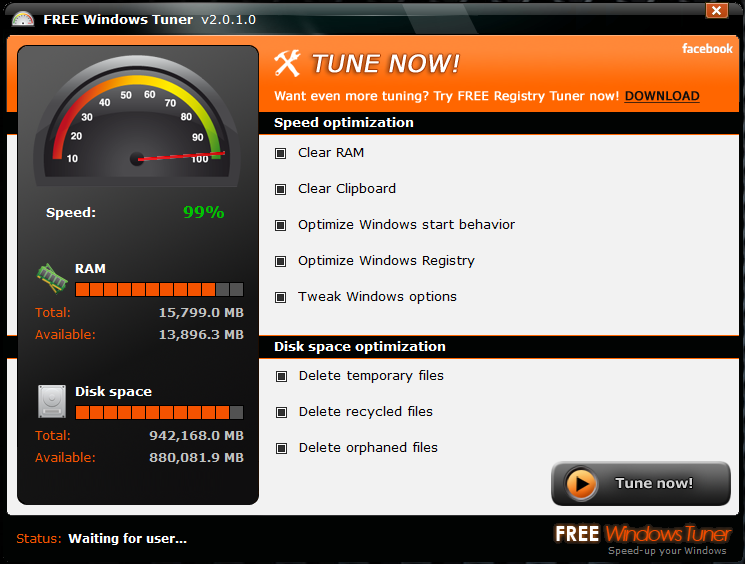
    3. Free Windows Tuner
    4. Uncleaner (freeware)

    All 4 are free but what it when you install Free Windows Tuner it tries to install some ads, I just setup a block on the app)
    That fixes those ads.

    So you install all 4x programs
    In your System Ninja twice on your system prior to that you uncheck off internet cookies
    In Slim Cleaner you need to go under Settings and save the cookies you want to keep on your PC the rest will get removed. Run Slim Cleaner on Auto Clean and also run Defrag under Disk Tools. First run do a full and after that a quick.

    Free Windows Tuner will disable the bootup animation in Windows 7/8 really don't need that slowing and using more memory so that can be disabled. The software does this for you. If you want it back just open up msconfig and remove any checks for boot options.

    Free one also frees up page file blocks on your system thus give you more memory free. Beside a Memory Optimizer it does some other things.
    Next I run Uncleaner this tool removes all the hidden junk on the system that other cleaners don't remove.

    Also run MSE from Microsoft for AV AS.
  20. JC713 TechSpot Guru Posts: 2,781   +205

    CCleander + Aslogics Defrag + Aslogics Registry Defrag = fast PC. No need for any other software. The registry defrag should be used rarely since the registry doesnt get fragmented often. So basically Defrag + CCleaner and you are good to go.