If you're an early adopter of solid-state drive technology, odds are you're interested in squeezing every last drop of performance out of your system otherwise you probably wouldn't have spent $300 on 80GB of storage (or considerably more than that a few months ago).
There's a wealth of information to be had about SSD tweaking and with a bit of research you'll find various adjustments for Windows that can help you make the most of your drive. The thing is, to fine tune Windows, you'll waste a lot of time navigating menus and that's where SSD Tweak Utility steps in.
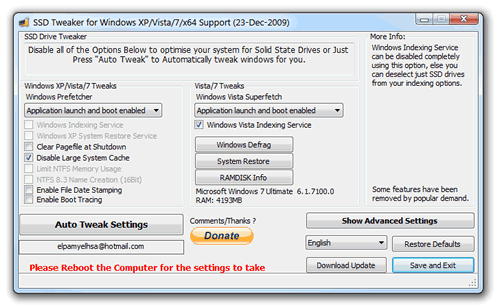
A user on the OCZ forums created a utility that gives you centralized access to all the popular SSD configuration points within Windows. The SSD Tweak Utility lets you fiddle with the following:
- Windows Indexing Service
- System Restore
- Windows Defrag
- Use Large System Cache
- Ntfs Memory Usage
- Disable 8.3 Filenames
- Disable Date Stamping
- Disable Boot Tracing
- Windows Prefetcher
- Windows Vista Superfetch
- Windows Services
The software is compatible with Windows 2000, XP, Vista, and 7 (both 32 and 64-bit). It's also worth mentioning that the program only makes adjustments to Windows at the OS level, so it should work with any SSD brand or model. I tested it using a second-gen Intel X25-M on Windows 7 Home Premium and Ultimate x64 as well as Windows XP x86 without a problem.
The SSD Tweak Utility recommends which settings to disable for optimal SSD performance, and if you're a little unsure there is an auto-tweak feature that offers a brief walkthrough. This should come as a great addition to a tip we ran in December about reclaiming storage space with a few simple steps within Windows.
Are you running a SSD on your desktop or laptop now? What brand and model did you choose, and how do you like it against your old standard HDD? Share your comments here.
Previous Tech Tips
- Effortless Ways to Download Video Content from YouTube and Other Sites
- Use a Browser Sandbox for Cross-Browser Testing
- Enable Windows 7's Hidden "God Mode"
- Reclaim Some Storage Space with a Few Simple Tweaks
- Prevent Windows Update From Automatically Restarting Your PC
- How to Bring a Lost Window Back to your Desktop
- How to Change the Logon Screen on Windows 7