also @ TechSpot: Rumor: AMD "Piledriver" FX CPU production to begin Q3 2012

Windows 7 updates AutoRun behavior to prevent further malware propagation

By

On April 30, 2009, 6:59 AM EST

If you have used any computer running Windows within the past 14 years (and who hasn't?), you are probably well aware of the AutoRun feature. Introduced along with Windows 95, AutoRun is a default feature present in every Windows desktop system. The simple concept, putting media in and having the computer automatically run a program on said media has changed little from when it was first introduced. It did eventually morph into two separate features, AutoRun and AutoPlay. The latter was intended to differentiate between content found on a CD, DVD or other removable media, and prompt you with a default action to choose from. What started as a good idea did eventually bring Microsoft a lot of slack, with people blaming infected computers and numerous other issues on this stock feature.
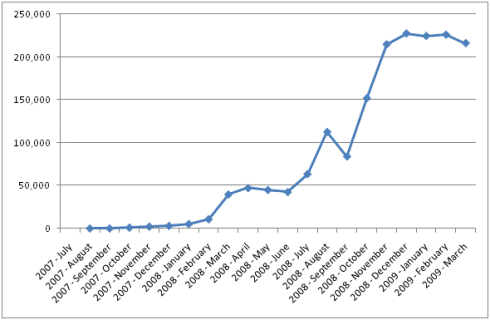

Infection Detections of Malware that Spread via AutoRun

Microsoft has admitted that malicious software are using AutoRun as a vector for infection, and thus newer versions of Windows (starting with 7) will not feature it for all removable media. Detachable hard drives, USB/thumb drives, rewritable CDs and DVDs and other “generic” mass storage devices will no longer use AutoRun by default. The idea is to reduce the chance of a machine getting infected by plugging in media you aren't sure of.

The commonly known AutoRun feature will be retained for read-only optical media, such as CDs and DVDs, claiming that those are seldom used as a transmission medium for malware or viruses. This may seem like a minor change, but it does represent a fundamental change in the way Microsoft developers are seeing security threats.

No tags on this story

User Comments (5)

Post a comment
Badfinger
on April 30, 2009
9:08 AM
Offer up a quickie kill the feature tool for the non-geeks of current Windows, too?I hate auto-run, always have, get rid of it . even for DVD and CD's. Whose that incompetent that it's needed?

Reply

czplayer
on April 30, 2009
9:11 AM
[b]Originally posted by Badfinger:[/b][quote]Offer up a quickie kill the feature tool for the non-geeks of current Windows, too?I hate auto-run, always have, get rid of it . even for DVD and CD's. Whose that incompetent that it's needed?[/quote]Children.

Reply

FOXBAT2000
on April 30, 2009
9:43 AM
can anyone tell me how to enable or disable in xp what ms has done for windows 7the easy way through the icons in my computer dont workthanks dougbut i think its a great idea

Reply

PanicX
on April 30, 2009
12:53 PM
[b]Originally posted by FOXBAT2000:[/b][quote]can anyone tell me how to enable or disable in xp what ms has done for windows 7the easy way through the icons in my computer dont workthanks dougbut i think its a great idea[/quote]Try this.[url]http://www.annoyances.org/exec/show/article03-018[
url]

Reply

Browse more commented news

Post a new comment

Guest user

To post as an anonymous
user click here
.

Members

If you are a TechSpot member,
please login first.


By signing up you gain complete access to the TechSpot community. Join thousands of computer and technology enthusiasts that contribute and share knowledge in our forum. Post messages, get a private inbox, upload your own photo gallery and more.

Subscribe to TechSpot

Get free exclusive content, learn about new features and tech breaking news.