Home › News › Download of the Week
Download of the Week: PC Decrapifier
If you’ve ever spent hours cleaning up your (or probably your friends and family’s) newly bought computer to get it up and running in tip-top shape, then the aptly named PC Decrapifier might be of some help. This 1.3MB, no-installation utility is designed to clean off, in an unattended fashion, most of the annoying software that is typically shipped with new PCs. Simply download and run the file, after which you will be guided through the process with a "wizard" style series of questions. Just pick and choose what you want to remove and PC Decrapifier will handle the rest.
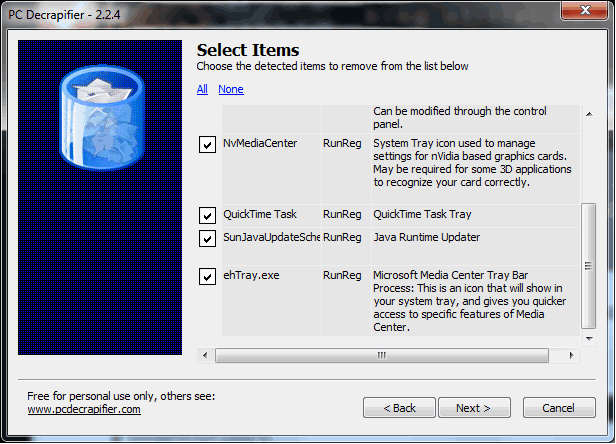
You can find a list of programs that PC Decrapifier removes on the developer’s website. A little word of advice, if there's a program you don't think you want but don't quite recognize, be sure to do a quick Google search before wiping it off so you don’t end up with a non-functioning Blu-ray drive or any random error messages. PC Decrapifier works with XP, Vista and Windows 7 systems, is free for personal use and can be downloaded here.
User Comments (73)
Post a comment|
mpribe
on October 29, 2010 1:46 PM |
Just what I've been looking for! Excellent. |
|
lawfer
on October 29, 2010 1:52 PM |
This is a great tool. This is like CCleaner's illegitimate son. I wished I had this when I bought my laptop 5 months ago, it would have made things much more easier. Lucky for me, I'm a techie, but I know if my girlfriend had bought my laptop (or any for that matter), she would still have all the bloatware and crappy toolbars that come pre-installed. Not to mention the horrendous McAfee. |
|
tacobfm
on October 29, 2010 1:52 PM |
LOL this is amazing. I have to admit they do put crapware on new computers |
|
Jibberish18
on October 29, 2010 1:54 PM |
Now this might be useful. I mean, I have no problem removing all of the crap myself but something that can do it automatically? Couple this with CCleaner and Auslogics Disk Defrag and you have win. |
|
drasho
on October 29, 2010 1:58 PM |
This will be usefull next time one of my friends buy a laptop.. gonna save me some time =P. And i love the name ahah |
|
highlander84
on October 29, 2010 2:07 PM |
yeah I wish I had been paid for all the time i spend takeing crap off computers... man this will be a god send! |
|
Jibberish18
on October 29, 2010 2:09 PM |
highlander84 said: yeah I wish I had been paid for all the time i spend takeing crap off computers... man this will be a god send! But you have to admit, removing all that crapware manually has some sort of satisfaction to it. If crapware had flesh, you'd be slicing it down with a big sword. There's something awfully chivalrous about that. |
|
Neojt
on October 29, 2010 2:43 PM |
LoL Love the name of the app!! could be pretty usefull for all the PC's that come trough my office to get ready for use |
|
LNCPapa
on October 29, 2010 2:43 PM |
This is great - I think I'll keep it on my thumb drive for whenever my friends/family ask me to look at their machines. I hope it actually does a good job of removing Norton. |
|
frodough
on October 29, 2010 3:03 PM |
i use CCleaner and Revo uninstaller both are on every machine i built, love them! |
|
sMILEY4ever
on October 29, 2010 3:05 PM |
I might actually use this on some pc's even though it's not really that impressive. |
|
customcarvin
on October 29, 2010 3:21 PM |
HAHA is like a colonoscopy / colon cleansing for your pc. |
|
PanicX
on October 29, 2010 3:27 PM |
Oh man, it hurts so bad to see that demo photo with NIS and Live update unchecked. why? WHY?! |
|
Serag
on October 29, 2010 3:33 PM |
haha the name is a win, great tool to add on my friend/family help usb stick. |
|
Kibaruk
on October 29, 2010 4:30 PM |
NIS is a pain, and it comes with every software nowadays... I totally hate it. Seems like a nice tool, I just go and uninstall one by one so I dont mess anything up or erase a program I actually use without knowing. |
|
ChrisG683
on October 29, 2010 4:34 PM |
Oh the joys of building your own computer, don't have to deal with that But man I could have really used this when I used to buy my computers from Dell! |
|
thedrelle
on October 29, 2010 4:39 PM |
Atch, where were you when i bought my laptop 2 months ago? I spent hours cleaning that crap off. |
|
kevin1212
on October 29, 2010 4:39 PM |
Nice little piece of software. I love techspot for pointing out these usefull apps. |
|
motrin
on October 29, 2010 4:53 PM |
when i bot my notebook.. i spent 10 mins booting it up and another 40 removing all that crapware. i'm bookmarking this for future use! |
|
peteyhawkins
on October 29, 2010 5:56 PM |
Everytime ive ever bought a laptop i've just reinstalled windows from the get go! this tool would have saved soo much time! Im on a mac now though, so i dont get any of that crap |
|
Se7enVII
on October 29, 2010 5:59 PM |
This should be very useful for when I'm working on peoples computers. I always delete all the crapware right when I get onto peoples computers (with their permission of course) but never thought to look for a program that does specifically that. |
|
n00bzZy
on October 29, 2010 6:08 PM |
Sounds useful, will surely use on this on my next laptop purchase. And relatives' comps |
|
AllEyezOnMe
on October 29, 2010 6:14 PM |
PC ethic cleansing all-in-1 |
|
rizalp
on October 29, 2010 6:27 PM |
I haven't using this tool yet. But i'll keep it in mind. Usually, when i bought new PC, i just uninstall the cra[ware. |
|
maestromasada
on October 29, 2010 7:23 PM |
doesn't appwiz.cpl does the same job? it sounds good though to have a proper crap killer at hand |
Most Popular
| Trending | Featured |
-
iOS 5.1.1 untethered jailbreak tool released, supports 4S, iPad 3
-
After five days, Facebook ranks as worst IPO flop of the decade
-
Rumor: Windows 8 RC will launch June 1, will ship with Adobe Flash
-
Rumor: AMD "Piledriver" FX CPU production to begin Q3 2012
-
Is Apple's USB wall adapter really worth $29?
Editors' Keyboard Picks
Subscribe to TechSpot
Get free exclusive content, learn about new features and tech breaking news.