also @ TechSpot: Onion Pi transforms Raspberry Pi into anonymous Wi-Fi hotspot

Download of the Week: PC Decrapifier

By

On October 29, 2010, 1:40 PM

For years, computer makers have managed to pull in a few extra bucks of profit out of each sale by bundling all sorts of third-party software with their machines. Commonly referred to as bloatware or crapware, these programs include everything from 30-day anti-virus trials, to needlessly complicated media applications and the always-annoying browser toolbar. At the end of the day it doesn’t matter if it’s a bad product or not, you simply didn’t ask for it and yet it’s there using up space, making your system to boot slower than it should or simply getting in the way.

If you’ve ever spent hours cleaning up your (or probably your friends and family’s) newly bought computer to get it up and running in tip-top shape, then the aptly named PC Decrapifier might be of some help. This 1.3MB, no-installation utility is designed to clean off, in an unattended fashion, most of the annoying software that is typically shipped with new PCs. Simply download and run the file, after which you will be guided through the process with a "wizard" style series of questions. Just pick and choose what you want to remove and PC Decrapifier will handle the rest.
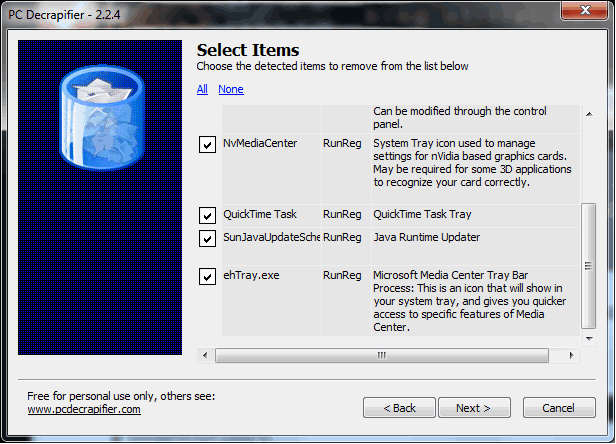

You can find a list of programs that PC Decrapifier removes on the developer’s website. A little word of advice, if there's a program you don't think you want but don't quite recognize, be sure to do a quick Google search before wiping it off so you don’t end up with a non-functioning Blu-ray drive or any random error messages. PC Decrapifier works with XP, Vista and Windows 7 systems, is free for personal use and can be downloaded here.

,

User Comments: 73

Got something to say? Post a comment
  1. This will save tons of time and could be a great app for anyone. I work on computers all the time and i hate i repeat hate the crap most people put on there computer.

  2. Just one question, does it clean/remove the associated registry entries too?

  3. I think I'll add this to my flashdrive with my other pc utilities. Virus scans, office, boot stuff, and this for sure now.

  4. Just got it for when family members decide to go and buy a new PC that comes with the amazing Free MS office trial and the godlike norton antivirus protection center.

  5. Jibberish18 said:

    highlander84 said:

    yeah I wish I had been paid for all the time i spend takeing crap off computers... man this will be a god send!

    But you have to admit, removing all that crapware manually has some sort of satisfaction to it. If crapware had flesh, you'd be slicing it down with a big sword. There's something awfully chivalrous about that.

    That's so true. I recently acquired a laptop that had a destroyed hard drive. Popped a new one in with a fresh install on Windows 7 and I was amazed at how clean and simple it was. I almost didn't like it.

    But the name of the program is awesome!

  6. i love the neologism decrapifier. its so apt for all the crap and bloatware u get on dell and hp and what have you.

  7. It looks interesting. I will definitely give it a try this weekend. Thanks!

  8. Where has this been all my computer-oriented life! Someone said earlier that this is very handy when working on other people's computers, most likely due to the fact that they are unaware of what they have in their little chip boxes.

  9. Great download this one focuses on cleaning those files which other cleaners fail to clean.

  10. My bootleg copy of windows didn't have any bloatware. It's nice.

  11. Jibberish18 said:

    highlander84 said:

    yeah I wish I had been paid for all the time i spend taking crap off computers... man this will be a god send!

    But you have to admit, removing all that crapware manually has some sort of satisfaction to it. If crapware had flesh, you'd be slicing it down with a big sword. There's something awfully chivalrous about that.

    i don't find satisfaction in it, it's 2 or 3 hours out of my day removing all the crap from a brand new machine and setting it up to how it should be, that's 2 - 3 hrs that i could have spent doing something more productive or spending quality time with my nephew and family. it shouldn't be necessary on a brand new machine.

    I don't know about you, but i'm tired of walkin into stores to buy a new laptop to find the prices hiked up because they come with an operating system pre-installed & the store won't sell you it minus the o/s. i have about 12 OEM recovery discs with windows vista or windows 7, i don't want them, i don't use them, but i am forced to buy them with the machine.

    I use Linux, my 12yr old nephew uses linux, in fact my whole family is pretty much using linux (yes i'm responsible for that). why can't we just buy a laptop at reduced priced with NO o/s installed if that's what we want? instead of the stores telling us what we want!

  12. Wow! This should help me clean up my Aunt's PC! I will try the PC Decrapifier 2.2.5 soon!

  13. The list on their website isn't all that long tbh.

    But if it removes all that Roxio stuff its well worth it. Had a ton of Roxio stuff preinstalled on a laptop once and it took me like 2 hours to get rid of all the programs and processes...

  14. i laughed at the software name. ima download it right now, idk why manufacturers pre install so much unwanted applications and toolbars, thinking it would add to the machine's functionality. had to figure out how to take off these stuff without deleting essential drivers and files. at times its hard to recognize whether these programs are important or not. good tool. ima test it out and let you guys know how it goes

  15. i laughed at the software name. ima download it right now, idk why manufacturers pre install so much unwanted applications and toolbars, thinking it would add to the machine's functionality. had to figure out how to take off these stuff without deleting essential drivers and files. at times its hard to recognize whether these programs are important or not. good tool. ima test it out and let you guys know how it goes

  16. epic name for epic software... gonna try soon

  17. I didn't even know a program like this existed, but I have dreamed of one. I wish I had this a dew weeks ago when I set up my mother's newly bought laptop, would have saved me a lot of time.

  18. wow its a great tools for me and for my daily works. I badly need sucha tools.

  19. I'll have to use this on my father in law's computer.

  20. Just checked it out. I'll have to remember it for new pre-built computers and all their crapware.

  21. Lol, nothing to remove on a XP installed 5 years ago. Anyway I'll further test this app on a brand new laptop to see if it finds anything (it came with Vista pre-installed and I presume it has many unnecessary programs).

  22. This is a very useful tool. The amount of crap they put on new computers is so annoying. It is the first this I remove when I am on a new pc. This tool makes it so much easier.

  23. In my experience, the more use of third-party software the more crapy your PC becomes. Afterall, I think I will try this one and see how good decrapifier it is

  24. After you've rid yourself from the crapware they want to burden your PC with, you can optionally jump to ninite.com to pick the necessary (mostly freeware) software you do want.

    Brilliant after a fresh windows install.

    (I am not in any way affiliated with, nor do I receive any monentary or other gains from ninite)

  25. Reinstalling Windows yourself! for the win! :P

Recently commented stories

Add New Comment

TechSpot Members
Login or sign up for free,
it takes about 30 seconds.
You may also...
Get complete access to the TechSpot community. Join thousands of technology enthusiasts that contribute and share knowledge in our forum. Get a private inbox, upload your own photo gallery and more.
TechSpot on:

Subscribe to TechSpot

Get free exclusive content, learn about new features and breaking tech news.