also @ TechSpot: Xbox One: Entertainment Hub First, Gaming Console Second -- But Could It Disrupt TV?

Download of the Week: PC Decrapifier

By

On October 29, 2010, 1:40 PM

For years, computer makers have managed to pull in a few extra bucks of profit out of each sale by bundling all sorts of third-party software with their machines. Commonly referred to as bloatware or crapware, these programs include everything from 30-day anti-virus trials, to needlessly complicated media applications and the always-annoying browser toolbar. At the end of the day it doesn’t matter if it’s a bad product or not, you simply didn’t ask for it and yet it’s there using up space, making your system to boot slower than it should or simply getting in the way.

If you’ve ever spent hours cleaning up your (or probably your friends and family’s) newly bought computer to get it up and running in tip-top shape, then the aptly named PC Decrapifier might be of some help. This 1.3MB, no-installation utility is designed to clean off, in an unattended fashion, most of the annoying software that is typically shipped with new PCs. Simply download and run the file, after which you will be guided through the process with a "wizard" style series of questions. Just pick and choose what you want to remove and PC Decrapifier will handle the rest.
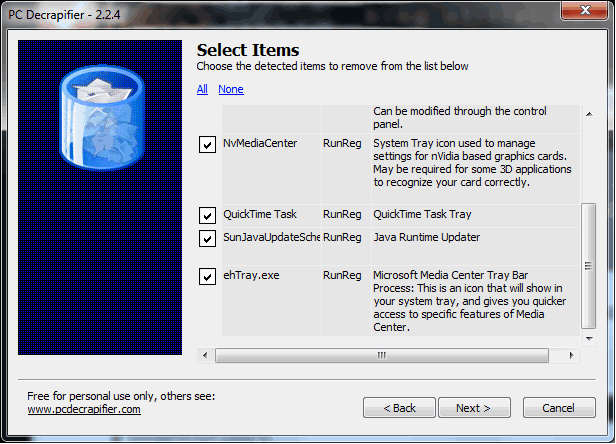

You can find a list of programs that PC Decrapifier removes on the developer’s website. A little word of advice, if there's a program you don't think you want but don't quite recognize, be sure to do a quick Google search before wiping it off so you don’t end up with a non-functioning Blu-ray drive or any random error messages. PC Decrapifier works with XP, Vista and Windows 7 systems, is free for personal use and can be downloaded here.

,

User Comments: 73

Got something to say? Post a comment
  1. I already use CCleaner with a little extra plug-in. For the rest I make sure that no unwanted crap gets installed with any bundled software packages by choosing custom installs.

  2. I know many people that could benefit from such a program, but the part about them using google to find something could pose a problem, as some people may not be as adept at finding what they need or being able to understand the answers found. just my thoughts on this

  3. Good idea, but there are sure to be some overzealous users who cripple themselves and complain about it.

    Always to research before you get rid of something you cannot identify.

  4. So it's a Noobified version of the Add and Remove programs interface? Oh wait, it might even add some features from good ol' MSCONFIG ... Lucky it's free :P

  5. I was thinking this would be useless for me since I rarely get tricked into crapware...however. I have lots of customers and friends who have crapware galore on their pc's. This could definitely come in handy. Thanks!

  6. i downloaded this but haven't had a use for it at all tried it on my computer and it said there was nothing to remove.

  7. this is awesome, i hate the Mcafee trial.

  8. ChrisG683 said:

    Oh the joys of building your own computer, don't have to deal with that

    But man I could have really used this when I used to buy my computers from Dell!

    My thoughts exactly. I always build my own PCs because I pick the parts individually. Plus, you never know where the manufacturer of your branded PC cut corners in choosing the hardware components just to meet some arbitrary price level and to squeeze out a few extra bucks on your unit.

  9. lawfer said:

    This is a great tool. This is like CCleaner's illegitimate son.

    So true, and long overdue.

    I work for a local computer business and part of my job is to clean off said bloatware from new computers before it's delivered. If this thing kills McAfee and Norton, it just made my day <3

  10. love every bit of it! What an amazing app, and now I can say 'go to h***' to those crappy ware!

  11. Lol the name says it all.

  12. m0nty said:

    i don't find satisfaction in it, it's 2 or 3 hours out of my day removing all the crap from a brand new machine and setting it up to how it should be, that's 2 - 3 hrs that i could have spent doing something more productive or spending quality time with my nephew and family. it shouldn't be necessary on a brand new machine.

    I don't know about you, but i'm tired of walkin into stores to buy a new laptop to find the prices hiked up because they come with an operating system pre-installed & the store won't sell you it minus the o/s. i have about 12 OEM recovery discs with windows vista or windows 7, i don't want them, i don't use them, but i am forced to buy them with the machine.

    I use Linux, my 12yr old nephew uses linux, in fact my whole family is pretty much using linux (yes i'm responsible for that). why can't we just buy a laptop at reduced priced with NO o/s installed if that's what we want? instead of the stores telling us what we want!

    If only that were true. It would be nice to kill a couple hundred bucks of the price of a laptop just because you either want Linux or have access to Microsoft Technet. Hopefully someday that will change but I doubt it. All these pre-packaged software is money for someone.

  13. This is awesome. I can't count the number of times I've had to do this the long way. I'm glad someone finally got around to making an automated solution.

  14. Wait so everything that it removes is useless and wont have ANY side-effects later....

  15. This app gives me warm fuzzy feelings. I hate cleaning new PC for relatives/friends. Hopefully this should make it a breeze .

  16. I have been using this for several years now. Very good program, highly recommended.

  17. fpsgamerJR62 said:

    ChrisG683 said:

    Oh the joys of building your own computer, don't have to deal with that

    But man I could have really used this when I used to buy my computers from Dell!

    My thoughts exactly. I always build my own PCs because I pick the parts individually. Plus, you never know where the manufacturer of your branded PC cut corners in choosing the hardware components just to meet some arbitrary price level and to squeeze out a few extra bucks on your unit.

    if u know how to buy computers, its better to have a pre-built computer and then upgrade it. i just recently bought one for $1000.

    5870, i7-860, 6gb tri-channel ddr3, liquid cooling, x58 motherboard, 1TB Sata hard drive, Windows 7 home premium, 5000 dpi mouse, large case. i think it's as cheap, if not cheaper than building a computer from scratch.

  18. I dig the name. Hopefully, it can play the game it says it can.

  19. Interesting name. Now if I could find something that would explain why my laptop does not shutdown properly... As it is, I'm left with a green screen and a mouse pointer -- no icons or options and CTR-ALT-DEL has no effect.

  20. This looks like a great tool! I recently got a new laptop, which of course came with tons of junk pre-installed. I tried to remove most of it by hand, but I will have to try this out to see if there was anything I missed. Thanks Techspot for the good find!

  21. After using it myself, this software is pretty crappy in my opinion... It just has a million pop ups of remove softwares and then freezes if you accidentally minimize a uninstaller... I'd give it a 6/10 on a rating of 10 being perfect, 1 being sh*t. It removed some of the ones I chose, but then froze as I said after being barraged by a bunch of pop ups. It felt like I was under attack by a virus...

  22. I downloaded it just for it's name but it seems useful!

  23. I used this one when i got my laptop and it really do what it suppose to do. Its must use utility for every new laptop / desktop buyer.

Recently commented stories

Post a new comment

Social Login & Guest Posting TechSpot Members
Login here or sign up for free,
it takes about a minute.
Get complete access to the TechSpot community. Join thousands of technology enthusiasts that contribute and share knowledge in our forum. Get a private inbox, upload your own photo gallery and more.
TechSpot on:

Subscribe to TechSpot

Get free exclusive content, learn about new features and breaking tech news.