Read on full site | Join TechSpot! (it's free) | Bookmark / Share this


Problem: Username and password when trying to connect to other computer

ryan29121
10-06-2009, 08:01 PM
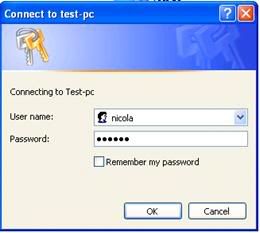
Hello I have a networking problem. Whenever I try and connect to my other computer I get a username and password prompt such as the one posted below this message. The computer I am trying to connect to has Windows 7 installed and this computer has windows xp. I had this same problem when there was vista installed instead of windows 7. Everything in sharing center is marked as shared, firewalls turned off, and I am connecting wired through my router. My windows 7 computer can connect to my laptop but not the other way around. Does anyone know of a solution to this problem? Thanks in advance for your help regarding this issue.
http://i9.photobucket.com/albums/a79/ryan7066/username-password-file-sharing.jpg

LookinAround
10-06-2009, 08:24 PM
Start by assuring the account info (both Userid and password!) are identical for users on both machines. Specificaly check user accounts for: Guest and Nicola (redefine their passwords to assure identical)

Ad
10-06-2009, 08:24 PM
  

ryan29121
10-06-2009, 09:28 PM
I have no password set up for windows 7 so I dont think that could be it. Also guest account I believe should be disabled by default, in which I do not have active. Any other suggestions?

LookinAround
10-06-2009, 10:04 PM
I have no password set up for windows 7<snip>

Do you have "no password" set up for the same userid on the other computer?? If the userid/passwords mismatch on the two computers it can be a problem

Also disabling Guest only means you can;'t use Guest for local logon. Windows will still use Guest account for remote logons to a computer which set for Simple File Sharing.

/* Edit */
Note windows uses the userid/password of the client computer to try and remote logon to remote computer

ryan29121
10-06-2009, 10:15 PM
both my laptop and win 7 computer have no password set up. Windows just auto logs in when i start the computer up. I dont know why its asking for a password. DO i have to set one up to get around this?

LookinAround
10-06-2009, 11:09 PM
Let me give you the easy answer first (then we can discuss why Windows does this and how to change it if need be)

Assign the same userid the same (non-blank) identical password on both computers. Does that fix the problem?

/* edit */
And, btw, when you get the prompt, are you successful at manually logging when it prompts for remote logon userid/password

ryan29121
10-07-2009, 11:01 AM
setting up a password for win 7 worked. I just wish I didnt have to type in a password every time I started the computer up. Thanks for the help by the way.

LookinAround
10-07-2009, 01:28 PM
Click here for how to autologon to Win7 when you boot up (http://www.windowsreference.com/windows-server-2008/how-to-enable-autologon-in-windows-7-windows-server-2008/)

It may be possible to remove the password requirement altogether (will post back sometime later with info and the windows config options) but for now you might just do the autologon on boot

LookinAround
10-07-2009, 11:23 PM
So here's some info....

First, terminology:
Windows remote network access works in a client/server model

The "client" is the computer you log into locally
The "server" is the remote computer you are trying to access

Also, Windows supports two different file sharing models

Simple File Sharing (SFS) and
Non-Simple File Sharing (Non-SFS)


The file sharing mode on the server controls the method of Windows remote logon
> If the server is configured to SFS, then Windows remote logon requires valid Guest account logon
> If the server is configured to non-SFS, the Windows remote logon requires a valid user account logon

By definition, XP Home edition ONLY supports SFS. It can not be configured non-SFS
You can check the other Windows versions by opening Explorer in XP. File/Folder options for Vista and (i think) Windows 7.
> Click the View tab
> Scroll through the options toward the end and look for Use Simple File Sharing
===> If the option isn't there, Windows is running SFS
===> If the option IS there, you can configure for SFS or non-SFS (is up to you)

Make any sense so far? Check for SFS or non-SFS on each of your computers and get back to me. This option lets you change the account logon requirement.

Also on each computer try clicking Start->Run, enter gpedit.msc. This is the group policy editor. It isn;'t available for XP Home. Check for your other Windows versions. If the group policy editor exists, it will let you change whether a blank password is allowed or not for remote logon to the server

/* edit */
You might find it simplest/easiest to run SFS on all your computers. It sounds like your Windows 7 machine is configured to non-SFS since Windows is prompting for remote log on with a user account (not Guest account)
Post a reply, see related topics & more

Tip: Download Advanced SystemCare 3 Free - Clean, Repair, Protect & Optimize your PC.


 Top Technology News

TechSpot Blog: Disable Windows automatic check for solutions after a program crashes

Tech Tip of the Week: Unearth Region-Specific Windows 7 Themes

Samsung intros 2TB, eSATA-packing Story Station Plus external HDD

Gartner: PC shipments to grow 2.8% in 2009, revenue down 11%

Microsoft issues warning for IE6, IE7 security hole

LG X120 netbook to launch in the US for $180 with two-year AT&T contract

Intel's six-core Gulftown processor benchmarked months early

Another iPhone worm spotted, this time it's dangerous

More Tech News

  
 Software Downloads

FlashGot 1.2.0.9

RemoveIT Pro XT - SE 23.11.2009

Vuze (Formerly Azureus) 4.3.0.4

RemoveIT Pro v7 Enterprise 23.11.2009

Aloaha PDF Suite 3.9.172

Blindwrite Suite 6.3.1.5

RemoveIT Pro v7 Ultra 23.11.2009

More Downloads


Copyright © 1998-2009 TechSpot.com. TechSpot is a registered trademark. All Rights Reserved.