voudas
02-19-2008, 06:53 AM
worked here as well... gigabyte WI01GS on a Toshiba SA30-213...
u saved my day... :D
Read with Formatting |
Join TechSpot! (it's free)
Toshiba Satellite 1135-S1552 WiFi Networking Problem
|
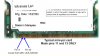
voudas 02-19-2008, 06:53 AM worked here as well... gigabyte WI01GS on a Toshiba SA30-213... u saved my day... :D jobeard 02-20-2008, 11:16 AM Toshiba Satellite 1135-S1552. on my Satellite the Fn + F2 switch accesses the Battery Mode. hum; my mx35-s161 says that fn+f2 IS BATTERY options and fn+f8 is wireless :) Ad 02-20-2008, 11:16 AM toxxic 04-16-2008, 08:10 PM I have Toshiba Satellite A30-514 and I bought a Intel 2200BG Chipset mini-PCI WLAN card from ebay. Everything was installed fine except I was getting the same no signal so I googled and read this thread on the forum and its amazing what a bit of sellotape can do. How you do it is you put some sellotape on pins 11 and 13. As sellotape normally doesn't come that small what you do is put the wide sellotape covering many pins then just use a cutter (not scissors) to cut around the 2 pins. Then just peel the sellotape covering the other pins and voila. BTW, the pins 11 and 13 are on the top of the card (where you put the antenna wires on) and you count them like this. The key the the cut between the pins, so the 11th and the 13th pin would be the 6th and 7th (or 5th and 6th if you count after the key). 1 Key 3 5 7 9 11 13 2 Key 4 6 8 10 12 14 A more accurate description can be found on this web page about which pin to cover but note that this webpage only tells you to cover pin 13 but you need to cover pins 11 and 13 with the Intel 2200BG Chipset. madwifi.org/wiki/UserDocs/MiniPCI Also Note on the 2 Antenna Wires and the LED light on the side for WLAN: I also wondered which wire goes in which socket but then I noticed that the white wire is a bit shorter than the brown/black wire. So what I did was connected the white wire to the little socket labelled "main" and the black/brown wire to the socket names "aux" (which was further away so I used longer wire). It works with those so I'm guessing I chose the right ones. As for the LED on the left side of the laptop, I have updated to the latest bios and still it doesn't seem to light up although wireless is working absolutely fine and I get full signal. vveggetta 04-22-2008, 02:04 PM Hi there! I tried the 11-13 selotaping procedure with the Intel 2200 BG wireless card in my Toshiba A30-303, and it worked! However, now I have 2 problems: 1. Battery - The full charge is now drained in less than 30 minutes (previously I had more than 1 hour) 2. Speed - I can only get 11 mbps, instead of the expected 54 mbps Anyone with the same problems? Can I solve this? Thank you all! |
|