Read on full site | Join TechSpot! (it's free) | Bookmark / Share this


Error Caused by a device driver in win xp sp2

Pages : [1] 2

Otmakus
08-18-2005, 05:09 AM
-win xp pro sp2
-mobo gigabyte GA-7N400SL (onboard LAN and sound)
-athlon XP 2000+ with stock fan and heatsink
-2 x 512MB RAM corsair value
-pixelview GF4 MX 4000 with 7189 driver (no the 6177 driver doesn't support my video card)
-seagate 80Gigs IDE 7200
-SB5100 motorola cable modem (works well with my other machine)
-PS2 keyboard and mouse
-400W PSU
-diskette drive
-Liteon CDRW
-LG DVD Rom

I got the same problems since about 2 months ago, my machine crashed after i used it to play games (all range of games, from call of duty, battle of middle earth, to ragnarok online, which shouldn't take too much resources), usually in about an hour or so into the game (but sometimes as early as 5 minutes into the game), sometimes the game just showed me an error message and went back to windows, sometimes the machine just went blank and restarted, and then after the reboot, there is an error message "ur machine has recovered from a serious error" and after i submitted the error to microsoft, there was the "error caused by a device driver". i've searched extensively in microsoft's website and followed their instruction, trying drivers from the oldest to the latest, to no avail.

I've tried to reformat windows a few times now, the last time i only installed the drivers from the mobo's cd and nvidia driver right after i installed windows, and then play some games, and the same error happened.
I've replaced my PSU, tried to use a single stick of RAM, a single stick of borrowed Kingston RAM, and the same error still happened, so i'm pretty sure it's not my RAM or PSU.

I first thought it may be because of overheating (my CPU temperature reached 62 Celcius in the heat of the game), but after i opened the casing and placed a room fan right in front of it, the same error still happened although the temperature was 56 Celcius (my other AMD machine worked fine at 58 - 59 Celcius)

I've turned off the auto restart but haven't got the BSOD yet, and i haven't run memtest because i can't find a diskette (can i run memtest from a CD? and how?). I've also dl a hard drive utility from seagate but haven't run it because i don't have a diskette. This problem is really getting into my nerve so any help is deeply appreciated.

In event viewer, with every crash there is an error saying :
Event Type: Error
Event Source: System Error
Event Category: (102)
Event ID: 1003
Date: 8/18/2005
Time: 2:02:41 AM
User: N/A
Computer: BIGZ
Description:
Error code 10000050, parameter1 87603858, parameter2 00000000, parameter3 805644ba, parameter4 00000000.

For more information, see Help and Support Center at http://go.microsoft.com/fwlink/events.asp.
Data:
0000: 53 79 73 74 65 6d 20 45 System E
0008: 72 72 6f 72 20 20 45 72 rror Er
0010: 72 6f 72 20 63 6f 64 65 ror code
0018: 20 31 30 30 30 30 30 35 1000005
0020: 30 20 20 50 61 72 61 6d 0 Param
0028: 65 74 65 72 73 20 38 37 eters 87
0030: 36 30 33 38 35 38 2c 20 603858,
0038: 30 30 30 30 30 30 30 30 00000000
0040: 2c 20 38 30 35 36 34 34 , 805644
0048: 62 61 2c 20 30 30 30 30 ba, 0000
0050: 30 30 30 30 0000

But i noticed with every crash, the error code and the parameter can be different, the other error is:
Event Type: Error
Event Source: System Error
Event Category: (102)
Event ID: 1003
Date: 8/17/2005
Time: 5:44:43 PM
User: N/A
Computer: BIGZ
Description:
Error code 1000000a, parameter1 6f9373d0, parameter2 0000001c, parameter3 00000001, parameter4 806ecaa0.

For more information, see Help and Support Center at http://go.microsoft.com/fwlink/events.asp.
Data:
0000: 53 79 73 74 65 6d 20 45 System E
0008: 72 72 6f 72 20 20 45 72 rror Er
0010: 72 6f 72 20 63 6f 64 65 ror code
0018: 20 31 30 30 30 30 30 30 1000000
0020: 61 20 20 50 61 72 61 6d a Param
0028: 65 74 65 72 73 20 36 66 eters 6f
0030: 39 33 37 33 64 30 2c 20 9373d0,
0038: 30 30 30 30 30 30 31 63 0000001c
0040: 2c 20 30 30 30 30 30 30 , 000000
0048: 30 31 2c 20 38 30 36 65 01, 806e
0050: 63 61 61 30 caa0

oh, i forgot, i've also tried to swap my video card with another one from my other machine (pixelview GF4 MX 440, which works fine for years now), and the same problem still happened. this machine is about half a year old, but i only used it as internet server before and everything worked well, so i only noticed this problem from maybe 2 months ago after i started to use this machine for gaming.

i read somewhere that it may be caused by the sp2 incompatibility with some drivers, but i use windows xp cd with sp2 included, how do i uninstal sp2? or should i reformat my comp again and install windows xp sp1? and microsoft said that sp2 is "final" already...
cpc2004
08-18-2005, 10:55 AM
One of your minidumps crashes at hal!HalpAcquireSystemHardwareSpinLock+0x8 at IRQL 28. System crash at IRQL 28 (x'1c') and this is hardware problem. I have 12 confirmed cases which are related to hardware error at CPU (6), RAM (4) and M/B (2). 6 cases which has no response from the problem owner and I hope you are not one of them. My prelimary finding is faulty CPU. If you can provide more minidumps, I can confirm which hardware is faulty.

The debug report of one of your minidumps
BugCheck 1000000A, {6f9373d0, 1c, 1, 806ecaa0}
STACK_TEXT:
ed2b5d64 0044efcb badb0d00 00000000 f7d12d98 hal!HalpAcquireSystemHardwareSpinLock+0x8
WARNING: Frame IP not in any known module. Following frames may be wrong.
ed2b5ddc 804fa477 f7684b85 86077630 00000000 0x44efcb
ed2b5de0 f7684b84 86077630 00000000 0132027f nt!KiThreadStartup+0x16
ed2b5de4 86077630 00000000 0132027f 00000000 NDIS!___PchSym_+0xc
f7684b85 08458bec 3bf63356 840f57c6 00006fb1 0x86077630
f7684b89 3bf63356 840f57c6 00006fb1 54bff08b 0x8458bec
f7684b8d 840f57c6 00006fb1 54bff08b a5f76844 0x3bf63356
f7684b91 00000000 54bff08b a5f76844 ffa5a5a5 0x840f57c6

Ad
08-18-2005, 10:55 AM
  

Otmakus
08-18-2005, 03:02 PM
Thanks a ton for ur time and effort, it's a relief to know there is someone to ask for advise about this problem, since this problem is so frustrating (the vendor can't do anything about it, since i don't know what the problem really is, they just blamed the windows installation cd i used, although i've used 3 different cds to install windows)

Yes i suspect it's my CPU or my mobo too, since i've checked almost everything else and got nothing. I haven't got the time to play games or even doing anything with my comp today but as soon as i get another crash i'll post the minidump. Meanwhile i'm thinking of swapping my CPU with one from my other machine this weekend and see if that helps. I want to make sure what hardware is the culprit before buying a new processor or mobo, and whether that helps or not, i'll post the result.

Any other suggestions on what i should do?

Otmakus
08-23-2005, 01:09 PM
I don't know whether this has anything to do with the problem or not, but a few days ago, i found out that one of the M/B's capacitor touched the heatsink for the CPU. I called the M/B's distributor and they told me to try to bend it away from the heatsink, i tried to do it but i found out i couldn't because there just isn't space.

I called again and they said i had to replace the heatsink for a smaller one (I don't want to because my cpu temperature is currently 58 Celcius at idle and 62 at heavy gaming, i'm even thinking about buying a better -and bigger- heatsink+fan). So i placed a thick paper between the heatsink and the capacitor, and now, after a few days, the comp never restarts again. I wonder whether this has any connections at all...

cpc2004
08-23-2005, 01:33 PM
Overheat and bad PSU are also hardware problem. It is overheat issue and cause the hardware problem at mother board.

marczi
08-29-2005, 12:08 PM
Dear cpc2004,

I have a similar system error problem, my system crashed with the
following error:

"Event Type: Error
Event Source: System Error
Event Category: (102)
Event ID: 1003
Error code: 000000c2, 00000007, 00000cd4, 028e0002, 814e9b98.

For more information, see Help and Support Center at
http://go.microsoft.com/fwlink/events.asp

"

I think, this should be also a hardware problem. Could you help me to make sure which hardware is faulty? I also have the minidump files but could not interpret them. Thank you in advance!

cpc2004
08-30-2005, 12:44 PM
Hi Merczi,

Bugcheck code C2 is usually caused by bad RAM. Without the minidump I cannot confirm it is faulty RAM.

cpc

marczi
08-30-2005, 06:17 PM
Dear cpc2004,

Thank you for your reply. Here are the minidump and the log files (by Debugger Tools for Windows):

http://www.palacsinta.com/kopdat/minidump/

Yes, I also suspected my RAM, however, memtest86 (www.memtest.org) had not found any errors during its 1 day-long progress (maybe I should've ran it for a couple of days?)

By the way, what do you think, is it possible to decide accurately whether a system crash was caused by a hardware or software error? Or you can never be quite sure that a WinXP reinstall would have solved the problem? (Some people consider as natural and unavoidable that WinXP locks up sometimes)...

Best wishes,
Marczi.

cpc2004
09-02-2005, 01:58 PM
Hi Marczi,

I believe that it is faulty ram. Some faulty ram can pass memtest cos memtest is not a reliable tools. I've several cases with bugcheck C2 and the culprit is faulty ram. You can refer to the following opened case, Bowie's PC also get bugcheck code C2. He claims he will call microsoft to find out the culprit. You can ask him what is the feedback from microsoft.

http://www.techspot.com/vb/showthread.php?p=175578#post175578

cpc2004

cpc2004
09-02-2005, 02:06 PM
Hi Merczi,

The stack trace of your mindump crashes at nt!ExFreePoolWithTag and this is the symptom of bad ram

STACK_TEXT:
b46e9d20 8054b741 000000c2 00000007 00000cd4 nt!KeBugCheckEx+0x1b
b46e9d70 8054b0b9 814e9b98 00000000 b46e9ddc nt!ExFreePoolWithTag+0x2be
b46e9d80 f7704d4b 814e9b98 f770212d 814e9b98 nt!ExFreePool+0xf

BAD_POOL_CALLER (c2)
The current thread is making a bad pool request. Typically this is at a bad IRQL level or double freeing the same allocation, etc.
Arguments:
Arg1: 00000007, Attempt to free pool which was already freed
Arg2: 00000cd4, (reserved)
Arg3: 028e0002, Memory contents of the pool block
Arg4: 814e9b98, Address of the block of pool being deallocated

Ad
09-02-2005, 02:06 PM
  

Otmakus
09-06-2005, 11:19 AM
Hey, i've been busy lately and don't have time to tinker much with my comp, turned out the same error still came up from time to time, and i haven't got time to try to swap the processor. Last time i got the error, the blue screen came up and it said that file "kmixer.sys" is the culprit, now i don't know what's that file is, but i guess it's one of the sound card driver file, am i right?

here are some of the minidumps for the latest errors, and i very much appreciated all the help and advices, u guys rule.

cpc2004
09-06-2005, 12:14 PM
Otamkus,

The crash is not related to sound card driver and it is faulty ram.

Otmakus
09-06-2005, 03:40 PM
Hey CPC, thanks a lot for the advice. But are you sure it's faulty ram? I've tried to swap my memory modules (2 x 512MB corsair value, working in dual channel) with one 512MB memory modules from other computer, which is working fine for years, and the same error still happened. Can it be caused by a faulty M/B? That's pretty much the only thing i haven't tried to swap, because i will then have to reinstall windows again.

cpc2004
09-06-2005, 09:25 PM
Otmakus,

Your latest crash is related to faulty memory which include RAM, L2 cache of CPU, cache memory of M/B and memory of video card. Unless you use the hardware diagnostic tools from the hardware manufacturer. There has no reliable diagnostic tools to detect which hardware component is faulty. You can re-install windows for problem isolation.

Otmakus
09-06-2005, 11:31 PM
cpc,

What do u mean by "You can re-install windows for problem isolation"? Do u mean swapping the M/B, re-install windows and see if the error still comes up?

cpc2004
09-07-2005, 09:07 AM
If you re-install windows and BSOD still occurs, you can eliminate the crash is casued by software and it is hardware problem.

Sn0wd0g
09-07-2005, 04:48 PM
I have had the same issue with one laptop where I work. The Event ID is 1003 as all the others have posted. This has happened twice on the machine. It is a Dell Latitude C840 with a DIMM 512 MB. All the memory tests passed, but Dell claims that it is the mother board. They replaced it and the problem went away. The problem has re-surfaced. I removed the DIMM from slot a and placed it in DIMM slot B. The problem has dissappeared, so it may be that the DIMM slot is defective in my case.

Otmakus
09-11-2005, 09:43 PM
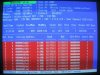
After yet one more crash, i ran memtest 86+ and left it running for one night, i attach the picture here. With more than 1 million errors after only 5 hours, no wonder i got all those crashes.

Is it safe to assume that i can narrow the suspects to M/B and RAM? Since my RAM modules have been tested on another machine and worked well, then is it safe to say that the M/B is the culprit? I also noticed that the errors always showed up at ffff ffff, what can be said about this?

I'm going to run to the shop and claim the warranty for my M/B. I'm going to be stranded without a PC for a while, but at least i can have some peace of mind after this.

Thanks a lot

PS: I've reinstalled Windows XP maybe 3 or 4 times because of this problem, so i'm pretty sure it's not caused by bad softwares, and the errors are varying widely, last time it said "driver irql not less or equal" and the faulty file is afd.sys, which is very different than the previous errors.

cpc2004
09-12-2005, 07:15 AM
Otmakus,

Your problem may be related to overheat. Are you sure your PC does not have overheat issue?

Otmakus
09-12-2005, 07:56 AM
Actually, yes, my comp has a heat issue. Like i posted previously, my CPU temp is 58 Celcius at idle and can rise to 62 at peak use. But at night, when the air con was on and the temp dropped to 54 or 55, the problem still came up.

I've tried running memtest using only 1 single memory module and it's allright, I'm currently trying to run memtest once more with 2 memory modules in dual channel, but I've already told the shop that i'll come tomorrow to claim the warranty for my M/B. It's still less than 1 year old so i expect a 1 on 1 replacement, and maybe i'll claim the warranty for the memory modules too, since i bought them at the same time with the M/B.

Oh, and i noticed in memtest that in DDR1, my memory ran at CAS 2.5, but in DDR3, it ran at CAS 2, in dual channel (DDR1 and DDR3), it ran at CAS 2.5. Does that mean anything? I can't find how to change the memory latency at BIOS, so I guess that's the default from the M/B.

CPC, why do u think my problem may be related to heat issue? I was told that my CPU's temp is quite high, but it's still acceptable for an AMD socket 462-based system. Do u think i need to buy a new heatsink + fan? My current heatsink is a stock, aluminum one, but my heatsink fan is quite good with 5000rpm (I don't know the brand tho). I don't want to spend $25 or so for a new heatsink and fan, but if that can solve the problem, i'll gladly buy one.

Thank u for the advice tho, as soon as i get the replacement M/B, i'll try it and post the result.

cpc2004
09-12-2005, 11:07 AM
Because one of your minidump crashed at hal and it is symptom of overheat. Your PC may have mutiple culprits: overheat and faulty ram.

IRQL_NOT_LESS_OR_EQUAL (a)
An attempt was made to access a pageable (or completely invalid) address at an
interrupt request level (IRQL) that is too high. This is usually
caused by drivers using improper addresses.
If a kernel debugger is available get the stack backtrace.
Arguments:
Arg1: 6f9373d0, memory referenced
Arg2: 0000001c, IRQL
Arg3: 00000001, value 0 = read operation, 1 = write operation
Arg4: 806ecaa0, address which referenced memory

Debugging Details:
------------------
WRITE_ADDRESS: 6f9373d0

CURRENT_IRQL: 1c

FAULTING_IP:
hal!HalpAcquireSystemHardwareSpinLock+8
806ecaa0 808f05844e6f80 or byte ptr [edi+0x6f4e8405],0x80

CUSTOMER_CRASH_COUNT: 1
DEFAULT_BUCKET_ID: DRIVER_FAULT
BUGCHECK_STR: 0xA

MISALIGNED_IP:
hal!HalpAcquireSystemHardwareSpinLock+8
806ecaa0 808f05844e6f80 or byte ptr [edi+0x6f4e8405],0x80

LAST_CONTROL_TRANSFER: from 0044efcb to 806ecaa0

STACK_TEXT:
ed2b5d64 0044efcb badb0d00 00000000 f7d12d98 hal!HalpAcquireSystemHardwareSpinLock+0x8

Otmakus
09-21-2005, 01:45 PM
Here I am again, sorry if my response is a bit late, it took a long time to claim the warranty for my M/B, my memory modules, and my processor with another processor of the same type(old stock). I haven't got the time to try to use my computer for a long time, but it seems pretty stable for me. The temperature drops about 5 or 6 degree Celcius, so i think CPC was right, my problem was caused by multiple culprits, the RAM modules were faulty, one module ran at 2.5 and one ran at 3, those 2 used together in dual channel generated a lot of errors in memtest. The processor or the M/B had something wrong too to generate so much heat (62 Celcius at peak use), it's now somewhat cooler although i didn't do anything different than with my old machine. If it can keep this cool, maybe i don't have to buy a fancy heatsink+fan, maybe i'll just borrow a little arctic silver from my friend.

Thanks for everything guys (especially for CPC), u're really the bright star in the middle of frustrating errors.

PS: If anything wrong came up again, i'll let u know ( I sure hope nothing wrong came up again tho)

cpc2004
09-21-2005, 04:29 PM
Hi Otmakus,

I'm glad to know that your problem is resolved.

plucas
09-21-2005, 05:14 PM
Hey Otmakus Good for you the problem is solved.

I too have been with the same kind of problem for months: intermitent reboots usually in 3D games or screen saver (3D). For months the memtests (Memtest 2.5 from HCI) reported nothing. Sometimes Windows would report afterwards that the problem was with the (in)famous Device Driver...

- Replaced video card ==> Same beh.
- Tweaked a lot of BIOS params. ==> Same beh.
- My RAM cfg was 1x256 + 1x512 DDR 2100: Replaced the 1x256 with a new 1x512 ==> Same beh.
Today the memtest reported "faulty RAM". Ah I said. It's the old 1x512 !!!
- Replaced the old 1x512 (becoming with 2x512 DDR w/ same brand and the old 1x256) ==> Same beh !!!
- Ah I said. It's also(!?) the 1x256. Now, I removed the old 1x256 (using only the new 2x512 DDR same brand)...we'll see if it can handle World of Warcraft playtime ;-)

Meanwhile, this is my latest minidump. Any hints from you experts ? cpc2004?

cpc2004
09-21-2005, 08:33 PM
Hi Plucas,

If you want me to help you. Zip 5 to 6 minidumps and attach the zip files here. Note this forum only accept attachment less than 100k.

plucas
09-22-2005, 04:56 AM
Thank you very much.
Here go 5 minidumps.

Btw, the result using only the new 2x512 DDR (so discarding almost for sure the problem with faulty DDR's) is the same. Crashed. This time with no minidump. Sometimes, when the crash occurs during 3D gaming, the game simply freezes with a repeating sound and that's all. This was the latest case.

As to temperatures, I think I have a cooled system (CPU 45-50şC, Chassis 33-35şC when in 3D), although the CPU is an Athlon XP 2100+ Palomino which was the fastest but also the hotest (and rarest :-) ?) with the .18 core.

cpc2004
09-23-2005, 10:36 PM
Hi Plucas,

The culprit is faulty ram.

ajoh
09-25-2005, 05:25 PM
Hey All,

My computer has been crashing for several months now. It's somewhat intermittant but it averages a crash a day. I located problems with the new video card and old Sound Blaster Live! sound card and have swapped them out. This corrected some problems. I'm aware that heat has had some effect on the video card I swapped out, but it doesn't seem to be a factor now. I'm getting concerned because windows now won't, or can't, save the dump file!

Could one of you guys examine my dumps and see if you can find the culprit?

AJOH
-----------------------

Oops, forgot to include my computer information. Sorry!

Microsoft Windows XP Professional 5.1.2600 (WinXP Retail)
Service Pack 2
4.09.00.0904 (DirectX 9.0c)
Intel Pentium 4, 3200 MHz (16 x 200)
Asus P4P800-E Deluxe (5 PCI, 1 AGP, 1 WiFi, 4 DDR DIMM, Audio, Gigabit LAN, IEEE-1394)
Intel Springdale i865PE
1024 MB (PC3200 DDR SDRAM)
AMI (09/24/04)
NVIDIA GeForce 6600 (256 MB) AGP
KDS Visual Sensation VS-195 [19" CRT]
Creative SB0350 Audigy 2 ZS Sound Card
Marvell Yukon 88E8001/8003/8010 PCI Gigabit Ethernet Controller

Otmakus
09-26-2005, 02:17 AM
Hey all, it seems that my computer still has some problems. It still crashed at random, although somewhat rarer than from the previous time. Sometimes i heard a soft "click" from the hard drive and then it just stopped working, causing windows to freeze and i have to restart the computer. And just now, the dreaded BSOD came up again, telling KERNEL_STACK_INPAGE_ERROR, STOP:0xC0000185, 0xC0000185, 0x00000000, 0x07773000. There isn't any new minidump in the minidump folder, even though the BSOD said that it did dumping the physical memory.

I opened the event viewer, and it has an error with event id 11, saying this:
The driver detected a controller error on \Device\Harddisk0\D.

0000: 03 00 68 00 01 00 b6 00 ..h...ś.
0008: 00 00 00 00 0b 00 04 c0 .......Ŕ
0010: 03 01 00 00 00 00 00 00 ........
0018: 00 00 00 00 00 00 00 00 ........
0020: 00 00 00 00 00 00 00 00 ........
0028: 96 23 0b 00 00 00 00 00 –#......
0030: ff ff ff ff 06 00 00 00 ˙˙˙˙....
0038: 40 00 00 00 00 00 00 00 @.......
0040: 00 20 0a 12 40 03 20 00 . ..@. .
0048: 00 00 00 00 0a 00 00 00 ........
0050: a0 f9 17 02 c8 89 40 86 ů..ȉ@†
0058: 00 00 00 00 70 ac 58 86 ....pŹX†
0060: 00 00 00 00 0c 25 98 08 .....%˜.
0068: 28 00 08 98 25 0c 00 00 (..˜%...
0070: 01 00 00 00 00 00 00 00 ........
0078: 00 00 00 00 00 00 00 00 ........
0080: 00 00 00 00 00 00 00 00 ........
0088: 00 00 00 00 00 00 00 00 ........

and then a warning with event id 51, saying this:
An error was detected on device \Device\Harddisk0\D during a paging operation.

0000: 03 01 68 00 01 00 b6 00 ..h...ś.
0008: 00 00 00 00 33 00 04 80 ....3..€
0010: 2d 01 00 00 00 00 00 00 -.......
0018: 00 00 00 00 00 00 00 00 ........
0020: 00 00 00 00 00 00 00 00 ........
0028: 71 29 0b 00 00 00 00 00 q)......
0030: ff ff ff ff 03 00 00 00 ˙˙˙˙....
0038: 40 00 00 09 00 00 00 00 @.......
0040: ff 20 0a 12 4c 03 20 40 ˙ ..L. @
0048: 00 00 00 00 0a 00 00 00 ........
0050: 00 10 58 f3 f0 4d 13 86 ..XóđM.†
0058: 00 00 00 00 a0 cb f6 85 .... Ëö…
0060: 00 00 00 00 8f ef 44 00 ....ďD.
0068: 28 00 00 44 ef 8f 00 00 (..Dď..
0070: 08 00 00 00 00 00 00 00 ........
0078: 00 00 00 00 00 00 00 00 ........
0080: 00 00 00 00 00 00 00 00 ........
0088: 00 00 00 00 00 00 00 00 ........

What can be said about this? Is it safe to say that the HD or the IDE cable is bad? Come to think of it, since the errors before, the only part in my computer i didn't try to swap with another is my HD and the cable. So now i'm swapping the cable to the HD with the cable to my CD Rom, so far, nothing happen, but i can't be sure until after a few days.

Can anyone give me an opinion on what's wrong with my computer? Any opinions or advices will be much appreciated

PS: My HD is Seagate Barracuda Ultra ATA 80GB, and i'm using ATA100 IDE cable for the cable to my CD ROM (secondary IDE) and to my HD (primary IDE)

cpc2004
09-26-2005, 05:05 AM
Hi Otamkus,

Bugcheck 77 is Kernek_Stack_Inpage_Error
NTSTATUS 0xC0000185 is STATUS_IO_DEVICE_ERROR

Probably your paging space is bad hence no minidump is created. Remove the corrupted paging space.

Refer the following case
http://www.techspot.com/vb/showthread.php?p=193134#post193134

Otmakus
09-26-2005, 02:18 PM
Hi CPC, thanks for you quick responses all this time. I've tried running chkdsk but it showed no errors, i also ran seatools, and no errors too. I've read the case in the url u sent me, but it seems i can't see anything in it that can be used for me. I've tried setting the BIOS to default settings, still with no luck.

Tomorrow i'm going to replace my PSU, a friend of mine told me a bad PSU will first hit the HD, so maybe the sudden hibernation of my HD is caused by a bad PSU. If that doesn't work, i think i'm going to reinstall my windows again. It's been getting a little weird from all the restarting afterall. I'll post the result in a few days.

wizkid
09-26-2005, 04:13 PM
Hi CPC, could you please check my minidumps? Is it caused by faulty RAM or sw? Any idea at all? (strange, as it seems to have problem with a different file every time...) ;)

Thanks, and have fun as life is too boring without it. :wave:

P.s.: I ran memtest for over 7 hours without errors, but I guess it is not 100%.

cpc2004
09-26-2005, 08:45 PM
Hi Otmakus,

You had better delete paging space. If it fixes the BSOD, you don't have to replace the PSU and save your money.

wizkid
09-27-2005, 03:17 AM
It seems that XP had problems with the following files:

incdrm.sys - part of Nero InCD, has been uninstalled
ctsfm2k.sys - driver for Soundblaster Card, has been updated since
nv4_disp.dll - vga driver, has been updated since.

Still there seems to be some problem with afd.sys (if it is not faulty hardware or overheating)... :(

Otmakus
09-27-2005, 03:44 AM
Hi CPC, i've done ur advice and set the virtual memory to no page file, restart, and then set the the virtual memory back to system managed. Is that what u mean by deleting page space? I'm still waiting if that solves my problem, but in the meanwhile, i still plan to replace my PSU, because it's still covered by warranty, and because sometimes i can literally hear my HD stops working (a soft click followed by a whirring sound).

Oh, and another symptoms i last forgot to mention is that whenever i stop using the comp for some time, i switch user in order to avoid use of my comp by other people, and then turn off the monitor, but when i turn the monitor back on, the screen is still black, and the power LED of the monitor is blinking, and it's not the monitor, because i notice my cable modem PC activity LED is not blinking, telling that the comp has no activity, altho i'm always downloading files at all times. I have to to press the reset button to restart the comp. This happened randomly, but usually after i stop using the comp for more than 5 hours.

wizkid
09-27-2005, 01:53 PM
Here is the hijackthis log, maybe it will help:

Logfile of HijackThis v1.99.1
Scan saved at 18:52:09, on 2005. 09. 27.
Platform: Windows XP SP2 (WinNT 5.01.2600)
MSIE: Internet Explorer v6.00 SP2 (6.00.2900.2180)

Running processes:
C:\WINDOWS\System32\smss.exe
C:\WINDOWS\system32\winlogon.exe
C:\WINDOWS\system32\services.exe
C:\WINDOWS\system32\lsass.exe
C:\WINDOWS\system32\svchost.exe
C:\WINDOWS\System32\svchost.exe
C:\WINDOWS\Explorer.EXE
C:\WINDOWS\system32\spoolsv.exe
C:\Program Files\Eset\nod32kui.exe
C:\WINDOWS\system32\CTHELPER.EXE
C:\Program Files\Spybot - Search & Destroy\TeaTimer.exe
C:\WINDOWS\system32\CTsvcCDA.EXE
C:\Program Files\SpywareGuard\sgmain.exe
C:\Program Files\Kerio\Personal Firewall 4\kpf4ss.exe
C:\Program Files\SpywareGuard\sgbhp.exe
C:\Program Files\Common Files\Microsoft Shared\VS7DEBUG\MDM.EXE
C:\Program Files\Kerio\Personal Firewall 4\kpf4gui.exe
C:\Program Files\Eset\nod32krn.exe
C:\WINDOWS\system32\nvsvc32.exe
C:\Program Files\Common Files\Symantec Shared\SNDSrvc.exe
C:\WINDOWS\system32\MsPMSPSv.exe
C:\Program Files\Kerio\Personal Firewall 4\kpf4gui.exe
C:\Program Files\totalcmd\TOTALCMD.EXE
c:\install\app\essentials\HijackThis.exe
C:\Program Files\Internet Explorer\IEXPLORE.EXE

O2 - BHO: AcroIEHlprObj Class - {06849E9F-C8D7-4D59-B87D-784B7D6BE0B3} - C:\Program Files\Adobe\Acrobat 6.0\Acrobat\ActiveX\AcroIEHelper.dll
O2 - BHO: SpywareGuard Download Protection - {4A368E80-174F-4872-96B5-0B27DDD11DB2} - C:\Program Files\SpywareGuard\dlprotect.dll
O2 - BHO: (no name) - {53707962-6F74-2D53-2644-206D7942484F} - C:\PROGRA~2\SPYBOT~1\SDHelper.dll
O2 - BHO: (no name) - {9ECB9560-04F9-4bbc-943D-298DDF1699E1} - (no file)
O2 - BHO: IeCatch2 Class - {A5366673-E8CA-11D3-9CD9-0090271D075B} - C:\PROGRA~2\FlashGet\jccatch.dll
O2 - BHO: AcroIEToolbarHelper Class - {AE7CD045-E861-484f-8273-0445EE161910} - C:\Program Files\Adobe\Acrobat 6.0\Acrobat\AcroIEFavClient.dll
O2 - BHO: (no name) - {BDF3E430-B101-42AD-A544-FADC6B084872} - (no file)
O3 - Toolbar: Adobe PDF - {47833539-D0C5-4125-9FA8-0819E2EAAC93} - C:\Program Files\Adobe\Acrobat 6.0\Acrobat\AcroIEFavClient.dll
O3 - Toolbar: FlashGet Bar - {E0E899AB-F487-11D5-8D29-0050BA6940E3} - C:\PROGRA~2\FlashGet\fgiebar.dll
O4 - HKLM\..\Run: [nod32kui] "C:\Program Files\Eset\nod32kui.exe" /WAITSERVICE
O4 - HKLM\..\Run: [NvCplDaemon] RUNDLL32.EXE C:\WINDOWS\system32\NvCpl.dll,NvStartup
O4 - HKLM\..\Run: [CTHelper] CTHELPER.EXE
O4 - HKLM\..\Run: [KernelFaultCheck] %systemroot%\system32\dumprep 0 -k
O4 - HKCU\..\Run: [SpybotSD TeaTimer] C:\Program Files\Spybot - Search & Destroy\TeaTimer.exe
O4 - Startup: SpywareGuard.lnk = C:\Program Files\SpywareGuard\sgmain.exe
O8 - Extra context menu item: Download All by FlashGet - C:\Program Files\FlashGet\jc_all.htm
O8 - Extra context menu item: Download using FlashGet - C:\Program Files\FlashGet\jc_link.htm
O8 - Extra context menu item: E&xportálás Microsoft Excel formátumba - res://C:\PROGRA~2\MICROS~2\OFFICE11\EXCEL.EXE/3000
O9 - Extra button: (no name) - {08B0E5C0-4FCB-11CF-AAA5-00401C608501} - C:\Program Files\Java\jre1.5.0_04\bin\npjpi150_04.dll
O9 - Extra 'Tools' menuitem: Sun Java Console - {08B0E5C0-4FCB-11CF-AAA5-00401C608501} - C:\Program Files\Java\jre1.5.0_04\bin\npjpi150_04.dll
O9 - Extra button: Kutatás - {92780B25-18CC-41C8-B9BE-3C9C571A8263} - C:\PROGRA~2\MICROS~2\OFFICE11\REFIEBAR.DLL
O9 - Extra button: FlashGet - {D6E814A0-E0C5-11d4-8D29-0050BA6940E3} - C:\PROGRA~2\FlashGet\flashget.exe
O9 - Extra 'Tools' menuitem: &FlashGet - {D6E814A0-E0C5-11d4-8D29-0050BA6940E3} - C:\PROGRA~2\FlashGet\flashget.exe
O9 - Extra button: Messenger - {FB5F1910-F110-11d2-BB9E-00C04F795683} - C:\Program Files\Messenger\msmsgs.exe
O9 - Extra 'Tools' menuitem: Windows Messenger - {FB5F1910-F110-11d2-BB9E-00C04F795683} - C:\Program Files\Messenger\msmsgs.exe
O16 - DPF: {0A5FD7C5-A45C-49FC-ADB5-9952547D5715} (Creative Software AutoUpdate) - http://creative.com/su/ocx/15015/CTSUEng.cab
O16 - DPF: {17492023-C23A-453E-A040-C7C580BBF700} (Windows Genuine Advantage) - http://go.microsoft.com/fwlink/?linkid=36467&clcid=0x409
O16 - DPF: {6414512B-B978-451D-A0D8-FCFDF33E833C} (WUWebControl Class) - http://update.microsoft.com/windowsupdate/v6/V5Controls/en/x86/client/wuweb_site.cab?1120058799070
O16 - DPF: {6E32070A-766D-4EE6-879C-DC1FA91D2FC3} (MUWebControl Class) - http://update.microsoft.com/microsoftupdate/v6/V5Controls/en/x86/client/muweb_site.cab?1127678169562
O16 - DPF: {B38870E4-7ECB-40DA-8C6A-595F0A5519FF} (MsnMessengerSetupDownloadControl Class) - http://messenger.msn.com/download/MsnMessengerSetupDownloader.cab
O16 - DPF: {F6ACF75C-C32C-447B-9BEF-46B766368D29} (Creative Software AutoUpdate Support Package) - http://creative.com/su/ocx/15016/CTPID.cab
O17 - HKLM\System\CCS\Services\Tcpip\..\{19630EFD-6CC8-4E80-896C-3DE8BFC45BD6}: NameServer = 195.228.240.249 195.228.242.180
O18 - Protocol: msnim - {828030A1-22C1-4009-854F-8E305202313F} - "C:\PROGRA~2\MSNMES~1\msgrapp.dll" (file missing)
O23 - Service: Creative Service for CDROM Access - Creative Technology Ltd - C:\WINDOWS\system32\CTsvcCDA.EXE
O23 - Service: InstallDriver Table Manager (IDriverT) - Macrovision Corporation - C:\Program Files\Common Files\InstallShield\Driver\11\Intel 32\IDriverT.exe
O23 - Service: iPod Service (iPodService) - Apple Computer, Inc. - C:\Program Files\iPod\bin\iPodService.exe
O23 - Service: Kerio Personal Firewall 4 (KPF4) - Kerio Technologies - C:\Program Files\Kerio\Personal Firewall 4\kpf4ss.exe
O23 - Service: NOD32 Kernel Service (NOD32krn) - Eset - C:\Program Files\Eset\nod32krn.exe
O23 - Service: NVIDIA Display Driver Service (NVSvc) - NVIDIA Corporation - C:\WINDOWS\system32\nvsvc32.exe
O23 - Service: Remote Packet Capture Protocol v.0 (experimental) (rpcapd) - Unknown owner - %ProgramFiles%\WinPcap\rpcapd.exe" -d -f "%ProgramFiles%\WinPcap\rpcapd.ini (file missing)
O23 - Service: Symantec Network Drivers Service (SNDSrvc) - Symantec Corporation - C:\Program Files\Common Files\Symantec Shared\SNDSrvc.exe


Thanks for any help.

cpc2004
09-27-2005, 02:32 PM
Hi CPC, could you please check my minidumps? Is it caused by faulty RAM or sw? Any idea at all? (strange, as it seems to have problem with a different file every time...) ;)

Thanks, and have fun as life is too boring without it. :wave:

P.s.: I ran memtest for over 7 hours without errors, but I guess it is not 100%.
Hi Wizkid,

I've investigate your minidumps. The crashes are randomly and no pattern. I believe that faulty ram is the culprit. Some faulty ram can pass memtest.

Suggestion
1. Reseat the memory stick to another memory slot
2. Downclock the ram
3. Clean the inside the computer case
4. Make sure that the ram is compatible to the motherboard
If it still crashes, diagnostic which memory stick is faulty
1. Take out one memory stick. If windows does not crash, the removed memory stick is faulty.
2. If you have only one memory stick, replace the ram

wizkid
09-27-2005, 03:57 PM
Thanks for investigating :wave:

I am about to by a new RAM, but will try some of your ideas before:

Suggestion
1. Reseat the memory stick to another memory slot
=> 2 333 256Mb RAMs (different brand :( ), 3 slots, changed them so they both are in a different slot now (on my way to play a little MoHAA :D )
2. Downclock the ram
=> Have no idea how to do that. Is it possible that the system runs 'em on 400MHz instead of the 333?
3. Clean the inside the computer case
=> Done (Still wouldn't eat from the inside :D )
4. Make sure that the ram is compatible to the motherboard
=> Chaintech 7NJS Zenith, according to their homepage it supports PC2700 RAMs (the ones I have).

If it still crashes, diagnostic which memory stick is faulty
1. Take out one memory stick. If windows does not crash, the removed memory stick is faulty.
=> Will do if system still crashes (I'll upload any dumps I get)
2. If you have only one memory stick, replace the ram
=> Will do regardless of them being ok or not.

Thanks for the help :wave:

wizkid
09-27-2005, 04:04 PM
More info, maybe it will help :)

After running Everest Home, it found the following problems (It is not in english, so I'll try and translate them):

"Current AGP speed lower then the supported max."
=> I have an NVidia ti4200, and I have no idea if it supports 8x or not (it has two different versions, I have the one without if memory serves). Turned off AGP8x support in BIOS.

"Video BIOS is over 2 years old."
=> Umm...what? I have update the MB BIOS to the latest available, which is certainly less than 2 years old. What is Video BIOS anyway? Is it something for the VGA-card? How can I update it at all (nothing on video bios on nvidia homepage).

wizkid
09-27-2005, 04:15 PM
Actually my VGA supports 8x AGP according to Everest. Should I trust it, and set the active AGP speed (4x now) to 8x? How/Where?

Sorry for the number of questions. :rolleyes:

Edited later: According to the nvidia device driver, the max setting is 4x (I cannot set it to 8x actually), so please ignore this post. :rolleyes:

dkousgaard
09-27-2005, 05:31 PM
I too was having the same problem with my computer crashing and then I would receive an error message that the error was caused by a device driver.
I spent many hours with the MS Support staff and one person that I was working with told me that the same thing had happened to him recently and here is the fix that he stumbled into;
Make sure that your RAM memory sticks are properly installed and in their slots tightly.
I checked mine, they were loose and BINGO = problem solved.
This may not be your problem but I would suggest trying it.
Good luck !
Dave Kousgaard
402-554-1965

wizkid
09-28-2005, 02:40 AM
Thanks for the tip, I have checked that a long time ago. :)

Otmakus
09-28-2005, 06:48 AM
Hi CPC, it looks like the PSU was bad after all. I had it replaced with a new one, and the comp has been running for more than 24 hours straight with no errors whatsoever, which had never happened before.

Thanks for all ur help, it's only after u said that my problem might be caused by more than one culprit that i started to re examine everything again, and it turned out that both my memory sticks and my PSU were bad. It's really difficult to single out the culprit when there are more than one.

Oh, and for Wizkid, this kind of errors can be caused by many things (sometimes by more than one thing, like what happened to me), if u can, try to swap ur PSU, ur memory sticks, and ur processor (actually, because of this problem, i've replaced virtually everything in my comp except my HD, casing, optical drive and video card). As CPC once said to me, this problem is mainly caused by faulty memory, but it can mean the processor cache memory or the M/B too, although it's usually caused by bad RAM.

Have u tried running memtest on each of your memory stick? Sometimes each stick, although from the same brand with the same type, can work at different latency (One of mine works at 2,5, while the other at 3). They work fine if used separately, but can generate unpredictable errors if used together (even more so at dual channel). U can see the latency time on the memtest display.

Have u ever got different kind of errors with ur computer, i mean different than the usual "error caused by a device driver" one? If u have, then maybe it's caused by something else, maybe a bad PSU.

PS: 4X video card works just fine in 8X supported M/B. If u want to be sure, read ur M/B manual, they usually give u a warning about the types of video card NOT to use (usually 2X, very old video cards)

Good Luck, i know u'll need that :)

wizkid
09-28-2005, 01:48 PM
I have had this problem for a very long time. I do not play games anymore because I'd only annoy myself. :(

I have checked a lot of things so far, ran dozens of tools...

I'll more than likely buy a Kingston RAM tomorrow, and see if the problem goes away. If it isn't, I'll get a new PSU, and so on, until I can find out what gave me the headaches all these months. My puter is an old one, so it is possible that every single element is faulty in it. :D

The error itself is always the same, and appears at random times (sometimes I can play half a day without any problem, sometimes it happens after 15 mins) during playing a 3D game (MoHAA, NOLF1+2 all had this kind of error). The monitor just seems to go into stand-by mode (screen goes black, led flashes green). Weird thing is I can still hear the sound (of me being killed :D ), but there is no way to get the monitor back in business. Only way is to reboot the whole machine.


Good Luck, i know u'll need that --- Thanks, tho luck has nothing to do with it anymore. ;)

wizkid
09-28-2005, 03:01 PM
Happened again after switching RAM-positions. :dead:

Nothing in the event-log and no minidump.

Removed one of them RAMs.

wizkid
09-29-2005, 06:27 AM
The error itself is always the same, and appears at random times (sometimes I can play half a day without any problem, sometimes it happens after 15 mins) during playing a 3D game (MoHAA, NOLF1+2 all had this kind of error). The monitor just seems to go into stand-by mode (screen goes black, led flashes green). Weird thing is I can still hear the sound (of me being killed :D ), but there is no way to get the monitor back in business. Only way is to reboot the whole machine.

cpc, does this shed any new light on the problem?

cpc2004
09-29-2005, 10:30 AM
Wizkid,

If the ram is faulty, reseat the ram does not fix the BSOD. Diagnostic which memory stick is faulty. Have you try downclock the ram?

jiffylueb
09-29-2005, 01:19 PM
For off, thanks cpc for all your help. I've been reading these forums for a couple days now and you've helped solve a couple issues that have been plaguing me for months.

Ok, down to business. My company has several (15) new computers. Half of them take our image, half of them blue screen (see attached mini dumps).

We've been unable to find any hardware differences between each group and we've sent a couple to HP and HP SWEARS the memory is in working order (all 4GB of it).

Any help will be appreciated. Thanks!

cpc2004
09-29-2005, 01:44 PM
Hi Jiffylueb,

You attached 4 minidumps and each are crashed with different symptom. It implies it is occurs randomly and it is symptom of hardware problem or storage overlaid by faulty device driver. In order to confirm whether it is hardware or software error, you must attach 7 7o 8 minidumps.

Mini092805-05.dmp is inaccesible by windbg and this is the symptom of faulty ram.

mini092905-01.dmp crashed at PC-Cillian. The root cause may be bad ram or software error at PC-Cillian.

mini092805-07.dmp crashed with stack is overlaid with 0x1023963.

UNEXPECTED_KERNEL_MODE_TRAP_M (1000007f)
This means a trap occurred in kernel mode, and it's a trap of a kind
that the kernel isn't allowed to have/catch (bound trap) or that
is always instant death (double fault). The first number in the
bugcheck params is the number of the trap (8 = double fault, etc)
Consult an Intel x86 family manual to learn more about what these
traps are. Here is a *portion* of those codes:
If kv shows a taskGate
use .tss on the part before the colon, then kv.
Else if kv shows a trapframe
use .trap on that value
Else
.trap on the appropriate frame will show where the trap was taken
(on x86, this will be the ebp that goes with the procedure KiTrap)
Endif
kb will then show the corrected stack.
Arguments:
Arg1: 00000008, EXCEPTION_DOUBLE_FAULT
Arg2: 80042000
Arg3: 00000000
Arg4: 00000000

Debugging Details:
------------------
BUGCHECK_STR: 0x7f_8
CUSTOMER_CRASH_COUNT: 7
DEFAULT_BUCKET_ID: COMMON_SYSTEM_FAULT
LAST_CONTROL_TRANSFER: from 35350030 to 805344eb

STACK_TEXT:
b6256080 35350030 00000000 f7a50f78 00000000 nt!KiTrap0E+0x23
WARNING: Frame IP not in any known module. Following frames may be wrong.
b6256094 0707070d 2d070707 35353516 0d150a2a 0x35350030
b6256118 80514d19 f7a50f78 f7a50000 b6259ce4 0x707070d
f7a50f78 01023963 01024963 01025963 01026963 nt!MmAccessFault+0x5b
f7a50f8c 01028963 01029963 0102a963 0102b963 0x1023963
f7a50f90 01029963 0102a963 0102b963 0102c963 0x1028963
f7a50f94 0102a963 0102b963 0102c963 0102d963 0x1029963
f7a50f98 0102b963 0102c963 0102d963 0102e963 0x102a963
f7a50f9c 0102c963 0102d963 0102e963 0102f963 0x102b963
f7a50fa0 0102d963 0102e963 0102f963 01030963 0x102c963
f7a50fa4 0102e963 0102f963 01030963 01031963 0x102d963
f7a50fa8 0102f963 01030963 01031963 01032963 0x102e963
f7a50fac 01030963 01031963 01032963 01033963 0x102f963
f7a50fb0 01031963 01032963 01033963 01034963 0x1030963
f7a50fb4 01032963 01033963 01034963 01035963 0x1031963
f7a50fb8 01033963 01034963 01035963 01036963 0x1032963
f7a50fbc 01034963 01035963 01036963 01037963 0x1033963
f7a50fc0 01035963 01036963 01037963 01038963 0x1034963
f7a50fc4 01036963 01037963 01038963 01039963 0x1035963
f7a50fc8 01037963 01038963 01039963 0103a963 0x1036963
f7a50fcc 01038963 01039963 0103a963 0103b963 0x1037963
f7a50fd0 01039963 0103a963 0103b963 0103c963 0x1038963
f7a50fd4 0103a963 0103b963 0103c963 0103d963 0x1039963
f7a50fd8 0103b963 0103c963 0103d963 0103e963 0x103a963
f7a50fdc 0103c963 0103d963 0103e963 0103f963 0x103b963
f7a50fe0 0103d963 0103e963 0103f963 01040963 0x103c963
f7a50fe4 0103e963 0103f963 01040963 01041963 0x103d963
f7a50fe8 0103f963 01040963 01041963 01042963 0x103e963
f7a50fec 01040963 01041963 01042963 0003a163 0x103f963
f7a50ff0 01041963 01042963 0003a163 00000000 0x1040963
f7a50ff4 01042963 0003a163 00000000 00000000 0x1041963
f7a50ff8 0003a163 00000000 00000000 00000000 0x1042963
01042963 00000000 00000000 00000000 00000000 0x3a163

FOLLOWUP_IP:
nt!KiTrap0E+23
805344eb 1e push ds

SYMBOL_STACK_INDEX: 0
FOLLOWUP_NAME: MachineOwner
SYMBOL_NAME: nt!KiTrap0E+23
MODULE_NAME: nt
IMAGE_NAME: ntkrnlmp.exe
DEBUG_FLR_IMAGE_TIMESTAMP: 4178b6af
STACK_COMMAND: kb
FAILURE_BUCKET_ID: 0x7f_8_nt!KiTrap0E+23
BUCKET_ID: 0x7f_8_nt!KiTrap0E+23

mini09280-06.dmp maybe crashed by bad ram
PAGE_FAULT_IN_NONPAGED_AREA (50)
Invalid system memory was referenced. This cannot be protected by try-except,
it must be protected by a Probe. Typically the address is just plain bad or it
is pointing at freed memory.
Arguments:
Arg1: f05c371c, memory referenced.
Arg2: 00000000, value 0 = read operation, 1 = write operation.
Arg3: 804fff6a, If non-zero, the instruction address which referenced the bad memory
address.
Arg4: 00000002, (reserved)

Debugging Details:
------------------
Could not read faulting driver name
READ_ADDRESS: f05c371c

FAULTING_IP:
nt!MiLocateAndReserveWsle+48
804fff6a 8b0c87 mov ecx,[edi+eax*4]

MM_INTERNAL_CODE: 2
CUSTOMER_CRASH_COUNT: 6
DEFAULT_BUCKET_ID: COMMON_SYSTEM_FAULT
BUGCHECK_STR: 0x50
LAST_CONTROL_TRANSFER: from 8050aed2 to 804fff6a

STACK_TEXT:
b565dc3c 8050aed2 89880fa0 c00003e8 8163fd90 nt!MiLocateAndReserveWsle+0x48
b565dc54 8050d01e 000fa110 c00003e8 8163fd90 nt!MiAddValidPageToWorkingSet+0x82
b565dc80 8050d300 000fa110 c00003e8 89880da8 nt!MiResolveTransitionFault+0x372
b565dcf8 8051599e 00000000 000fa110 c00003e8 nt!MiDispatchFault+0x100
b565dd4c 80534584 00000000 000fa110 00000001 nt!MmAccessFault+0xce0
b565dd4c 1001b470 00000000 000fa110 00000001 nt!KiTrap0E+0xbc
WARNING: Frame IP not in any known module. Following frames may be wrong.
02fe2e5c 00000000 00000000 00000000 00000000 0x1001b470

FOLLOWUP_IP:
nt!MiLocateAndReserveWsle+48
804fff6a 8b0c87 mov ecx,[edi+eax*4]

SYMBOL_STACK_INDEX: 0
FOLLOWUP_NAME: MachineOwner
SYMBOL_NAME: nt!MiLocateAndReserveWsle+48
MODULE_NAME: nt
DEBUG_FLR_IMAGE_TIMESTAMP: 4178b6af
STACK_COMMAND: kb
IMAGE_NAME: memory_corruption
FAILURE_BUCKET_ID: 0x50_nt!MiLocateAndReserveWsle+48
BUCKET_ID: 0x50_nt!MiLocateAndReserveWsle+48

jiffylueb
09-29-2005, 01:47 PM
Thanks for your quick response.

Here are 4 more minidumps

Post a reply, see related topics & more

Tip: Download Advanced SystemCare 3 Free - Clean, Repair, Protect & Optimize your PC.


 Top Technology News

TechSpot Blog: Disable Windows automatic check for solutions after a program crashes

Weekend Open Forum: Google Chrome OS and the future of cloud computing

Tech Tip of the Week: Unearth Region-Specific Windows 7 Themes

Sony: PlayStation 3 to be 3D-capable via firmware update

iSuppli: DDR3 to account for over half of DRAM shipments by Q2 2010

Facebook named third most popular video website behind YouTube and Hulu

Patriot introduces new PS-100 SSD series

Sony working on digital store for music, movies, books

More Tech News

  
 Software Downloads

Norton Virus Definitions 2003-07 November 20, 2009

AVG Anti-Virus Updates November 20, 2009

Norton Virus Definitions 2008-09 November 20, 2009

avast! Virus Definitions November 20, 2009

McAfee SuperDAT Update 5808

Kaspersky Anti-Virus Update November 20, 2009

Google SketchUp 7.1.6087

More Downloads


Copyright © 1998-2009 TechSpot.com. TechSpot is a registered trademark. All Rights Reserved.