Sorry guys, I am a complete newb when it comes to Linux but I have Xandros currently installed on my extra HDD (40gb) and I'm having a hell of a time getting the internet to work. I have a DSL modem that is connected to my router and no matter what I try, nothing seems to be able to allow it to get on the net through the router. I have also tried connecting the modem directly to my computer and attempting to connect that way but to to avail. Can anyone help me?
confused001
09-18-2006, 10:46 PM
hey, maybe disconnect the power to the modem, then take out your ethernet cable, and replug it into the modem.
Plug the modem back into the modem, and wait till it starts up.
Boot up linux.
If you can access the command line, then type dhclient You must be root user.
then, wait till it ends, and then try clicking on firefox, or you web browser.
Hope this helps.
Ad
09-18-2006, 10:46 PM
jobeard
09-19-2006, 01:10 PM
what does IFCONFIG show you?
wazza
09-19-2006, 01:12 PM
Your network interface setting, the same thing ipconfig does for Windows
jobeard
09-19-2006, 01:22 PM
Your network interface setting, the same thing ipconfig does for Windowsdahhh! I'm hoping the originator will post that data here:)
wazza
09-19-2006, 01:22 PM
Hey MetalX
You should check to see if your network/s cards are coming up, use the folowing command in a terminal/console: service network restart
make sure you have plugged the network cables into the comp.
This command restarts your network services.
After entering in the command tell me post what comes on the screen and I will be able to assist you
MetalX
09-19-2006, 10:37 PM
When I type that into the console I get the following:
bash: service:command not found
BTW, I am trying to configure the internet on my router. That is, the router is hooked up to the computer and the modem is connected to the router. The modem is not directly connected to the computer... but should it be?
jobeard
09-20-2006, 12:12 AM
The modem is not directly connected to the computer... but should it be? NO!
first things first, however. your NIC must be operational to get anywhere,
which is why I suggested getting the results from ifconfig
this will tell you if the nic is operational and how it is configured.
without proper settings, you will NEVER get to the router or the modem.
so, pls post your findings ...
MetalX
09-20-2006, 12:23 AM
This is what I get when I type "ifconfig" into the console:
eth0 Link encap:Ethernet HWaddr 00:13:8F:B3:32:C3
inet addr:192.168.62.52 Bcast:192.168.62.255 Mask:255.255.255.0
UP BROADCAST MULTICAST MTU:1500 Metric:1
RX packets:2 errors:0 dropped:0 overruns:0 frame:0
TX packets:0 errors:0 dropped:0 overruns:0 carrier:0
collisions:0 txqueuelen:1000
RX bytes:120 (120.0 b) TX bytes:0 (0.0 b)
Interrupt:10 Base address:0xe800
I have absolutely no idea what to make of it... but I hope you can help!
jobeard
09-20-2006, 01:23 PM
very good;
eth0 Link encap:Ethernet HWaddr 00:13:8F:B3:32:C3
inet addr:192.168.62.52 Bcast:192.168.62.255 Mask:255.255.255.0
UP BROADCAST MULTICAST MTU:1500 Metric:1
the UP says your NIC is running
(fyi: you can control this with ifconfig eth0 {up,down}
the addr: and Mask: are just fine
so, we have hope that this is workable.
now try to access the router via your browser. from your addr: info,
it looks like it would be 192.168.62.1, but that's not any known default ...
did you change it? get your setup info for the router -- it will tell you
the DEFAULT router lan address -- the usual addresses are
192.168.0.1; 192.168.1.1; 192.168.2.1
keep trying one of these and take not which one works (if any).
without any hard docs on your setup, I will guess that nothing will work
and we will need to reconfig the NIC.
fyi: the system nic must be in the same subnet as the router,
eg: router 192.168.0.1 and the system nic might be anything like 192.168.0.X
Ad
09-20-2006, 01:23 PM
MetalX
09-20-2006, 06:55 PM
Well I can tell you for sure that the router is 192.168.62.1 and that is how it came packaged. I have tried accessing the router from the browser but it doesn't work...
jobeard
09-20-2006, 07:15 PM
Well I can tell you for sure that the router is 192.168.62.1 and that is how it came packaged. I have tried accessing the router from the browser but it doesn't work...
On linux we use ifconfig instead of ipconfig -- the arguments are very different too
so see man ifconfig
this article will give you some basics (http://www.techspot.com/vb/topic55006.html) to start from
You will need to access your router’s configuration page which is brand-name dependent:
1) disconnect the system from the router.
2) reset the router with the switch on backside.
3) power cycle the router
4) while disconnected, use ifconfig to down the interface
(ifconfig eth0 down)
this will return the device to the MFG defaults and prepare your nic
for another DHCP setup.
5) reconnect to the router and then ifconfig eth0 up
MetalX
09-20-2006, 10:06 PM
I tried that... but it didn't seem to do anything... :( Oh, maybe I should mention that my router is something of an obscure brand. The brand is "inexq". Google it for more info although the website is HORRIBLY designed. Anyway, it might not be compatible with linux. If it isn't, is there a way to connect using the DSL modem connected right to the computer? ...Linux really seems hell-bent on keeping me off the internet... hope you guys can help!
YosefM
09-21-2006, 09:58 AM
1) your computer dual-boots xandros & windows?
2) when in windows you have access to the internet?
3) from xandros we need the output of route -n
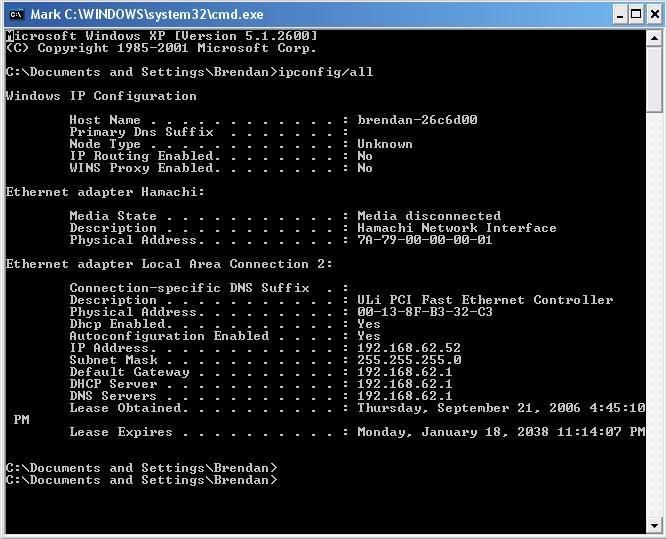
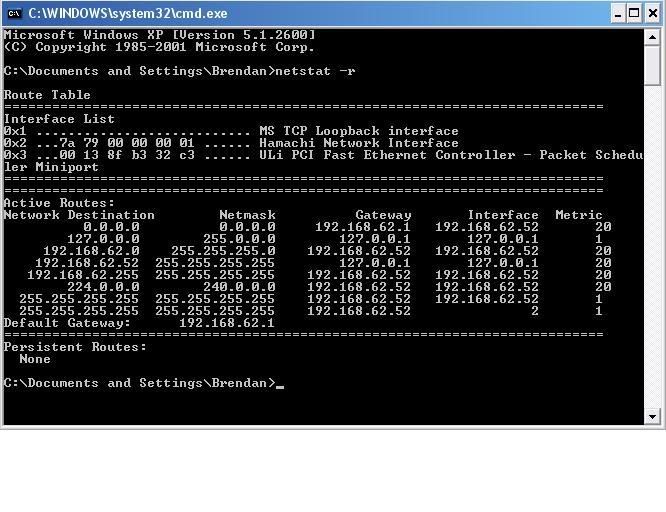
4) from windows send us the results of ipconfig/all and netstat -r
jobeard
09-21-2006, 11:51 AM
Anyway, it might not be compatible with linux. If it isn't, is there a way to connect using the DSL modem connected right to the computer? ...Linux really seems hell-bent on keeping me off the internet..
Linux doesn't even know any router exists, so refocus your time.
Yes you can directly couple your system to the modem B U T you better config
IPTABLES to inhibit all inbound for ports 0-1024, except port 53+687.
IMO, you will have more success and find it easier and safer to use the ROUTER approach.
you NIC needs DHCP to be configured correctly
MetalX
09-21-2006, 06:07 PM
1) your computer dual-boots xandros & windows?
2) when in windows you have access to the internet?
3) from xandros we need the output of route -n
4) from windows send us the results of ipconfig/all and netstat -r
1) Yes.
2) Yes.
3) Is route -n something I should type into the console?
4) Ok here they are:
all of this is letter PERFECT (on the windows side)
now get the same from your Linux environment
MetalX
09-21-2006, 09:28 PM
Ok here are the results of ifconfig and route -n in xandros. They are attachments.
YosefM
09-21-2006, 10:16 PM
hmmmm - thanks. route table looks fine - totally unremarkable, just as it should be. ifconfig looks normal as well.
in xandros do these commands from console, you shouldn't need to be root. Post the results.
ping -c 4 127.0.0.1
ping -c 4 192.168.62.52
ping -c 4 192.168.62.1
traceroute 216.109.112.135
ping -c yahoo.com
I suspect you simply need to reconfigure your network card to use a dynamic IP address instead of static, this will give it the proper route out and set the router as your name server. If it's already dynamic, and the only thing that fails is the ping to yahoo.com by name, edit the file /etc/route.conf to add this line:
nameserver 192.168.62.1
MetalX
09-21-2006, 10:33 PM
hmmmm - thanks. route table looks fine - totally unremarkable, just as it should be. ifconfig looks normal as well.
in xandros do these commands from console, you shouldn't need to be root. Post the results.
ping -c 4 127.0.0.1
ping -c 4 192.168.62.52
ping -c 4 192.168.62.1
traceroute 216.109.112.135
ping -c yahoo.com
I suspect you simply need to reconfigure your network card to use a dynamic IP address instead of static, this will give it the proper route out and set the router as your name server. If it's already dynamic, and the only thing that fails is the ping to yahoo.com by name, edit the file /etc/route.conf to add this line:
nameserver 192.168.62.1
How do I do that last part?
MetalX
09-22-2006, 01:34 AM
hmmmm - thanks. route table looks fine - totally unremarkable, just as it should be. ifconfig looks normal as well.
in xandros do these commands from console, you shouldn't need to be root. Post the results.
ping -c 4 127.0.0.1
ping -c 4 192.168.62.52
ping -c 4 192.168.62.1
traceroute 216.109.112.135
ping -c yahoo.com
I suspect you simply need to reconfigure your network card to use a dynamic IP address instead of static, this will give it the proper route out and set the router as your name server. If it's already dynamic, and the only thing that fails is the ping to yahoo.com by name, edit the file /etc/route.conf to add this line:
nameserver 192.168.62.1
Here are the results in the order that you posted them.
YosefM
09-22-2006, 02:17 AM
ok. Analysis of results:
1) ping is working - it hits your lo (loopback interface, 127.0.0.1)
2) NIC is working, you can ping yourself
3)while route -n reports the router as your gateway, you cannot ping it.
I think we need to set a default gateway. One syntax of the route command looks like this:
route [add default gw] <ip_address> <interface>
do this as root from the console in xandros:
route add default gw 192.168.62.1 eth0
Then use a text editor from the xandros GUI (also as root) to edit the file /etc/route.conf Add this line to the end of the file:
nameserver 192.168.62.1
That should get you up & surfing.
MetalX
09-22-2006, 07:02 PM
Where is that file located?
YosefM
09-22-2006, 07:20 PM
in the /etc directory, the file name is route.conf
You might have to be root to edit it. If you dont find it, then you will need to use whatever administration tools xandros supplies to configure your network and NIC.
Specifying a nameserver gives your system a destination for DNS lookup queries (this translates an internet server name like yahoo.com to an IP address like 216.109.112.135). Without this you could only use the numeric address, and who could remember more than a few of those?
MetalX
09-22-2006, 11:52 PM
in the /etc directory, the file name is route.conf
You might have to be root to edit it. If you dont find it, then you will need to use whatever administration tools xandros supplies to configure your network and NIC.
Specifying a nameserver gives your system a destination for DNS lookup queries (this translates an internet server name like yahoo.com to an IP address like 216.109.112.135). Without this you could only use the numeric address, and who could remember more than a few of those?
There is no file called route.conf. How can I configure it in the adminitstration tools? BTW thanks for all your help so far!
YosefM
09-23-2006, 11:09 AM
well - drrr - of course you didn't find it. the file you should put that line in is named resolv.conf & it should be in the /etc directory LOL.
MetalX
09-23-2006, 06:30 PM
That file already contains the line I should add and I can't modify it because the system won't let me save it as a ".conf" file. Oh, and I figured out that the system was set on static IP not DHCP. I put it on DHCP but nothing changed.
jobeard
09-23-2006, 06:51 PM
That file already contains the line I should add and I can't modify it because the system won't let me save it as a ".conf" file. Oh, and I figured out that the system was set on static IP not DHCP. I put it on DHCP but nothing changed.Lunix does not associate ANY MEANING WHATSOEVER to filename extensions (eg .txt, .etc, .conf, .cnf, .confg, .ps, .html).
you're into the file permissions of Unix/Linux systems
from a terminal window, issue
ls -l /etc/route.conf
you will get a display something like
-rw-r-----+ 1 root sys 4576 May 4 2005 /etc/route.conf
this says ONLY root can write the file, users in group sys can read it, and everyone else can do neither
login as root, edit the file, and save where it is
YosefM
09-24-2006, 12:00 AM
Jobeard: you're correct, but there's no reason to edit the file, what we were adding is already there.
MetalX: Read the Xandros documentation carefully. I'm certain the answer is there. You might also want to search the xandros forums. The only suggestion I have at this point would be to redo your install - but I'm pretty sure someone more familiar with Xandros & its admin tools would give a different answer.
MetalX
09-24-2006, 02:28 AM
Ok... thanks for all your help guys! BTW, where can I find the xnadros documentation? On their website?
Rick
09-24-2006, 02:40 AM
The brand is "inexq". Google it for more info although the website is HORRIBLY designed. Anyway, it might not be compatible with linux.Not likely, although some web interfaces I've seen only work with Internet Explorer. Regardless of config page compatability, routing technologies are based on open standards and should work with any computer.
Can you access your router config page from Windows, using IE?
I caught up on this thread by skimming over it, but I don't remember seeing any information on whether or not your Internet works in Windows. Can you get online with Windows? If not, can you ping external address and get a reply, like www.google.com? Trying this in both Linux and Windows would be good.
If not, (and I know this may be obvious...) your router probably needs to be configured for your WAN. Just making sure you get all the bases checked...
MetalX
09-24-2006, 12:25 PM
I can get online in Windows... I use windows on the same computer to go on TS. However, on linux I can't acess the router or the internet. I can't even ping them.
YosefM
09-25-2006, 07:40 AM
Having had a day to review, I'm thinking this distro comes locked down out of the box. Check Xandros.com & the forums there.
MetalX
09-28-2006, 12:09 AM
Ok... I'm going to wait awhile before trying linux again... a few months at least because I have replaced the hard drive space it took with Vista RC-1.
Thank you very much for all your help.
YosefM
09-28-2006, 12:21 AM
Ok... I'm going to wait awhile before trying linux again... a few months at least because I have replaced the hard drive space it took with Vista RC-1.
Thank you very much for all your help.
LOL - & I was feeling like such a traitor when I did the same thing last week LOL
It did go in smooth as silk - couldn't believe my XP2600 barton system scored a 3.5! This has inspired me to delay the BIG upgrade another year & just replace the 5200FX AGP vid card with a 7600GT AGP.
I still have the server running SuSE 9.0 though. Gonna upgrade it to a sempy 2800 on socket 754 & step up to SuSe 10.0. At least 1 machine in the house will be 64-bit.