also @ TechSpot: A List of PC Game Classics Available Free of Charge

Read on full site | Join TechSpot! (it's free) | Bookmark / Share this


TechSpot Giveaway: Win an Acer Timeline 14

Computer will not turn on..

hatcht
11-19-2006, 04:22 AM
This is the first time I have posted here, so I would like to give an advance big thanks for any help you can give me. The computer I am working on will not turn on, checked through the forum, and tried these tricks, PSU, patched in a new one, did not help, bought a new CPU, (socket type) Did not help, Cleared the CMOS ( reversed the battery). no help. removed the ram, no help... in other words, I left the CPU,PSU, removed the periphials. and the ram,, all that happens is, If I hold the power button in, power lite on the motherboard comes on and "the fans" give a small movement. I have tried a new powercord... Is there anything else I should try? the CPU is and AMD, I am not sure what the Mother board is, I have not had it out.. I am at a loss, so anything I can try would be a great help,, Oh by the way, this was one of those " you turn the computer off and go to bed, and get up in the morning, and it would not turn back on things.... so it was working.

DonNagual
11-19-2006, 04:34 AM
Hello, and welcome to Techspot!

Take a look at your motherboard's capacitors. Any of them swelling or leaking?
http://www.tnpcnewsletter.com/dan/Bulging_Capacitors/close-up-sm.jpg

Ad
11-19-2006, 04:34 AM

hatcht
11-19-2006, 12:13 PM
Thanks for the help Don, I checked the over the best I could, I did not take the motherboard out, so I don't know about the other side, but as far as what I can see, I don't see any buldges. Don, Can the CMOS battery, ( if it is dead) stop the computer from coming on? thanks again!

hatcht
11-19-2006, 03:00 PM
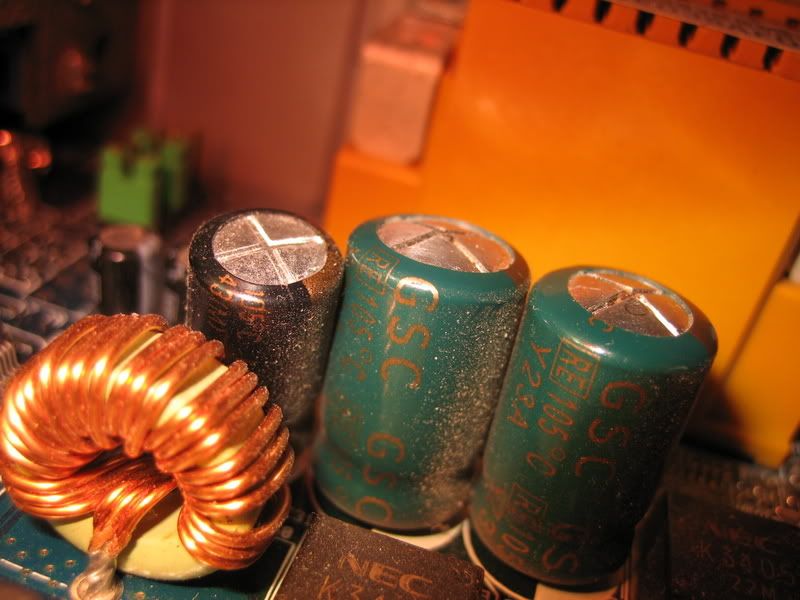
Don, I took a closer look at the capacitors, I think there may be some that are bulgding. They are not quite as bad and the ones in your picture, but Would that stop it from coming on?

hatcht
11-19-2006, 03:17 PM
here is a quick pic of what I am looking at:


http://i126.photobucket.com/albums/p105/hatcht1/IMG_0728.jpg


What do you think? are these buldging?

dmill89
11-19-2006, 03:30 PM
Yes those are defently buldgeing, the tops should be flat. Your options are now to replace the bad capacitors (involves desoldering the old ones and soldering new ones in) or to replace the motherboard.

Mictlantecuhtli
11-19-2006, 03:38 PM
I left the CPU,PSU, removed the periphials. and the ram
Hmm, I've never seen a PC that would boot without memory.

dmill89
11-19-2006, 03:41 PM
Hmm, I've never seen a PC that would boot without memory.

A computer can't boot with out memory but it should atleast give a POST error instead of just doing nothing.

Mictlantecuhtli
11-19-2006, 05:07 PM
Hmm, I don't think I've seen one post without memory either. Then again, I don't think I've tried many times.

Ad
11-19-2006, 05:07 PM

dmill89
11-19-2006, 05:10 PM
Hmm, I don't think I've seen one post without memory either. Then again, I don't think I've tried many times.


It will fail post giveing a long continious beep for an error message. If you get nothing there is likely a problem with the motherboard.

Post a reply, see related topics & more

 Top Technology News

Tech Tip of the Week: Customize Your Windows 7 Start Menu Button

Stragglers: Windows 7 SP1 is only a minor update

Intel Larrabee to come back from the dead, eventually

Dell restocks Adamo XPS, retracts previous claims

Google working on Android-powered TV platform?

New GeForce 197.13 beta drivers fix overheating issues

News around the web: One pair of 3D glasses to rule

Catalyst 10.3 previewed, full release coming next week

More Tech News

 Software Downloads

Opera 10.51.3315 Beta

JAlbum 8.7.2

CDBurnerXP 4.3.0.1977

SmartFTP Client 4.0.1088.0

SmartFTP Client 4.0.1088.0 64-bit

Joy Image Printer 2.15

Adit Testdesk 2.01

More Downloads


Copyright © 1998-2010 TechSpot.com. TechSpot is a registered trademark. All Rights Reserved.