also @ TechSpot: ThinkPad on a Budget, Meet the Edge 13" Notebook - Reviewed

Read on full site | Join TechSpot! (it's free) | Bookmark / Share this


Need a little help with overclocking

ryan29121
01-22-2008, 11:23 AM
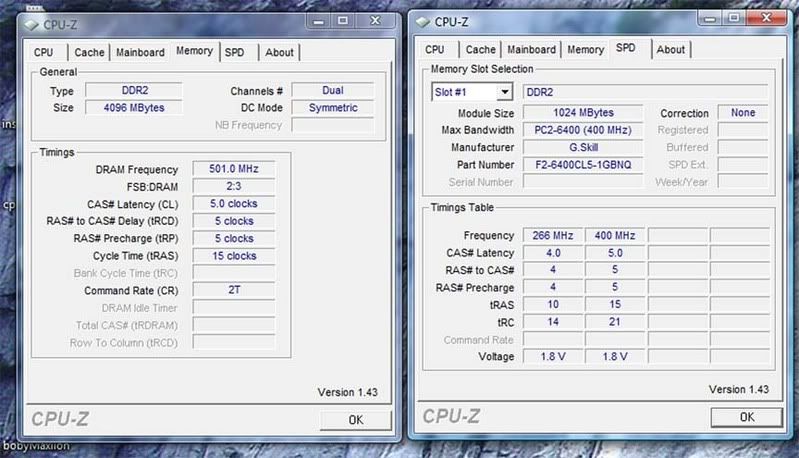
Alright I have been doing a few things to overclocking. First I started increasing my FSB by 25MHz increments then once I got close to 3.0GHz I increased the voltage to 1.38v. Everything boots fine but then I start CPUz and im looking at my multiplier and its fluctuating from 6.0x to 9.0x which also changes my core speed. What is causing this? Thanks in advance for your help.
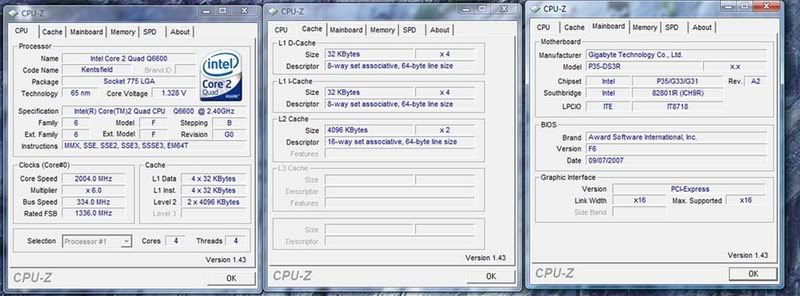
http://i9.photobucket.com/albums/a79/ryan7066/Untitled-1copy.jpg

http://i9.photobucket.com/albums/a79/ryan7066/second2.jpg

Tedster
01-24-2008, 06:52 PM
http://www.techspot.com/vb/topic70998.html

Ad
01-24-2008, 06:52 PM

luvhuffer
01-25-2008, 03:19 AM
Nice thread to point to Tedster. But I didn't see anything in there about the speed stepping. Maybe someone should tell CMH to add a speed step guide.

Ryan. What you are seeing is the speed step technology. It is a power saving feature that increases the CPU speed to handle heavier loads. Overclocking your CPU is in effect telling the system what the maximum speed on the sppeed step should be. To run the CPU wide open 24/7 you need to disable speed step. In your BIOS set C1E and EIST to disabled. Some info on speed step can be read here (http://en.wikipedia.org/wiki/SpeedStep)

Mictlantecuhtli
01-25-2008, 03:27 AM
To run the CPU wide open 24/7 you need to disable speed step. In your BIOS set C1E and EIST to disabled.
Wide open?

I never disable SpeedStep, overclock, and run the PC usually 24/7. What's wrong with a little power saving?

I haven't seen SpeedStep or Cool'n'Quiet making CPUs any more crash-prone than without them, even with overclocking.

luvhuffer
01-25-2008, 04:26 AM
Ya my E6400 runs wide open all the time at 3.4. Of course my room doesn't have a heater so the sys exhaust fan helps warm it up. lol Besides with the speedstep enabled I see a noticable slow down when surfing. So why bother with overclocking if you are not gonna use it to optimize performance all the time? But then to each his own. I doubt I'm shortening the life of the CPU in anyway I'll ever see as the thing will be obsolete long before it dies.

Post a reply, see related topics & more

 Top Technology News

Lenovo ThinkPad Edge 13" Notebook Review

Weekend Open Forum: OnLive Games on Demand -- the future of gaming or destined to fail?

Lenovo intros three new LCDs, one with multitouch

Samsung preps new tablet, scoffs at iPad

Blizzard may license Battle.net down the road

News around the web: Privacy is Not Dead, Just Evolving

Dell intros 24-inch eco-friendly G2410H display

FCC's National Broadband Plan detailed early, calls for 100Mb/s home connections

More Tech News

 Software Downloads

K-Lite Mega Codec Pack 5.8.3

K-Lite Codec Pack Full 5.8.3

K-Lite Codec Pack Basic 5.8.3

K-Lite Codec Pack Standard 5.8.3

K-Lite Codec Pack Update 5.8.3

AVG Anti-Virus Updates March 15, 2010

avast! Virus Definitions March 15, 2010

More Downloads


Copyright © 1998-2010 TechSpot.com. TechSpot is a registered trademark. All Rights Reserved.