Welcome to the TechSpot OpenBoards. Please read the FAQ if you have any questions. Login to participate.

Go Back   TechSpot OpenBoards > OS & Software > Security and the Web

Loading Windows Error = virus?

Reply
Bookmark / Share this page
Thread Tools
  #1  
Old 07-05-2008, 09:28 PM
Scootervon's Avatar
Scootervon Scootervon is offline
Newcomer, in training
 
Location: Montana
Member since: Jul 2008, 9 posts
Loading Windows Error = virus?

a couple weeks ago i received a blue screen error then my computer restarted and it hasn't been the same since. the next time i logged onto my computer it would last 11mins 31 seconds (i timed it) then restart with another blue screen error. so i tried running my virus scan in safe mode, found nothing. now when i try to load windows it gives me these errors* or at least i think its an error. I have tried clicking on the box, and it just restarts and gives the same error. before this (about a week ago i received blue screen errors during the errors there was a C: chkdsk or something along those lines on my NTFS files(?) while it checked for consistency::
step one (files):
1: Delete corrupt files code 128 in file 15101 attribute list entry.
2: Delete corrupt files code 128 in file 15101 attribute list entry.
3: Deleting corrupt attribute record (128, ") from file record segment 31070
step 2 (indexes) ,3(Security) went really fast so i couldn't write what it said.

now i get these errors when windows is trying to load

here is the error box
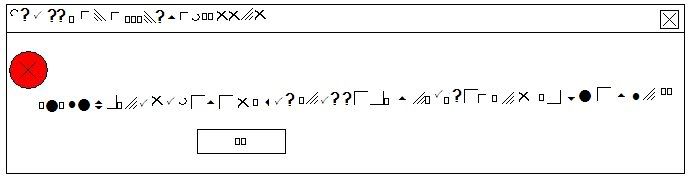

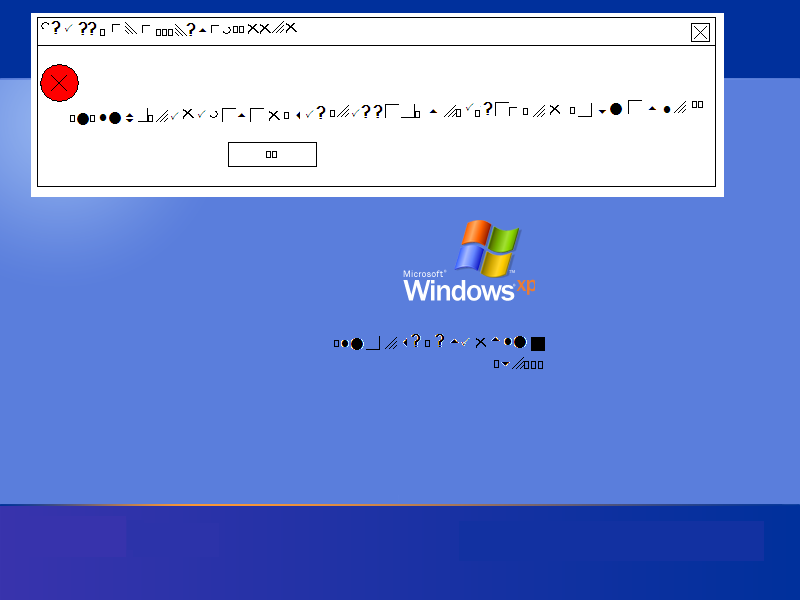
and here is the windows screen


*note the text/images are not exact, i had to try to copy them as best as i could by looking at them from another computer (copy & paste ing the images so they are at least the same through out.)

what do i do? i have also posted this on the Kaspersky anti virus forums

Scott

ps. i am posting on another computer


thanks for all the help

pss. im using Windows XP home v2002 SP3 on a Toshiba Satellite M35X- S3112
Last edited by Scootervon; 07-05-2008 at 09:30 PM.
Reply With Quote
  #2  
Old 07-05-2008, 10:58 PM
Scootervon's Avatar
Scootervon Scootervon is offline
Newcomer, in training
 
Location: Montana
Member since: Jul 2008, 9 posts
ok so i tried to recreate what it looks like i googled the log in screen so i can paste the other images in so u can see what it looks like (not exact but close)


Reply With Quote
You can remove this banner by registering, join the TS Community for free.
  #3  
Old 07-05-2008, 11:15 PM
raybay raybay is offline
TechSpot Evangelist
 
Location: Four Corners, US
Member since: Dec 2006, 6,000 posts
You could have a lot of issues without it being caused by a virus.
It could be a driver error of various types, bad memory module, bad hard drive, or bad install on the hard drive.
You will get the best results by reinstalling Windows. Next best results by downloading your key drivers, then once downloaded, delete your old drivers in Device Manager before installing the new ones.

The most common causes (but not the only causes) of Blue Screen are driver errors, failed memory module, failed video graphics card, and failed hard drive.
Reply With Quote
  #4  
Old 07-05-2008, 11:30 PM
Scootervon's Avatar
Scootervon Scootervon is offline
Newcomer, in training
 
Location: Montana
Member since: Jul 2008, 9 posts
ok so what if i said that i cannot find my windows disk... i do have (at least i think i do) the rest of the disks that came with my computer

Last edited by Scootervon; 07-05-2008 at 11:33 PM.
Reply With Quote
  #5  
Old 07-07-2008, 04:54 PM
Maureen Maureen is offline
Newcomer, in training
 
Location: NC
Member since: Dec 2006, 11 posts
Are you sure it was the real blue screen and windows restarting? About a week or so ago, I had a virus that changed my screensaver to the blue screen and what looked like windows restarting and background that said i was infected ,then removed the tabs in display so i couldn't change back.
And it happened about ten min. into being on comp. F8 got me out of the screen saver.
Reply With Quote
  #6  
Old 07-07-2008, 06:32 PM
Scootervon's Avatar
Scootervon Scootervon is offline
Newcomer, in training
 
Location: Montana
Member since: Jul 2008, 9 posts
Quote:
Originally Posted by Maureen
Are you sure it was the real blue screen and windows restarting? About a week or so ago, I had a virus that changed my screensaver to the blue screen and what looked like windows restarting and background that said i was infected ,then removed the tabs in display so i couldn't change back.
And it happened about ten min. into being on comp. F8 got me out of the screen saver.

yeah im sure cause when my computer restarts it beeps at me and it was doing that beep,

now windows wont even load. so it cant be a screen saver.
Reply With Quote
Reply

Thread Tools

Posting Rules
You may not post new threads
You may not post replies
You may not post attachments
You may not edit your posts

BB code is On
Smilies are On
[IMG] code is On
HTML code is Off
Forum Jump

Similar Threads
Thread Thread Starter Forum Replies Last Post
Error loading c:windows\system32\jucblvj.dll amylitas Windows OS 1 05-13-2008 12:15 PM
Disabling automatic reboot upon error without loading Windows XP? A57Strat Windows OS 2 01-22-2008 07:53 AM
"error loading os" in windows 2000 32bitzeba Storage & Networking 5 02-02-2007 12:03 AM
Error loading C:\WINDOWS\system32\uhvjsul.dll natzkie Security and the Web 21 10-03-2006 11:56 PM
windows is now loading error Sylly Windows OS 3 09-14-2006 04:12 PM


All times are GMT -4. The time now is 08:15 AM.