also @ TechSpot: Nortel's internal network "owned" by hackers for almost a decade
Welcome to the TechSpot OpenBoards. Please read the FAQ if you have any questions. Sign up or Login to participate.

Go Back   TechSpot OpenBoards > Tech Support > Device Drivers

Begin your free trial now Pay-as-you-go options starting at $10/user/month

cant flash bios!!!!

Thread Tools Search this Thread
  #1  
Old 02-12-2004
Guest
 
cant flash bios!!!!

i have problems with my nvidia fx5600 but cant flash my bios with the download from nvidia. followed instructions and used a start up disc to pure dos but it comes up with unknown command when i type flash.bat as per instructions. any ideas how to flash it?
  #2  
Old 02-13-2004
TechSpot Evangelist
 
Location: has left the building
Member since: Aug 2003, 8,165 posts
With Explorer, check what files are on that floppy. You need either a file with the .bat extension or a program with the .exe extension.
You get the unknown command, because there is no such file on that floppy I bet. If there is another .bat file (not autoexec.bat), right-click it and select "edit" to see what is in it. That may give you an idea.
Otherwise look for flash.exe or something like that and run that.
  #3  
Old 02-13-2004
Didou's Avatar
Bowtie extraordinair!
 
Location: Brussels, Belgium
Member since: Feb 2002, 5,895 posts
System specs
Why do you want to flash your BIOS ?

If it's really the last solution, it's much more recommended to get a BIOS from the card maker rather then a generic BIOS from nVidia itself.
  #4  
Old 02-13-2004
Guest
 
why flash bios

i am tryin anything i can to get this new card runnin. flashin the bios is a last ditch attempt. its not a hardware prob with card. it works in my mates pc with the driver i am tryin but not n mine. i have reinstalled direct x9b to see if that was the problem but it isnt. if you can think of any other way to remedy it without flashing bios pleeeeaaassee tell me. is it possible the motherboard and the card just wont work together? its a gainward fx5600 ultra and an elitegroup motherboard with sis735 chipset. cheers
  #5  
Old 02-13-2004
Liquidlen's Avatar
TechSpot Paladin
 
Location: Canada
Member since: Oct 2003, 1,646 posts
you might get a lot more help if the guys knew exactly what happens. e.g. error messages,if you get to windows, when the problem occurs,e.g. boot up , GUI
  #6  
Old 02-13-2004
Didou's Avatar
Bowtie extraordinair!
 
Location: Brussels, Belgium
Member since: Feb 2002, 5,895 posts
System specs
If the card works on your friend's PC, then it does not need to be flashed.
  #7  
Old 02-14-2004
Guest
 
any suggestions then? my prophet 4500 works fine but when i try the fx5600 it behaves ok til gaming then the colours go vivid reds greens and yellows. the game still runs tho. when i exit the game to windows everythin is normal. i have the latest drivers and patches for games if needed. also the xp boot up screen is normal. its just games that dont work. unfortunatly thats all i use the pc for!!!!
  #8  
Old 02-14-2004
Didou's Avatar
Bowtie extraordinair!
 
Location: Brussels, Belgium
Member since: Feb 2002, 5,895 posts
System specs
Well I know that the sis735 ( ECS K7S5a ) can be picky with VGA cards & sometimes will refuse to work with some of them.

I've had a friend try to make a RadeonVE work on it, we never got it to work, it would reboot about every 10 minutes. Even with AGP set to 2x, fastwrites & SBA off.

Doesn't the FX5600 require an extra power connector from the PSU ? Is that plugged in correctly ?
  #9  
Old 02-14-2004
Guest
 
hi didou. the card doesnt have an extra power supply. or should i say i hope it doesnt cos there is no socket or anything on the board. sounds like i may be better cutting my losses and getting a new motherboard eh? can you suggest anything in the lower price range that should work ok and take sdram? its 1200 amd cpu but might stretch to upgrade to amd 2500 soon so it needs to take both those as well. i am on a bit of a tight budget tho!!! thanks for your help
  #10  
Old 02-14-2004
Didou's Avatar
Bowtie extraordinair!
 
Location: Brussels, Belgium
Member since: Feb 2002, 5,895 posts
System specs
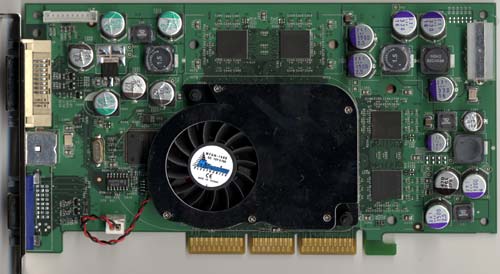
Allthough that picture is of the 5600 Ultra, it might be the same thing for yours. The power connector is in the upper right corner.


I can't say for sure if that's what giving you these problems but it would be better to get that out of the way.
  #11  
Old 02-14-2004
Guest
 
this is a piccy of my board didou
[url]http://www.pearl.de/images/large/pe-6329.jpg[/url]
as you can see it diff to the ou#ther no extra power supply.
prob best to ditch the motherboard by the sounds of it
  #12  
Old 02-14-2004
Didou's Avatar
Bowtie extraordinair!
 
Location: Brussels, Belgium
Member since: Feb 2002, 5,895 posts
System specs
Well your problem seems different from the one my friend was experiencing.

For the record he's stil using the same board with a 2400+ & a Radeon 8500 now.

Have you tried playing around with Brightness settings & such within the game ?
  #13  
Old 02-15-2004
TechSpot Evangelist
 
Location: has left the building
Member since: Aug 2003, 8,165 posts
Another question, did you properly UNinstall the drivers from your previous card? They may clash or interfere.
  #14  
Old 02-16-2004
Guest
 
old drivers

hello realblackstuff. yes. it was a fresh install of xp. hard drive formatted so def no old drivers on it. still no joy tho.
Closed Thread

Similar Topics
Topic Replies Forum
How to flash/update your BIOS 14 Guides and Tutorials
Trying to flash my BIOS!!! 5 Processors and Motherboards
bios flash 3 Processors and Motherboards
Fix for bad bios flash 0 Device Drivers
trying to flash BIOS 2 Device Drivers

Thread Tools Search this Thread
Search this Thread:

Advanced Search
All times are GMT -4. The time now is 11:29 AM.