After about an hour of computer usage (Just making that number up, I have no idea how long it usually takes since it's only done it twice tonight, once on Windows then again when I was using Linux), I am dual-booting and it doesn't matter if I'm on Linux or Windows, the monitor goes into the same mode as if you had left the pc idle for awhile when you have no screensaver. It just goes black and the light on the front goes from green to orange, I can still hear my music and I'm guessing keypresses are still working but I have to restart. WHAT ?
You are using an out of date browser. It may not display this or other websites correctly.
You should upgrade or use an alternative browser.
You should upgrade or use an alternative browser.
Monitor going into power-save mode?
- Thread starter jamesearl
- Start date
Ok details:
It's a Dell LCD monitor.
My graphics card is a Radeon 9600 XT.
A few weeks ago when this started happening (When I started this thread) I upgraded my graphics drivers to the latest, and it seemed to go away, but today it's back. It first happened when I was just playing Counter-strike 1.6. So I hit the reset button and it happened straight away when the computer was booting up. So I turned it completely off, waited awhile, then on again and it happened when i was just on IRC.
I have turned off my screen-saver, power save settings and hibernate.
I have absolutely no idea what could be causing it. Also I don't have another monitor I can try, sorry.
EDIT: I think it may be an audio issue.
I was booted up on Linux before, to see if there was any difference, and I remembered the last time it happened my sound skipped, so I unplugged my Microsoft Lifechat USB headset to try a different one, and it happened.
So I reset the computer again and plugged in some other headset I found (not USB), then I unplugged it. Tada, it happened.
Could it be a sound card issue ?
My sound card is a VIA Realtek AC'97.
It's a Dell LCD monitor.
My graphics card is a Radeon 9600 XT.
A few weeks ago when this started happening (When I started this thread) I upgraded my graphics drivers to the latest, and it seemed to go away, but today it's back. It first happened when I was just playing Counter-strike 1.6. So I hit the reset button and it happened straight away when the computer was booting up. So I turned it completely off, waited awhile, then on again and it happened when i was just on IRC.
I have turned off my screen-saver, power save settings and hibernate.
I have absolutely no idea what could be causing it. Also I don't have another monitor I can try, sorry.
EDIT: I think it may be an audio issue.
I was booted up on Linux before, to see if there was any difference, and I remembered the last time it happened my sound skipped, so I unplugged my Microsoft Lifechat USB headset to try a different one, and it happened.
So I reset the computer again and plugged in some other headset I found (not USB), then I unplugged it. Tada, it happened.
Could it be a sound card issue ?
My sound card is a VIA Realtek AC'97.

Tmagic650
Posts: 17,233 +235
"My sound card is a VIA Realtek AC'97"... Your sound is on-board (a chip on the motherboard) not a card.
It sounds like a you are talking about a laptop but the Radeon 9600XT wouldn't fit in a laptop. I used to have a Radeon 9600XT... It was a good OLD friend. If you are in the habit of hitting the reset instead of powering down properly, the hard drive could be in trouble too. What is your computer? What is it's make and model number? Please tell us, pretty please Could it actually be a Dell too? What is the model number? It could be your power supply...
It sounds like a you are talking about a laptop but the Radeon 9600XT wouldn't fit in a laptop. I used to have a Radeon 9600XT... It was a good OLD friend. If you are in the habit of hitting the reset instead of powering down properly, the hard drive could be in trouble too. What is your computer? What is it's make and model number? Please tell us, pretty please
Could it actually be a Dell too? What is the model number? It could be your power supply..."My sound card is a VIA Realtek AC'97"... Your sound is on-board (a chip on the motherboard) not a card.
It sounds like a you are talking about a laptop but the Radeon 9600XT wouldn't fit in a laptop. I used to have a Radeon 9600XT... It was a good OLD friend. If you are in the habit of hitting the reset instead of powering down properly, the hard drive could be in trouble too. What is your computer? What is it's make and model number? Please tell us, pretty please
What do you mean powering down properly? I can't shut down because the monitor goes. The computer is a Dell, I dont even know what make/model, it's custom.
EDIT: Sorry mistake, the monitor is a dell, not the computer.

k.jacko
Posts: 483 +1
I'd take a closer look at your psu. it may not be supplying the right voltage to your gfx, and hence your monitor.
By turning the pc off and leaving it for a while the capacitance bleeds off, which then allows you to turn it back on and it works.....for a while, until the voltage drops again. I'm not saying this IS the cause, but i'd say its pointing nearer that direction.
Could also be faulty gfx card. Are you connecting vga or dvi? Can you try using the other, via an adaptor if need be?
By turning the pc off and leaving it for a while the capacitance bleeds off, which then allows you to turn it back on and it works.....for a while, until the voltage drops again. I'm not saying this IS the cause, but i'd say its pointing nearer that direction.
Could also be faulty gfx card. Are you connecting vga or dvi? Can you try using the other, via an adaptor if need be?
k.jacko
Posts: 483 +1
See if something as simple as F5 refreshes the monitor.
lol, well if he's clutching at straws why not?But he did say that music is still playing and guessed that his keystrokes still worked.

zipperman
Posts: 1,168 +7
Tmagic650
Posts: 17,233 +235
What do you mean powering down properly? I can't shut down because the monitor goes. The computer is a Dell, I dont even know what make/model, it's custom.
Press the power switch once and the computer will shut down. Like Zipperman posted, set your Power Settings to "Always On", and set the monitor to shut off in 1 hour. Older Dells had crappy power supplies to start. Change it soon. Your Radeon 9600XT is getting old too
zipperman
Posts: 1,168 +7
I beg your pardon
NEVER i said.So you mean change them to ON?
jamesearl,
Glad you fixed it,updateing with the latest and compatible drivers is
always a good idea.
Re Tmagic650 : All Dells need a better Power supply.Invest in a 500 watt.
Check it's fan regularily.
:wave:
I didn't post "always on" See my screenshot "Press the power switch once and the computer will shut down. Like Zipperman posted, set your Power Settings to "Always On", and set the monitor to shut off in 1 hour. Older Dells had crappy power supplies to start. Change it soon. Your Radeon 9600XT is getting old too
NEVER i said.So you mean change them to ON?
jamesearl,
Glad you fixed it,updateing with the latest and compatible drivers is
always a good idea.
Re Tmagic650 : All Dells need a better Power supply.Invest in a 500 watt.
Check it's fan regularily.
:wave:

almcneil
Posts: 1,236 +1
James,
I just skimmed the replies to your post (I did read your original one entirely) but I don't think anyone suggested that you try checking the front panel settings on the monitor. There should be 2 to 4 buttons on the front or side of the monitor. The settings menu should appear. Navigate through them and see of there is a power savings setting and adjust or disable it.
Best,
-- Andy
I just skimmed the replies to your post (I did read your original one entirely) but I don't think anyone suggested that you try checking the front panel settings on the monitor. There should be 2 to 4 buttons on the front or side of the monitor. The settings menu should appear. Navigate through them and see of there is a power savings setting and adjust or disable it.
Best,
-- Andy
General info at Dell Forums re Flat Panel/LCD monitor issue:
http://www.dellcommunity.com/supportforums/board/message?board.id=dim_monitor&message.id=33721
http://www.dellcommunity.com/supportforums/board/message?board.id=dim_monitor&message.id=33721
Ok, well I was using my PC this morning and after about 15 minutes it happened again. I think the audio driver thing was just a coincidence.
No. The music either stops playing straight away, or keeps playing for about five seconds then stops, or skips for about five seconds then stops.
I'm reading through that article now... I was reading, and it happened again.
EDIT: Above I said that the computer was a Dell. The monitor is, not the PC. The PC is a custom made.
I read the first post in that thread and the suggestion was this:
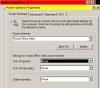
There is no 'Options' tab in the settings section, so I set my res to 800x600 and turned Hardware acceleration to none. Just trying different settings, whatever.
See if something as simple as F5 refreshes the monitor.
But he did say that music is still playing and guessed that his keystrokes still worked.
No. The music either stops playing straight away, or keeps playing for about five seconds then stops, or skips for about five seconds then stops.
I'm reading through that article now... I was reading, and it happened again.
EDIT: Above I said that the computer was a Dell. The monitor is, not the PC. The PC is a custom made.
I read the first post in that thread and the suggestion was this:
Download and install the latest ATI Catalyst drivers here.
Click Start | [Settings] | Control Panel | Display.
Click the Settings tab, then click the Advanced button.
Select the Options tab.
Click to enable the option Reduce DVI frequency on high-resolution displays. If a warning appears, click Yes or OK.
Click Apply and OK. Close out of the Display Properties.
Restart your computer.
There is no 'Options' tab in the settings section, so I set my res to 800x600 and turned Hardware acceleration to none. Just trying different settings, whatever.
Similar threads
- Replies
- 1
- Views
- 359

- Replies
- 4
- Views
- 40


Latest posts
-
Samsung is building floating data centers on ships, and it's already got regulatory approval
- Alfonso Maruccia replied
-
 Canada introduces social media ban for under 16s
- Puiu replied


-
TechSpot is dedicated to computer enthusiasts and power users.
Ask a question and give support.
Join the community here, it only takes a minute.