Welcome to the TechSpot OpenBoards. Please read the FAQ if you have any questions. Login to participate.

Go Back   TechSpot OpenBoards > OS & Software > Security and the Web

Laptop is totally bombed, please help

Reply
Bookmark / Share this page
Thread Tools
  #1  
Old 10-06-2008
Newcomer, in training
 
Member since: Oct 2008, 33 posts
Laptop is totally bombed, please help

Hey, thanks for the people that helped me last time, but now i have a new task for you to tackle. Well, my laptop got seriously infected somehow. i cant run anti-viruses or anything. it locks me out of task manager, probably a .bat some where that autoexects the command when i delete the registry key. Ive tried everything and just cant get it. so please help me. i run SuperAntiSpyware like so many times and it finds the same things, deleted them, but they just keep showing up, i could post all the logs and you would see the same files there and i dont understand why =/. So i would be thankful for the people that will take the time and help me.

--------------------------------------------------------------------------------------------------------
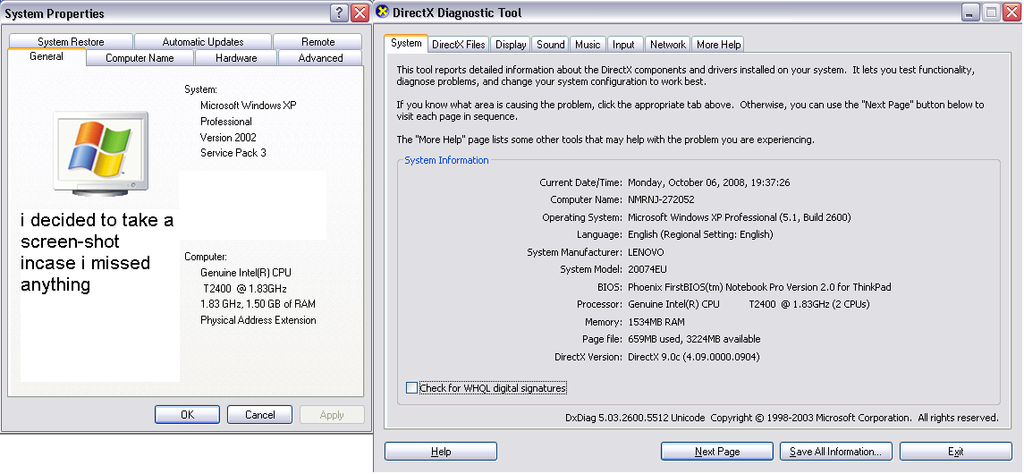
System Specs:
Genuine Intel[R] CPU
T2400 @ 1.83 Ghz
1.83 Ghz, 1.50 GB of RAM
Physical Address Extention
(I'm not sure if its a duel-core, its dxdiag it shows that it is)

Dxdiag:
T2400 @ 1.83Ghz (2 CPU's) <- thats throwing me off if its duel or not.
--------------------------------------------------------------------------------------------------------
Heres a screen shot of DxDiag, and system specs.
--------------------------------------------------------------------------------------------------------

Thanks in advance.

Last edited by viper22x; 10-07-2008 at 07:38 AM.
Reply With Quote
  #2  
Old 10-06-2008
kimsland's Avatar
TS Special Forces
 
Member since: Dec 2007, 11,672 posts
Well it's always best to start with the Make and Model
Here it is: Lenovo ThinkPad T60 2007-4EU
http://www-307.ibm.com/pc/support/si...hineind=293667

Try this

Download EndItAll
Extract, then run Setup
Then run the EndItAll application
Then click on the skull heads
Then close EndItAll

Then continue over to Viruses/Spyware/Malware Preliminary Removal Instructions
Reply With Quote
You can remove this banner by registering, join the TS Community for free.
  #3  
Old 10-06-2008
Newcomer, in training
 
Member since: Oct 2008, 33 posts
Ok, ill try the end it all. what was with the link you have me to leveno?
Reply With Quote
  #4  
Old 10-06-2008
kimsland's Avatar
TS Special Forces
 
Member since: Dec 2007, 11,672 posts
That's all you Drivers just for that laptop, we'll need that later
Reply With Quote
  #5  
Old 10-06-2008
Newcomer, in training
 
Member since: Oct 2008, 33 posts
Im running off a USB modem for internet... if i end all i cant use internet..
Reply With Quote
  #6  
Old 10-06-2008
kimsland's Avatar
TS Special Forces
 
Member since: Dec 2007, 11,672 posts
Here's the first word of advice
Always use Ethernet not USB

If you have to, go purchase an Ethernet Hub, that is required to allow more than one computer connected to the Internet (via Ethernet ofcourse)

Here's the point.... Ethernet does not require any "extra" drivers

What do you think? Come back tomorrow?
Reply With Quote
  #7  
Old 10-06-2008
Newcomer, in training
 
Member since: Oct 2008, 33 posts
Yeah, i have a Ethernet and a hub, with 2 cables coming out, but only one computer will get internet idk why. and ive tried diffrent laptops, all the same problem. it goes from a modem to a hub, and one into my PC and the other is just for my 360 or a diff computer, but now it wont work for a dff computer.

Last edited by viper22x; 10-06-2008 at 10:17 PM.
Reply With Quote
You can remove this banner by registering, join the TS Community for free.
  #8  
Old 10-06-2008
kimsland's Avatar
TS Special Forces
 
Member since: Dec 2007, 11,672 posts
Hmm, could be a cabling issue, or drivers
Reply With Quote
  #9  
Old 10-06-2008
Newcomer, in training
 
Member since: Oct 2008, 33 posts
ive tried multiple cables, diffrent ports on the hub. i took the working one out and tried that nothing. BUT all the laptops were levenos, one T40, T60, T61. that could be an issue. i did need drivers for my desktop...
Reply With Quote
  #10  
Old 10-06-2008
kimsland's Avatar
TS Special Forces
 
Member since: Dec 2007, 11,672 posts
I'll be back a bit later (I'm in and out today a bit ! No I don't get paid )

Anyway step away (have a coffee) and a little think
Reply With Quote
  #11  
Old 10-06-2008
Newcomer, in training
 
Member since: Oct 2008, 33 posts
Too bad i dont drink coffee. Im 14. =) well, should i end it all then restart my modem application? or try and figure out a different way. if wost comes to worst my dads work will just re-ghost it.
Reply With Quote
  #12  
Old 10-06-2008
kimsland's Avatar
TS Special Forces
 
Member since: Dec 2007, 11,672 posts
In EndItAll you can right click on the program you don't want ended, and then protect it.
14 incredible
Reply With Quote
  #13  
Old 10-06-2008
Newcomer, in training
 
Member since: Oct 2008, 33 posts
Why is it incredible?
Reply With Quote
  #14  
Old 10-06-2008
kimsland's Avatar
TS Special Forces
 
Member since: Dec 2007, 11,672 posts
I was going to elaborate

Well because
You sounded older (except for the acromyns)
Your words are quite reasonable (above the level of a bratty kid)
When I was 14, I was screaming around having fun, (not using my brain ! )

Sooo, go jump on your bike and have fun
Look it at it this way:
1 to 5 (not much happening, just laughing and crying)
6 to 12 (The best years of having fun)
13 to 18 (Oh, all the new adventures and exploring)

19 to 100 (um about 80 years !!) mostly going to work and stressing, some family life and holidays (but very low percentage)

ie Go have fun
Reply With Quote
  #15  
Old 10-07-2008
Newcomer, in training
 
Member since: Oct 2008, 33 posts
Well im more of a computer person, and im trying to get in a habit instead of trying "u" i type "you" because ive done reports and typed "U" and i didnt even notice it. Plus all the kids that live near me are jerks. Also, im alot more mature then them. So yeah, i just like my computer. I forget what acronyms are ha. Isn't it like "Word : Word"
IE: "Hot : Cold" something around those lines...?
Anyway you must be glad that i don't use words like "rofl, idc, idk, omg, zomg," ect. I use "lol" but thats not that bad.

Can we get back to my laptop!?
Reply With Quote
  #16  
Old 10-07-2008
kimsland's Avatar
TS Special Forces
 
Member since: Dec 2007, 11,672 posts
Quote:
Originally Posted by viper22x View Post
Anyway you must be glad that i don't use words like "rofl, idc, idk, omg, zomg," ect. I use "lol" but thats not that bad.

Can we get back to my laptop!?
Ah Huh
Quote:
Originally Posted by viper22x View Post
but only one computer will get internet idk why.
Hmm, anyway

Yes about the laptop...
Reply With Quote
  #17  
Old 10-07-2008
Newcomer, in training
 
Member since: Oct 2008, 33 posts
dont give me "ah huh"! ok, anyway the anti spyware finds the same thing over and over again.
Reply With Quote
  #18  
Old 10-07-2008
kimsland's Avatar
TS Special Forces
 
Member since: Dec 2007, 11,672 posts
Well, read above, how I have stated to stop everything except for required running processes, then continue over to the multi-step removal guide.

There is another option
Remove the HardDrive and mount it in another working computer (as a slave, or using external USB adaptor) And scan it from there (actually that's probably what I'd do.)
Reply With Quote
  #19  
Old 10-07-2008
Newcomer, in training
 
Member since: Oct 2008, 33 posts
Well, if i end like the 5 svchost.exe it does a command shutdown -s -t 60 -c "You need to restart your computer because the dcom server was shut down" or something like that, but i just do start -> run -> shutdown -a
screw it im just gana let my dads work ghost it
Reply With Quote
  #20  
Old 10-07-2008
kimsland's Avatar
TS Special Forces
 
Member since: Dec 2007, 11,672 posts
Well you took out a required Windows file, not what I was suggesting for you to do
Although, yes the shutdown abort command has saved me many times too

Soooo, you are re-imaging?
Probably for the best. I agree
Then once all setup, with all new MS updates, just create a new image (ie up to date one) after that
Note: do not put Antivirus software (installed in Windows) in any new image, because once you re-install, the Antivirus software (program, itself) may be out of date (or expired, ie one year subscription, usually)

I like Ghost images
Reply With Quote
Reply
Thread Tools

Forum Jump

Similar Topics
Thread Thread Starter Forum Replies Last Post
I'm totally lost, help MetalX Security and the Web 13 06-16-2008 07:52 PM
I'm totally stuck with what AV sandeepb Security and the Web 6 04-25-2008 07:32 PM
This Is Totally Doing My Head In Please Help! hnsexeter Windows OS 3 08-14-2006 12:49 PM
Something totally different to talk about Vigilante The Meeting 'spot' 24 11-01-2005 03:02 AM
Totally baffled empressvee Windows OS 4 03-08-2005 10:11 AM


All times are GMT -4. The time now is 06:28 AM.