also @ TechSpot: Nortel's internal network "owned" by hackers for almost a decade
Welcome to the TechSpot OpenBoards. Please read the FAQ if you have any questions. Sign up or Login to participate.

Go Back   TechSpot OpenBoards > Hardware > Overclocking, Cooling and Modding

Collaborate in the cloud with Office, Exchange, SharePoint, and Lync

High performance cache management?

Thread Tools Search this Thread
  #1  
Old 10-26-2008
red1776's Avatar
Omnipotent Ruler of the Universe
 
Location: Minneapolis MN
Member since: Sep 2008, 5,668 posts
System specs
High performance cache management?

Hi Folks,
Im trying to squeeze every last bit of performance from my machine until my next build this spring and I kinda forgot about cache management, and page file size etc. for one, i have 4 gigs ram, and it seems to hit my HD more than it should(i suspect anyway) anywho, I see advice on this from one end of the spectrum to the other. anyone have any advice on settings or software to improve performance? i would appreciate any input.

AMD Athlon x2 4400+ Toledo @ 2.55 Ghz
4 gigs ddr 3200 Dual channel
Asus A8N-LA
windows XP
HD 1-250 gb w/2mb cache @7200 rpm
HD 2-250 gb w/16mb cache @7200 rpm
  #2  
Old 10-26-2008
Cinders's Avatar
TechSpot Paladin
 
Location: Texas, USA
Member since: Jul 2007, 1,070 posts
System specs
Your machine is only using 2GB or so of ram because you have a 32 bit operating system. You might think about moving to Windows XP Pro 64 bit to get full use of your ram.
  #3  
Old 10-27-2008
red1776's Avatar
Omnipotent Ruler of the Universe
 
Location: Minneapolis MN
Member since: Sep 2008, 5,668 posts
System specs
thanks Cinders for the reply. would you elaborate,the reason i ask is that i have seen my system use all but 200mb of ram of the 4 gb, google earth, so i guess i dont understand your explanation entirely.

thanks again
  #4  
Old 10-27-2008
Cinders's Avatar
TechSpot Paladin
 
Location: Texas, USA
Member since: Jul 2007, 1,070 posts
System specs
You've seen your computer use upto 3GB of memory if you set it up to do so, but the "extra" memory you've seen used was actually virtual memory. Virtual memory is a small part of your system hard drive.

Normally a 32 bit OS will only use up to 2GigaBytes of real memory because that's all windows is set up to use. A 64 bit OS can access up to TeraBytes of memory.

Memory includes video memory, system memory, and virtual memory.

Your computer isn't going to load all of Google earth into memory at once. I used that program before and what it does is load the main program and then downloads many of the current maps as you go places.

Last edited by Cinders; 10-27-2008 at 12:52 PM..
  #5  
Old 10-27-2008
JimShady23's Avatar
TechSpot Addict
 
Location: Merrill, WI
Member since: Dec 2003, 650 posts
System specs
If you want your system to run off of your physical memory rather than virtual memory, disable file paging. It will make the system use your physical memory (RAM) rather than your hard drive. It actually improoves performance a lot as it not looking to your HD for files but rather strait to your memory.

Only downside is that some adobe programs that actully use virtual memory will not function correctly or give you errors. But if you can avoid photoshop or whatever than your good to go.
  #6  
Old 10-27-2008
zipperman's Avatar
TechSpot Maniac
 
Location: Mississauga,ONT.
Member since: Dec 2006, 1,423 posts
System specs
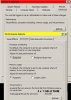
Virtual memory size

It should be 15 % of your ram.I think it's needed.
Go to Control Panel/System/Advanced/Performance/Advanced option
to check your memory settings.
? How many memory slots do you have and how many sticks installed.
For instance 2 x 1 gb is better then 1 x 2 gb.
Attached Images
File Type: jpg Memory.jpg (54.2 KB, 10 views)

Last edited by zipperman; 10-27-2008 at 07:50 AM..
  #7  
Old 10-27-2008
red1776's Avatar
Omnipotent Ruler of the Universe
 
Location: Minneapolis MN
Member since: Sep 2008, 5,668 posts
System specs
Thanks for all the input guys. I disabled the paging file and just using ram, cannot believe the performance boost. everything works, and im running crysis on highest settings with the above specs +an ati HD3650 1gb card with absolutely no lag at 1440x900 res,during the exodus level, makes me wonder what the page file is for?
  #8  
Old 10-28-2008
zipperman's Avatar
TechSpot Maniac
 
Location: Mississauga,ONT.
Member since: Dec 2006, 1,423 posts
System specs
Stop wondering !

Quote:
Originally Posted by red1776 View Post
Thanks for all the input guys. I disabled the paging file and just using ram, cannot believe the performance boost. everything works, and im running crysis on highest settings with the above specs +an ati HD3650 1gb card with absolutely no lag at 1440x900 res,during the exodus level, makes me wonder what the page file is for?
Look at my screenshot,thats why i posted it.
Glad your satisfied and tried your options.
Useing pageing file is necessary for my system.
My 1368 x 768 suites my Cable TV PVR best.
  #9  
Old 10-29-2008
JimShady23's Avatar
TechSpot Addict
 
Location: Merrill, WI
Member since: Dec 2003, 650 posts
System specs
Dated OS

XP has been around for a while, file paging was extreamly needed 7 years ago when systems where common with as little as 128mb of ram running XP.
  #10  
Old 11-03-2008
TechSpot Member
 
Location: Beaverton, OR
Member since: Nov 2008, 60 posts
System specs
where do i find the paging file option so i can try turning mine off as well
  #11  
Old 11-03-2008
red1776's Avatar
Omnipotent Ruler of the Universe
 
Location: Minneapolis MN
Member since: Sep 2008, 5,668 posts
System specs
Hey N8T, go to :control panel/performance and maintianence/system/advanced tab/ under performance hit settings/ and the advance tab/ in the virtual box, select change,and select 'no pageing file, and ok.
please let me know what your results are, been running nine for a week now and no problems, performance has been great. ****** one note, i would not recommend it if you have less than 2.5 GB of ram.
  #12  
Old 11-03-2008
TechSpot Member
 
Location: Beaverton, OR
Member since: Nov 2008, 60 posts
System specs
i have 3.5 gb of RAM so its ok.... but ive changed the setting and i see no difference at all.... is it supposed to effect games to or what?
Closed Thread

Similar Topics
Topic Replies Forum
Slow installations on High Performance PC 1 Other Hardware
Want to buy a laptop with high performance? 4 Mobile Computing
CPU switches off during high performance 9 Processors and Motherboards
Building A High Performance Gaming PC For Near $500 35 Gaming
Performance Problem, High Spec, Please Help 16 Gaming

Thread Tools Search this Thread
Search this Thread:

Advanced Search
All times are GMT -4. The time now is 06:29 AM.