Welcome to the TechSpot OpenBoards. Please read the FAQ if you have any questions. Login to participate.
|
|||||||
Vundo; Infostealer; W32 Spybot
![]() |
|
|
|
Thread Tools |
|
#1
|
|||
|
|||
|
Vundo; Infostealer; W32 Spybot
My Trend program picked up one virus and supposedly "handled" it. My browser started trying to load pages, but Trend prevented. I obviously had some issues going on so I scanned with Trend and got no probs. Went to Symantec's online scanner and found trojan.vundo; infostealer.gampass; w32spybot.worm. Tried a few fixes, still had probs with the browser trying to access sites. Thank goodness for Trend stopping it, even though I am fairly annoyed it did not detect any malware on the scans. Why is that? I even tried going online to Trend and using Housecall - still no probs. Trend is supposed to be good stuff, right? Also, during my "fixes" Trend and Windows Security started giving me messages that they couldn't do updates or turn on the firewall, or protect against changes. Also, I couldn't get Super Anti-Spyware to update. Kept telling me that my firewall was preventing, although I did not have either Windows or Trend firewall active at the time.
In any event, I followed the protocal and have attached the logs from my scans. Any help is much appreciated - thanks! |
|
#2
|
||||
|
||||
|
Hi jshock
Ive had a look through you log and everything appears clean. However as to your problem as to why Super anti spyware wont update is a mystery. Please for the record download Spybot S&D from Here Install it and see if you can update. If you can update run the program with a FULL SCAN and then attach the log file to your next post. IF you cannot update download and install the latest update from Here Also download the latest definitions for Superanti Spyware from here. Run it and install and you will have the latest SAS. Run a FULL scan with that and again post the results of the log In your next post i would like to see: Spybot S&D log Superanti Spyware (SAS) log FRESH Hijackthis Log |
|
|
|
#3
|
|||
|
|||
|
Thanks for your help. I'm running the scans and will post them later after work. Or, I could call my wife and walk her through it over the phone (wow, I needed that laugh). In the meantime, Symantec scan still is finding w32 and infostealer - I've posted the log here. Vundo appears to be gone now. The help.exe file indeed loads by itself and if I don't kill the process, has to be killed by Windows on shutdown. I'll post the other logs later.
|
|
#4
|
||||
|
||||
|
OK,
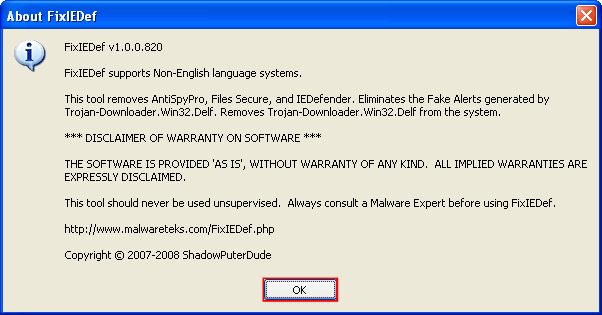
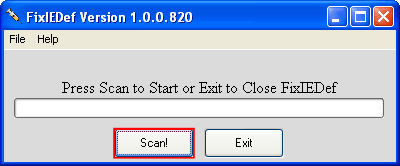
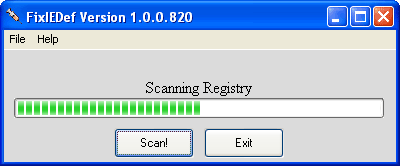
Disable System Restore Find out how here Download FixIEDef.exe by ShadowPuterDude to the Desktop Double-click FixIEDef.exe That will open the About FixIEDef screen. Click OK to continue Next, press the Scan! button A message will then pop up to say that it has successfully gained Admin rights. Click ok Wait for the scan to finish After the !!! All Finished !!! message is displayed, click Exit NEXT Download and run combofix from here BEFORE running disable all of your Antivirus. You can find out how here Follow these instructions on how to create the recovery console Scan your system by following the instructions above. THEN Rescan with Symantec and post a fresh: Symantec log HJT log log from Superantispyware Log from Spybot S&D Log from Combofix Also tell me the results of the FixIEdef scan |
|
#5
|
|||
|
|||
|
Down to two viruses with four infected files, which is improvement, but we have a new file that is infected, though. Here are the logs. I couldn't figure out how to get a log from Spybot, but it found no immediate threats on the second scan (after it found one cookie and one trojan and I clicked fix the problems the ran a second scan).
oops - forgot to tell you about the FixIEdef scan - everything it was supposed to find and fix was apparently cleared up. Last edited by kimsland; 01-04-2009 at 08:37 AM.. Reason: merged 2 posts |
|
#6
|
||||
|
||||
|
Hi jShock
Sorry its taken so long to reply. Do you still have the problem? If so can you: Right click the Hijackthis icon In the name field can you rename hijack this analysethis.exe This is because some forms of malware can hide from HijackThis THEN Can you Download SDFix Now, double-click on the SDFix icon that should now be residing on your desktop. If a Open File - Security Warning box opens, click on the Run button A window will now open showing SDFix being extracted into the C:\SDFix folder. Once the installation program has finished extracting SDFix, it will open a Notepad with further instructions as shown below DO NOT RUN YET Now please Boot into safe mode. Now follow the Instructions here from point 7 were i left off. Let the program run following through all of the steps. Then post the log from SDFix in your next post along with the freshly renamed HJT log. |
|
#7
|
|||
|
|||
|
I still have the last remaining infected files. I really appreciate your help on this. I will follow your latest instructions and post them soon.
Attached are the SDFix and Hijack (renamed) logs. I am restarting the 'puter and going to scan with Malwarebytes and Norton, which both have been picking up infections. I'll post those results separately. Mbam found two .exe files that were infected and Symantec found three .exe files that were infected. The only one that I really notice being active is the help.exe that's infected with infostealer. It loads up in processes with each start and if I forget to kill the process, Trend winds up blocking something it is trying to do. Here are the logs: Hi Rev Olie, Do we have another fix to try? Last edited by kimsland; 01-04-2009 at 08:38 AM.. Reason: merged 4 posts |
|
|
|
#8
|
||||
|
||||
|
-> No action taken on MBAM scan, for found issues
Quote:
Confirm updated (third tab) Then do the above quoted message, but this time "Remove all found issues" By the way, you will need to then restart, and run (and attach) a new HJT log |
|
#9
|
||||
|
||||
|
I'm really sorry your post seems to have slipped by.
Please do as Kimsland has advised. Malwarebytes should be used to re scan the system as it seems its picked up the Help.exe file as problematic. Another malwarebytes scan should remove the majority of the infection. |
|
#10
|
|||
|
|||
|
Here are the two logs - Malwarebytes then HiJack after restart. Malwarebytes has consistently only found two of the infected files - r.exe and stm.exe (both in the help directory). The help.exe file is only found by Norton scan. After the reboot and Hijack log, I rescanned with Malwarebytes and the r.exe and stm.exe files are still problems. What's the next step?
Thanks |
|
#11
|
||||
|
||||
|
hmmm ok then
Whats your system been like since the malwarebytes scan? Can you do another symantec scan as well just so i can compare the results Were almost there ![]() |
|
#12
|
||||
|
||||
|
Seeming the member is using Symantec
![]() This would be preferred Run Kaspersky Online AV ScannerIn order to use it you have to use Internet Explorer. Go to Kaspersky and click the Accept button at the end of the page. Note for Internet Explorer 7 users: If at any time you have trouble with the accept button of the licence, click on the Zoom tool located at the right bottom of the IE window and set the zoom to 75 %. Once the license accepted, reset to 100%.
|
|
#13
|
|||
|
|||
|
My anti virus is Trend. It is not picking up anything (along with Malwarebytes & Super Anti Spyware). Because of the hijacked browser stuff, I knew I had a problem so I used the Symantec online scan and found three infections. I also used Kaspersky this morning - log is attached. I don't care for the Norton stuff, which is why I used Trend, but the Symantec scan seems to be the only one that is picking up the help.exe infection. I seem to have three infected files with the help.exe file seeming to be the only one that is active as a process when I start Windows. I haven't noticed odd behaviors, but I do not have that computer connected to my network since I discovered I'm infected. When I have to do the online scans, I do a Chinese firedrill with my computers and router and no, it is not as fun as it sounds.
I will hook my infected computer back up to my modem and rescan with Symantec and post results. Thanks again for your help. Here is the Symantec scan: two viruses/four files. Seems to have identified all of them except the r.exe file and maybe the one Kaspersky found on drive e. Not sure, though, of course as I'm not the expert. What's the next step? Thanks again Last edited by kimsland; 01-04-2009 at 09:51 PM.. Reason: merged 2 posts |
|
#14
|
||||
|
||||
|
OK so this is what you got:
Symantec Scan: Quote:
Quote:
and 1 in E Drive Please search and remove (delete) those files, manually |
|
#15
|
|||
|
|||
|
C:\WINDOWS\system32\syssupdate.exe - [COLOR="Red"]Deleted[/COLOR]
C:\WINDOWS\system32\taksman.exe - [COLOR="red"]Deleted[/COLOR] C:\WINDOWS\Help\Help.exe - [COLOR="red"]Can't find file (see note below)[/COLOR] C:\WINDOWS\Help\stm.exe - [COLOR="red"]Deleted[/COLOR] E:\i386\Apps\App00577\comps\toolbar\toolbr.exe - [COLOR="red"]See Note below[/COLOR] Help.exe is the process that I kill in task manager whenever I restart my computer. Maybe that has something to do with my not finding it?? E: is my backup partition. I get a big scary warning that deleting any files in this partition might cause the world to end. Or at least prevent me from restoring any data on it. Should I go ahead, find and delete? I also came across r.exe, which Malwarebytes finds and tries to quarantine. I delted this as well. Also, after deleting, I removed the files from my recycle bin. Next step? Thanks so much |
|
#16
|
||||
|
||||
|
Quote:
Quote:
Quote:
![]() Deleting this file may break your image backup But it is malware ... ![]() I've pondered about it ![]() Please delete it Last edited by kimsland; 01-07-2009 at 07:05 AM.. Reason: Note: I did not check HJT in full |
|
#17
|
||||
|
||||
|
Is help.exe not a needed file though?. I was going to advise its removal earlier but i thought it had something to do with the OS?
|
|
#18
|
||||
|
||||
|
C:\WINDOWS\Help\Help.exe infected with Infostealer.Gampass
Not part of any Windows OS Note: Should have been picked up by SuperAntiSpyware scan |
|
#19
|
|||
|
|||
|
Okay, power outage at home while I was at work today so the computer was off when I got home. When I restarted, some of the files I deleted this morning were back (r.exe; stm.exe). Taksman.exe and syssupdate.exe are gone.
I still could not find the Help.exe, although it showed up in processes. I Hijacked it and fixed it, and it is now gone after a restart. I cannot find a way into the recovery partition to access the toolbr.exe file and delete it. The partition is something called PC Angel that Gateway adopted from Emachines. Must be quality if Emachines was using it, right? It appears the active infections are gone - yeah! I'm left with three files - r.exe; stm.exe and the partition file toolbr.exe. |
|
#20
|
||||
|
||||
|
KillBox is a tool to delete in-use files, if the file is running, KillBox will attempt to end the process (close the running file) and delete it.
http://www.killbox.net/downloads/KillBox.exe Other than that, I think it's time for => Combofix (run in Safe Mode ) |
![]() |
| Thread Tools | |
|
|
| Similar Topics | ||||
| Topic | Category | Replies | Last Post | |
| Do we need Spybot? | Other Software & Utilities | 15 | 10-05-2008 05:46 PM | |
| SpyBot | Other Software & Utilities | 4 | 07-29-2008 01:20 PM | |
| Spybot S&D 1.5.2 is now available | News and Links from Around the Web | 5 | 03-28-2008 05:20 AM | |
| Experience of Infostealer.Gampass and Infostealer.Perfwo | Virus & Malware removal | 0 | 05-06-2007 03:35 PM | |
| New Spybot | Old Frontpage News & Comments | 0 | 02-24-2004 07:37 AM | |
All times are GMT -4. The time now is 05:38 PM.


Run Kaspersky Online AV Scanner


)