Welcome to the TechSpot OpenBoards. Please read the FAQ if you have any questions. Sign up or Login to participate.
|
|||||||
Begin your free trial now
Pay-as-you-go options starting at $10/user/month
Blue display on front panel getting dim
|
|
Thread Tools | Search this Thread |
|
#1
|
||||
|
||||
|
Blue display on front panel getting dim
Here's a question about a dumb little feature with no real purpose but looks: the blue display on the front panel of my computer case is getting dim. If I take off the panel and look behind it, what should I look for? A small battery that needs replacement? Or would it be part of a software configuration?
Here's an attached image of it that I took last summer. It's the bright blue rectangle with the digital letters between the two vertical lights. |
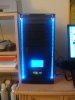
|
#2
|
||||
|
||||
|
LEDs do burn out. Sometimes quick, sometimes slowly. In your posted picture, what part is getting dimmer? There is no battery involved
|
|
#3
|
||||
|
||||
|
The entire rectangular window in the middle of the case, just above the buttons. Would this be a complete unit with a wire that I would have to replace?
|
|
#4
|
||||
|
||||
|
There might be an LED hot glued to the assembly, that can be replaced
|
|
#5
|
||||
|
||||
|
That sounds like the answer. I'll go looking for LEDs.
|
|
|
|
#6
|
|||
|
|||
|
Quote:
At times the panel would be ok and then it would be dim. Very difficult to remove the chassis front panel. I tried and thought better. However I did resolve the problem. I noticed while the computer was running, if I moved the wires connected to the front display panel it would go from dim to bright. I disconnected the molex feeding power to the display and used a different molex. Since I did that the display has stayed bright. I hope that will cure your problem as well. Let us know. |
|
#7
|
|||
|
|||
|
BTW you claim the panel is jusy a cosmetic gimmick. Not really........it furnishes cpu, hdd ,and graphic card temps in c/f degrees. It also displays the system fan operation.
|
|
#8
|
||||
|
||||
|
Thank you! I'll give it a try and let you know how it goes.
|
|
#9
|
||||
|
||||
|
Well, I tried changing molexes and fiddling with the wires. No luck, but I think that narrows it down.
|
|
#10
|
|||
|
|||
|
Quote:
I have a new case and tried to find a similar display to mod the case. Seems like they are only sold in a 3.5 bay type housings. And those I saw were c- - - , compared to the one like we have. |
![]() |
| Similar Topics | ||||
| Topic | Replies | Forum | ||
Red light on front panel
|
14 | Windows OS | ||
Front panel connection
|
1 | Audio and Video | ||
Front panel display? How does it sense???
|
14 | Processors and Motherboards | ||
usb front panel problem
|
4 | Other Hardware | ||
Converting USB 1.0 Front Panel to USB 2.0
|
9 | Other Hardware | ||
| Thread Tools | Search this Thread |
|
|
All times are GMT -4. The time now is 02:56 PM.


Red light on front panel