also @ TechSpot: Nortel's internal network "owned" by hackers for almost a decade
Welcome to the TechSpot OpenBoards. Please read the FAQ if you have any questions. Sign up or Login to participate.

Go Back   TechSpot OpenBoards > Hardware > Mobile Computing

Collaborate in the cloud with Office, Exchange, SharePoint, and Lync

Inspiron 5150 black & white stripped screen

Thread Tools Search this Thread
  #1  
Old 02-24-2009
Newcomer, in training
 
Member since: Feb 2009, 7 posts
Inspiron 5150 black & white stripped screen

greetings,

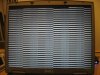
my inspiron 5150 got hang up on running symantec corporate scan, then after hard shutdown didn't boot okay, screen's shaky with shadows. I tried again to restart then on booting the screen is stripped black and white with very faint shadows, etc.

please, advise of you know of a solution.
  #2  
Old 02-24-2009
TechSpot Booster
 
Location: Odessa,Ukraine
Member since: Jun 2007, 570 posts
what videochip do you have in laptop?
  #3  
Old 02-24-2009
TechSpot Evangelist
 
Location: Four Corners, US
Member since: Dec 2006, 10,626 posts
Inspiron 5150 laptops seem to have a lot of trouble with the inverter for the screen. As they begin to fail, you can sometimes have a variety of black and white video problems, partial gray screens, and such.
But it could be something as simple as a video graphics cable that has become loose, or a video graphics device driver that has gone bad.
Run the 8-steps to search out infestations that you will find elsewhere on this forum. If Ok, and your software appears normal, then you have work to do.
Assuming your software is oK, I would first download the driver for your service tag from the Dell support site. Once you know where it is located on your computer after download, go to the Device Manager (Start->Control Panel->System->Hardware->Device manager) and remove or disable the old driver, then install the downloaded version.
If no change, remove your keyboard. Remove the battery and power cord. Then, this may require removing six or eight screws from the bottom of the laptop, and changing some sliders slightly hidden in among the keys. Once the keyboard is loose, carefully with gloved hands, remove the very thin ribbon cable, then re-connect it.
Reassemble everything.
Now, if the problem persists, you should consider the inverter. It is about the size of a fountain pen, and rests at the bottom of the screen. You can buy the inverter on eBay. New. Do not get a used one, and get the exact model for your Inspiron 5150. Only a few are interchangeable..
The tricky part is that many of the screws to the screen are hidden behind rubberized screw covers, and they can be damaged during removal, resulting in an ugly look when reassembled. You can usually find replacement screw covers on eBay.
Otherwise, there is no difficulty. This is not rocket science, but it will take perhaps an hour or two. Remove all the screws that hold the screen assembly. Be careful to note which screws go where, as there are as many as four or five different screws and can be as many as 18 to 24 altogether. The inverter is at the bottom held on by screw clamps and simply unplugs like a two or three-prong lightbulb.
Plug in the new inverter. Replace the screws. Presto. Working again.
  #4  
Old 02-24-2009
Newcomer, in training
 
Member since: Feb 2009, 7 posts
Quote:
Originally Posted by lamo View Post
what videochip do you have in laptop?
64mb nVidia GeForce FX Go5200 Video Memory Card, if this is what you mean to ask...

thanks for helping...
  #5  
Old 02-24-2009
Newcomer, in training
 
Member since: Feb 2009, 7 posts
Quote:
Originally Posted by raybay View Post
Inspiron 5150 laptops seem to have a lot of trouble with the inverter for the screen. As they begin to fail, you can sometimes have a variety of black and white video problems, partial gray screens, and such.
But it could be something as simple as a video graphics cable that has become loose, or a video graphics device driver that has gone bad.
Run the 8-steps to search out infestations that you will find elsewhere on this forum. If Ok, and your software appears normal, then you have work to do.
Assuming your software is oK, I would first download the driver for your service tag from the Dell support site. Once you know where it is located on your computer after download, go to the Device Manager (Start->Control Panel->System->Hardware->Device manager) and remove or disable the old driver, then install the downloaded version.
If no change, remove your keyboard. Remove the battery and power cord. Then, this may require removing six or eight screws from the bottom of the laptop, and changing some sliders slightly hidden in among the keys. Once the keyboard is loose, carefully with gloved hands, remove the very thin ribbon cable, then re-connect it.
Reassemble everything.
Now, if the problem persists, you should consider the inverter. It is about the size of a fountain pen, and rests at the bottom of the screen. You can buy the inverter on eBay. New. Do not get a used one, and get the exact model for your Inspiron 5150. Only a few are interchangeable..
The tricky part is that many of the screws to the screen are hidden behind rubberized screw covers, and they can be damaged during removal, resulting in an ugly look when reassembled. You can usually find replacement screw covers on eBay.
Otherwise, there is no difficulty. This is not rocket science, but it will take perhaps an hour or two. Remove all the screws that hold the screen assembly. Be careful to note which screws go where, as there are as many as four or five different screws and can be as many as 18 to 24 altogether. The inverter is at the bottom held on by screw clamps and simply unplugs like a two or three-prong lightbulb.
Plug in the new inverter. Replace the screws. Presto. Working again.

Thanks for helping,
Besides the stripped black and white, one on several tries, wxp pro boot up and sreen was flickering and performance was sluggish. It I could for once access to gmail, and just happens to windows uddate install/restart routine... it's not restarting now. I mean screen got stock with the zebra look... my gut feeling is that is something more than the screen... I also revert hd with go-back on a chance I had to see it on booting the machine... most of the times I tried (in the last 24hr, this happens yesterday) I just got stock and don't see wxp or roxio go back on booting the machine... I mentioned further details because for your level of expertise perhaps there is another screw I can twick inside? (or a hammer? LoL)

Thanks sincerely...
  #6  
Old 02-24-2009
TechSpot Booster
 
Location: Odessa,Ukraine
Member since: Jun 2007, 570 posts
lechuguin, that's because your problems are not familiar with broken LCD cable and inverter. this is videochip failure. i can answer exactly if you post here some pics of "screen mess". but don't be so sad. this videochip is located at detachable videocard, and you an buy such one at ebay or somewhere else.
  #7  
Old 02-24-2009
Newcomer, in training
 
Member since: Feb 2009, 7 posts
thank you Iamo,

Please, find enclosed a pic.

Jaume
Attached Images
File Type: jpg IMG_2978.jpg (34.7 KB, 5 views)
  #8  
Old 02-25-2009
TechSpot Booster
 
Location: Odessa,Ukraine
Member since: Jun 2007, 570 posts
clear as a day this is videochip failure. check if this laptop shows something to external monitor. if you'll see exact picture as for LCD, so dismantle the laptop and start to look for videocard.
  #9  
Old 02-25-2009
Newcomer, in training
 
Member since: Feb 2009, 7 posts
thank you, I really appreciate your help.
I'll proceed as advised; and post progress.
regards,
Jaume
  #10  
Old 02-25-2009
Newcomer, in training
 
Member since: Feb 2009, 7 posts
I removed the video card; yet, I only could find the "nVidia GeForce FX Go5200 64MB Video Card" on ebay us (I'm in london, uk) for a total (incl. shipment) of 60gbp.

did you mean that before proceeding to replace the video card, to check if my pc performs with an external monitor? (I actually don't have any or cable, only my other laptop I am using now)

this inspiron 5150 it'll make 5yrs on july09; meant to get a replacement towards the summer (now it's not a good time). I am not sure though to throwing time and money on trying to resolve this.

Would you please have a final advise/thoughts?

thank you...
  #11  
Old 02-25-2009
TechSpot Booster
 
Location: Odessa,Ukraine
Member since: Jun 2007, 570 posts
well, as for me, it's time to buy new laptop. i think, that there's no need to spend 60gbp for new videocard for this laptop. as for this case, yes, i'm sure, that replacement of videocrad will help you.
  #12  
Old 02-25-2009
Newcomer, in training
 
Member since: Feb 2009, 7 posts
thank you very much. I really appreciate your help.

all the best, Iamo
Closed Thread

Similar Topics
Topic Replies Forum
Black and white screen on the TV 3 Audio and Video
Black screen with white flashing underscore 3 Windows OS
BLACK SCREEN + white cursor 4 Windows OS
After bios, black screen with white cursor 4 Windows OS
Black and White screen on X-card 1 Audio and Video

Thread Tools Search this Thread
Search this Thread:

Advanced Search
All times are GMT -4. The time now is 07:28 AM.