also @ TechSpot: Seven Intel P55 Motherboards Compared, Reviewed
Welcome to the TechSpot OpenBoards. Please read the FAQ if you have any questions. Login to participate.

Go Back   TechSpot OpenBoards > TechSpot Community > The Meeting Spot - Chat & Socialize

Tales from the toolroom - the drive that came in from the cold

Reply
Bookmark Thread Tools
  #1  
Old 05-27-2009
AlbertLionheart's Avatar
TechSpot Guru
 
Location: UKkers
Member since: Jun 2007, 2,516 posts
System specs
Tales from the toolroom - the drive that came in from the cold

Just in case someone did not know of this little trick - I had a client machine with a dying hard drive (sounded a bit like a chicken on speed) which sometimes refused to show up on the BIOS and would not allow access when it did show up.
I put it in the freezer overnight at about -17C and in a waterproof bag: this morning I fired up the wksps machine with the drive and another new one attached. The supposedly dead drive was packed between two trays of ice to keep it as cold as possible for as long as possible - best I could do without liquid nitrogen. Ghosted the old to the new which took about 35 mins and it worked. I allowed the dead drive to warm up and once again it clucked away and refused to speak to anyone. Point made - this trick does work.
Reply With Quote
  #2  
Old 05-27-2009
bobcat's Avatar
TechSpot Member
 
Location: South Europe
Member since: Sep 2008, 252 posts
Advice on HDD's

The trick is worth noting, as it may come useful. In full sincerity, I didn’t know it and wouldn’t have suspected it, since motors generally don’t run smoothly at very low temperatures. Next time my car engine refuses to start on a cold winter morning, I’ll cover it with ice.

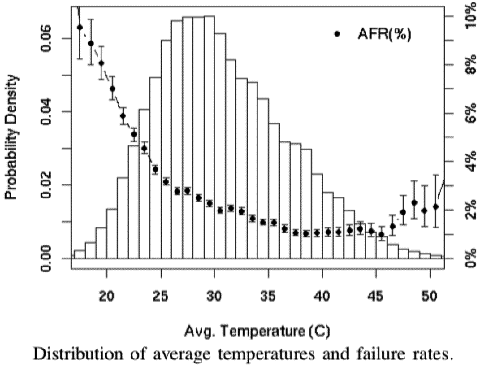
Furthermore, contrary to common belief, high temperatures don’t seem to harm the HD’s. In its extensive study on HDD failure, Google found that:
Quote:
In the lower and middle temperature ranges, higher temperatures are not associated with higher failure rates.


http://storagemojo.com/2007/02/19/go...re-experience/

I take the opportunity to also contribute some advice to users. Many "experts" recommend that the computer should not be switched off e.g. at night, to keep its temperature constant. This is bad medicine for the HDD, which needs the rest.
Reply With Quote
To remove this ad, sign in. To register for a new account, click here.
  
  #3  
Old 05-27-2009
captaincranky's Avatar
TechSpot Evangelist
 
Member since: Oct 2006, 3,484 posts
Quote:
Originally Posted by bobcat View Post
I take the opportunity to also contribute some advice to users. Many "experts" recommend that the computer should not be switched off e.g. at night, to keep its temperature constant. This is bad medicine for the HDD, which needs the rest.
These are more than likely the same "experts" that suggest not turning the computer off due to "thermal cycling" off the CPU, so that the thermal paste doesn't wear out.

These "experts" are usually having their electric bill paid by their parents.
Reply With Quote
  #4  
Old 05-27-2009
Matthew's Avatar
TechSpot Elite
 
Location: New York
Member since: Feb 2008, 2,879 posts
System specs
@bobcat and captaincranky: Not to mention the common theory that by frequently shutting down/turning on the PC, its components expand and contract, thus reducing the lifespan. Sounds somewhat logical but in reality, people so readily chuck their PCs after a year or two of use, what could any minor decrease in the length of life matter?

Anyhow, I always enjoy reading your "Tales from the toolroom" posts, AlbertLionheart.
Reply With Quote
  #5  
Old 05-27-2009
Rage_3K_Moiz's Avatar
TechSpot Evangelist
 
Location: Sharjah, UAE
Member since: Sep 2005, 6,582 posts
System specs
I've tried it numerous times, and it always works like a charm. The drive heads contract off the surface of the drive due to the cold, allowing you to read the info off easily.
Reply With Quote
  #6  
Old 05-27-2009
captaincranky's Avatar
TechSpot Evangelist
 
Member since: Oct 2006, 3,484 posts
I'll just offer this as a testimonial, to what I'm not sure.

I have an Emachine (Matx case) 1 90mm fan, with a Prescot P-4. It's approaching 4 1/2 years of age. The OEM HDD (WD160 SATA 1), the original mobo, Intel 915GAG, and OEM CPU cooler are all working just fine. So, maybe it's on borrowed time compared to the 2 year estimate, but I'm keeping it until it falls out from under me. Er......just not running 24/7, I have to pay the electric bills.
Reply With Quote
  #7  
Old 05-27-2009
LookinAround's Avatar
TechSpot Evangelist
 
Location: Chicago-land, IL
Member since: Apr 2007, 3,782 posts
Quote:
Originally Posted by AlbertLionheart View Post
Just in case someone did not know of this little trick - I had a client machine with a dying hard drive (sounded a bit like a chicken on speed) which sometimes refused to show up on the BIOS and would not allow access when it did show up.
I put it in the freezer overnight at about -17C and in a waterproof bag: this morning I fired up the wksps machine with the drive and another new one attached. The supposedly dead drive was packed between two trays of ice to keep it as cold as possible for as long as possible - best I could do without liquid nitrogen. Ghosted the old to the new which took about 35 mins and it worked. I allowed the dead drive to warm up and once again it clucked away and refused to speak to anyone. Point made - this trick does work.
My 2cents...
I've never had occasion to try this trick myself.. but i have seen others post (in TechSpot as well as other forums) doing the same and getting the same positive results. So I'd say is definitely something to remember and try if ever needed!
Reply With Quote
  #8  
Old 06-07-2009
Newcomer, in training
 
Member since: Feb 2009, 31 posts
I've used that trick several times with perhaps 1 in 3 or 4 success, not bad considering it's a last ditch attempt after software. One drive actually leaking metal shavings came back long enough to get the user's personal data. The tech who originally taught me that attributed its success to contracting the disk material (this was back when jostling the PC had a reasonable chance of head contacting disk, thereby creating a tiny burr.) I've also heard it attributed to contraction of ICs restoring continuity and to contracting bearings restoring the correct rotating speed (not a problem I'd think with today's disks which use embedded hardware for low level formatting.) I have no idea if any or all of these are correct, but it is sometimes useful and always worth trying if there's data worth spending some time recovering, but not worth the high cost of professional recovery. The sealed plastic bag tip is good too. I like to add a little desiccant or dry rice to soak up any moisture (which would expand when frozen) for a couple hours before the freezing, although I have no idea if either of these makes any real difference.

Love the Tales from the toolroom, Al. Good stuff, thanks!
Reply With Quote
  #9  
Old 06-09-2009
Newcomer, in training
 
Location: Rosarito, BC, Mexico
Member since: Apr 2009, 41 posts
Quote:
Originally Posted by bobcat View Post
Furthermore, contrary to common belief, high temperatures don’t seem to harm the HD’s. In its extensive study on HDD failure, Google found
The highest failure rates occurred at more or less normal room temperatures, if I read the graph correctly. Is it possible a higher failure rate at higher temperatures was masked by the simple fact that most drives operate right around room temperature most of the time?

The advice to avoid failures by keeping drives always on to avoid peeling the magnetic coating off the disk by repeated expansion and contraction - that made better sense when I first heard it in the mid-1980s, when a 20MB Seagate cost $250 and the tech was still new. *Everything* was less reliable in those days and you couldn't find a meaningful MTBF figure because everything failed all the time for any reason at all. It makes a LOT less sense now.
Reply With Quote
To remove this ad, sign in. To register for a new account, click here.
  
Reply

Tip: Download Advanced SystemCare 3 Freeware - 1 Click A Day to Clean, Repair, Protect & Optimize your PC.

Thread Tools


Similar Topics
Topic Category Replies Last Post
Tales from the toolroom - fun with backups The Meeting Spot - Chat & Socialize 5 04-06-2009 10:25 PM
Tales from the Toolroom - Kaspersky is innocent! The Meeting Spot - Chat & Socialize 1 03-23-2009 09:35 AM
Tales from the toolroom - AOL snake in the grass The Meeting Spot - Chat & Socialize 5 03-21-2009 06:39 AM
Tales from the toolroom - storage problems The Meeting Spot - Chat & Socialize 0 03-18-2009 02:45 PM
Tales from the toolroom - and you did what to it? The Meeting Spot - Chat & Socialize 8 02-26-2009 02:28 PM


All times are GMT -4. The time now is 12:19 PM.