Welcome to the TechSpot OpenBoards. Please read the FAQ if you have any questions. Login to participate.
|
|||||||
Ran 8 Steps, please see logs attached
![]() |
|
|
|
Thread Tools |
|
#1
|
|||
|
|||
|
Ran 8 Steps, please see logs attached
Hi,
I seem to have some rather nasty virus going on. The main symptoms I've noticed are: 1.) Randomly closing out IE (sparingly used anyway) and Firefox with no error message during normal use (i.e., just sending me back to the desktop randomly) 2.) Sending me to malware/random search sites when clicking on seemingly harmless Google search result links Any input you could give me on helping me remove this stuff would be helpful. Please let me know if more info is needed or if I should run a certain scan again. Thank you very, very much! Jim |
|
#2
|
||||
|
||||
|
Hi,
You seem to be running Avira and Symantec, unistall one of them. If you have paid for a subscription for Symantec then I suggest that you keep it.
|
|
|
|
#3
|
|||
|
|||
|
Hi,
Thank you for your quick reply. Attached are the OTL logs, per your request. Please let me know what you think the next steps might be. I appreciate your help. |
|
#4
|
||||
|
||||
|
Hi,
Uninstall the following, BitTorrent DNA BitTorrent Run OTL
Download Combofix to your desktop from one of these locations: Link 1 Link 2 Link 3
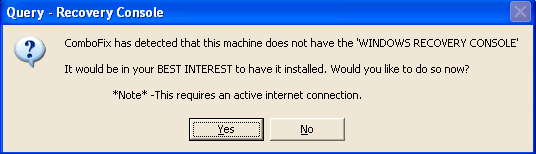
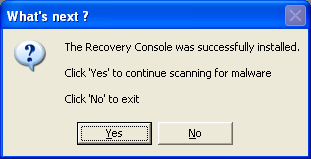
Notes: 1. Do not mouse-click Combofix's window while it is running. That may cause it to stall. 2. ComboFix may reset a number of Internet Explorer's settings, including making I-E the default browser. 3. Combofix prevents autorun of ALL CD, floppy and USB devices to assist with malware removal & increase security. If this is an issue or makes it difficult for you -- please tell your helper. 4. CF disconnects your machine from the internet. The connection is automatically restored before CF completes its run. If CF runs into difficulty and terminates prematurely, the connection can be manually restored by restarting your machine. |
|
#5
|
|||
|
|||
|
Hello again,
Quick question regarding Combofix: it's popping up with an error advising that I turn off Symantec/Norton. I right-clicked it in the tray and disabled Auto-Protect, but it still doesn't look like Combofix likes this. Do you have any suggestions regarding this, or is it not really a big deal? As a sort of side note, I think it's possible that my Symantec is damaged by the malware anyway, but... Anyway, thank you again for your assistance, I do appreciate it. |
|
#6
|
||||
|
||||
|
Lets try it this way,
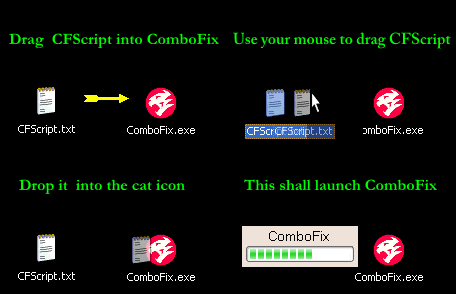
Run CFScript Open notepad and copy/paste the text in the code box below into it: NOTE* make sure to only highlight and copy what is inside the quote box nothing out side of it. Also .. Pay particular attention to this :- Make sure the word KillAll:: is on the first line of the text file you save (no blank line above it, & no space in front of it) Quote:
Then drag the CFScript.txt into ComboFix.exe as you see in the screenshot below. ![]() This will start ComboFix again. After reboot, (in case it asks to reboot), post the contents of Combofix.txt in your next reply together with a fresh HJT log. |
|
#7
|
|||
|
|||
|
Thanks. ComboFix was still giving me an error regarding Symantec ("ComboFix has detected the following real-time scanner(s) to be active..."), even after I had disabled the Auto-Protect feature, but I ran it anyway in Safe Mode. Attached are the logs for review. Thanks yet again.
|
|
#8
|
|||
|
|||
|
Update: Google search result click-throughs are still redirecting to random search/spam sites. Stuff like "c.php," "click.php" and "findwhat.dll" show up in Firefox's immediate browsing history. Thanks again for your help...let's kick this thing!
|
|
#9
|
||||
|
||||
|
Did you do the OTL script?
NORTON ANTIVIRUS Please navigate to the system tray on the bottom right hand corner and look for a sign.
Run CFScript Open notepad and copy/paste the text in the code box below into it: NOTE* make sure to only highlight and copy what is inside the quote box nothing out side of it. Also .. Pay particular attention to this :- Make sure the word KillAll:: is on the first line of the text file you save (no blank line above it, & no space in front of it) Quote:
Then drag the CFScript.txt into ComboFix.exe as you see in the screenshot below. ![]() This will start ComboFix again. After reboot, (in case it asks to reboot), post the contents of Combofix.txt in your next reply together with a fresh HJT log. Please download GooredFix from one of the locations below and save it to your Desktop Download Mirror #1 Download Mirror #2
Run Kaspersky Online AV ScannerIn order to use it you have to use Internet Explorer. Go to Kaspersky and click the Accept button at the end of the page. Note for Internet Explorer 7 users: If at any time you have trouble with the accept button of the licence, click on the Zoom tool located at the right bottom of the IE window and set the zoom to 75 %. Once the license accepted, reset to 100%.
|
|
|
|
#10
|
|||
|
|||
|
I'm almost certain that I did run that OTL script you posted--should I run it again?
Attached are some new logs. The Kaspersky scan took 3.5 hours to complete, but unfortunately when I went to save the report I am getting an "error on page" message at the bottom-left of IE when I click the Save Report As... button. It won't let me save it --pretty frustrating. It picked up a lot of infected objects. I'll try running it again and hopefully be able to save the log. |
|
#11
|
|||
|
|||
|
Success with saving the Kaspersky scan--it is attached. Thanks!
|
|
#12
|
||||
|
||||
|
This should remove the remaining infected entries,
Note:- one of the items was a pst file that was infected with a few items, it would be best to remove this but if you have e mails that you want then this is up to you. Empty the quarantine folder for Symantec. OTL by OldTimer Run OTL.exe
|
|
#13
|
|||
|
|||
|
Thanks for the reply--looks like we're almost finished.
One quick question, though--I don't mean to get off track here, but do you know if it's possible to clean the infected .pst file? Is there a way to identify which message(s) are infected and delete them separately, as opposed to deleting the entire file (as there may be some messages inside worth saving)? |
|
#14
|
||||
|
||||
|
unfortunately no.
It could be any of them. Best chance at getting clean is to delete it. |
|
#15
|
|||
|
|||
|
OK; I've attached the OTL log. Unfortunately, I didn't check the boxes beside LOP Check and Purity before running the script, because I forgot about/didn't see that step until after I had pasted in and ran the custom fix--is that OK? Thanks again.
|
|
#16
|
|||
|
|||
|
kritius, thanks for your help. Do you think I'm in the clear now?
(If anyone else wants to jump in and give their thoughts on my last OTL log, be my guest...I had been working with kritius, though, as you can see. Thanks!) |
![]() |
| Thread Tools | |
|
|
| Similar Topics | ||||
| Topic | Category | Replies | Last Post | |
| 8 Steps completed, logs attached | Virus & Malware removal | 20 | 04-03-2009 04:07 AM | |
| 8 Steps Done, Logs Attached | Virus & Malware removal | 0 | 03-07-2009 01:50 PM | |
| 8 Steps logs attached | Virus & Malware removal | 2 | 02-24-2009 02:02 PM | |
| Completed 8 steps, logs attached | Virus & Malware removal | 5 | 01-27-2009 11:34 AM | |
| 8 steps completed - logs attached | Virus & Malware removal | 6 | 01-01-2009 11:35 PM | |
All times are GMT -4. The time now is 06:06 AM.


sign.
Run Kaspersky Online AV Scanner