Welcome to the TechSpot OpenBoards. Please read the FAQ if you have any questions. Login to participate.
|
|||||||
Overclocking E8400 Suggestions
![]() |
|
|
|
Thread Tools |
|
#21
|
||||
|
||||
|
okay, can i raise my FSB even with my stock cooler? And would synchronizing the RAM with the FSB decrease the memory performance?
|
|
#22
|
||||
|
||||
|
yeah you should be fine, just don't overdo it. Apart from my Q6600 i own a E6550 and i overclocked it from the stock 2.33 to 3.22, using max multiplier and raising FSB... vcore at 1.328 and all using a stock cooler.
I think to 3.4 or 3.6 is fine as long as you don't volt your cpu too high. Undervolting will only cause your pc to reboot then have the values resetted but over volting can be a bit risky, and it also increases core temp so i suggest raising core temp only when needed, i.e. to gain a bit more stability. |
|
|
|
#23
|
||||
|
||||
|
Should i leave volting to auto?
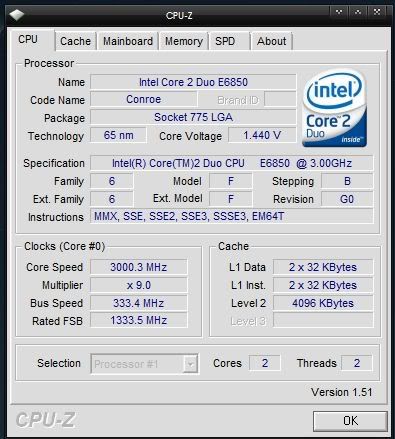
Also im having some problems...I put the frequencies to "linked", Put the ratio 1:1, and increased FSB 5 mhz, but when i reload, the initial bios screen doesnt appear until i restart manually, and when i do restart, CPU-Z doesnt show an overclocked cpu.. |
|
#24
|
||||
|
||||
|
i don't recommend auto volting, but thats weird. might have something to do with you not having performance rams.
even then they should take thing just fine. try linking, testing if it works, leaving the voltage at stock then slowly increasing fsb after that. odd case you've got there but my guess is vcore issues |
|
#25
|
||||
|
||||
|
Quote:
have you seen his cpuz shots?BTW, +5mhz is not any overclock really. |
|
#26
|
||||
|
||||
|
i didn't pay much attention to vcore but i'm guessing auto did something >.> and yeah it doesn't make sense that 5 mhz and pc won't boot, thats why i'm blaming auto volt lol
|
|
#27
|
||||
|
||||
|
why is you core voltage so high 1.44 is to high
|
|
#28
|
||||
|
||||
|
I had the same thought actually, though i took his word when he said he dropped them to stock.
|
|
#29
|
||||
|
||||
|
i guess 1.44 is stock because i loaded bios defaults.. Should i manually set it?
|
|
|
|
#30
|
||||
|
||||
|
Also, when i enabled linking it booted fine, but as soon as i put the ram ratio to 1:1, im getting the boot problem, i upgraded to 4GB ram recently if that makes a difference...
|
|
#31
|
||||
|
||||
|
if you didn't manually push it up then it should be stock voltages...
I did some small research and i'm starting to think that its 1.44 by defaults... must've been the processors at the time. Don't touch the vcore, try just pushing the FSB up. Leave the Vcore to default or manually set it to default. I actually see some people with 1.41 vcores on their CPU-Z. hmmm what kind of rams are you using? are they of the same spec? i.e. if 4 dimms all 4 DDR2-800? I'm guessing your Rams don't like being overclocked much... |
|
#32
|
||||
|
||||
|
Im using four of these:
http://www.newegg.com/Product/Produc...82E16820146599 All running in dual channel. Also should i leave it at "linking"? I also set the overclocking option to manual. Is that right? I could also choose between "AI Overclocking" where i can increase overclocking by percentages. |
|
#33
|
||||
|
||||
|
I'm not familiar with AI Overclocking since i use a Gigabyte board, but yes, use manual overclocking. It may be that the rams don't like having their bus speeds changed... you can leave them alone for now, focus on one bit at a time.
With everything at defaults, pump up the fsb by increments of 0.1 ghz or so (usually i like to take big jumps for the first time, since i know its possible) though you shouldn't stretch it too far. You're not using any overclocking heatsinks so i'd suggest 3.3 Ghz safe for starters. Go into windows each time and check stability. If unstable, add a little or less vcore and see how it affects, if not turn down the fsb or sometimes even turn up. I've heard of strange occasions of cpus not liking certain speeds i.e. will boot at 3.2ghz, will not boot at 3.3. but will boot at 3.4ghz Play around but be gentle with your numbers. Once you find a good core speed and is stable, start tampering with the 1:1 ratio of your ram. My guess would be that 3.6ghz be your golden number. 400 FSB, 400 Mhz ram, so the full DDR2 800 at synchronous. |
|
#34
|
||||
|
||||
|
Okay, thanks alot for the assistance. I will see what i can do
|
|
#35
|
||||
|
||||
|
Hmm.. As i increase my FSB my core voltage is increasing also... which is giving me some pretty high cpu temps. For example i only increase FSB 10 and it set it to 1.536.
|
|
#36
|
||||
|
||||
|
The E6850 has a VID of 1.35V most of the time. VID = default voltage for those people that didn't know that
|
|
#37
|
||||
|
||||
|
So dustin, are you suggesting mine is too high?
|
|
#38
|
||||
|
||||
|
sounds like you have yours set to auto voltage, yeah as dustin said throw your voltage back down to 1.35
|
|
#39
|
||||
|
||||
|
Quote:
Since you recently upgraded to 4 gigs, I don't know what that link is for, but that is low quality RAM, probably the same low quality you have right now, don't buy it. |
![]() |
| Thread Tools | |
|
|
| Similar Topics | ||||
| Topic | Category | Replies | Last Post | |
| Help o/c P5Q-E with E8400 | Overclocking, Cooling and Modding | 11 | 03-24-2009 07:28 PM | |
| E8400 Wolfdale motherboard Suggestions Needed | Processors, Chipsets and Motherboards | 2 | 09-16-2008 11:32 PM | |
| Overclocking my E8400 Intel duo core | Overclocking, Cooling and Modding | 3 | 07-21-2008 08:44 PM | |
| Overclocking suggestions wanted | Processors, Chipsets and Motherboards | 0 | 03-13-2006 09:10 PM | |
| Overclocking Suggestions/Advice | Processors, Chipsets and Motherboards | 16 | 03-13-2002 09:52 PM | |
All times are GMT -4. The time now is 07:16 PM.


have you seen his cpuz shots?