Welcome to the TechSpot OpenBoards. Please read the FAQ if you have any questions. Login to participate.
|
|||||||
Multiple instances of iexplore.exe running in task manager
![]() |
|
|
|
Thread Tools |
|
#1
|
|||
|
|||
|
Multiple instances of iexplore.exe running in task manager
I am not very tech savvy but I have several instances of iexplore.exe running in my task manager. In addition, I will get random audio coming from what I can only assume are pop-up adds running in internet explorer. I downloaded hijack this and have attached the log. I ran this log thru an automated analyzer and tried to fix the issues identified but I am still having the issues and the items that I fix keep coming back when I run another HJT scan.
HELP |
|
#2
|
|||
|
|||
|
I guess everyone is laughing at the newbie. Oh well, I'm in the process of tying the 8 steps. Maybe that will bear some fruit.
|
|
|
|
#3
|
|||
|
|||
|
No one is laughing!
2 Iexplorers is normal for IE8. Get us the 8 Steps! Mike |
|
#4
|
|||
|
|||
|
I guess my initial post was a bit incomplete. The 2 instances run when I am not browsing. When I end the process, they come back and if I leave them running for any length of time I end up hearing streaming video in the the background and then eventually the computer crashes. Sorry for the smart alec remark, but I am a bit frustrated at this point.
|
|
#5
|
|||
|
|||
|
OK that clarified it so get us the 8 Step logs.
Mike |
|
#6
|
|||
|
|||
|
I'm having issues getting the Malwarebytes and Super AntiSpyware to load on my computer. I need to download the Malware software twice to get it to complete the install but once complete the software wont run. The Anti Spyware just wont install.
|
|
#7
|
|||
|
|||
|
The Malware program gets hung up once it gets to the finishing installation. The Antispyware installs ok but when I try to run it encounters and error and shuts down.
|
|
#8
|
|||
|
|||
|
Boot to Safe Mode with networking and try again!
Mike |
|
#9
|
|||
|
|||
|
OK that worked. Here are the logs. Thanks in advance for having a look see.
|
|
|
|
#10
|
|||
|
|||
|
Oh Geeze! That's what Jed Clampett meant by "Wheee Doggie!
Update and run both MBAM and SAS again as both had and removed much malware. We now need to confirm they find no more. Post the logs if they find anything. We are looking for clean logs. Try in normal mode but if you have problems go Safe mode. Only when you have clean logs above do the below..... Download ComboFix Get it here: http://download.bleepingcomputer.com/sUBs/ComboFix.exe Or here: http://subs.geekstogo.com/ComboFix.exe Double click combofix.exe follow the prompts. Install Recovery Console if connected to the Internet! When finished, it will open a log. Attach the log and a new HJT log in your next reply. Note: Do not click combofix's window while its running. That may cause it to stall. Last a new HJT log! Mike |
|
#11
|
|||
|
|||
|
OK here are the logs. The Combofix did not give me the option to install recover console
|
|
#12
|
|||
|
|||
|
Any response? What else can I do to get the computer back to normal?
|
|
#13
|
|||
|
|||
|
Once I have completed this process, will it be safe to back-up my data and application files (Word, Xcel, etc.) to an external drive for transfer to a new system if necessary.
|
|
#14
|
||||
|
||||
|
I'll try to finish you up. There are a lot of users with malware and fewer volunteers to help them!
Please run the Norton Removal Tool for the left over Norton Internet Security Suite Service: http://service1.symantec.com/SUPPORT...05033108162039 After you have run that tool, check this and make sure the entry is either gone or disabled: Open IE> Tools> Manage add-ons> there are 2 sections 1. add-ons currently used and 2. add-ons previously used> look in both sections for the Symantec Download Manager which may show as symdlmgr> highlight the entry> Disable. Quote:
It appears that your router may not be installed or configured correctly due to this incomplete entry: Quote:
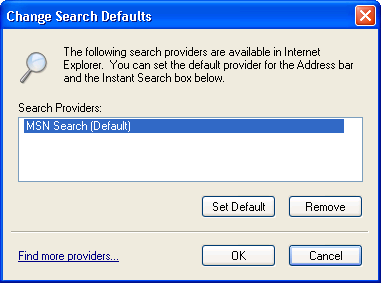
I recommend you remove the Ask Bar. If it is listed as the default search engine, change that: Internet Options> General tab> See 2/3 of the way down the section "change search defaults"? That's what you want. Click on the button "Settings" right next to that and you'll see: ![]() Click on the small text link "find more providers" on the lower left corner> Choose Google. (Note: AskBar might not be set as the default) Reopen HijackThis to [b]do system scan only] and check the following entries if present: O2 - BHO: AskBar BHO - {201f27d4-3704-41d6-89c1-aa35e39143ed} - C:\Program Files\AskBarDis\bar\bin\askBar.dll O3 - Toolbar: Ask Toolbar - {3041d03e-fd4b-44e0-b742-2d9b88305f98} - C:\Program Files\AskBarDis\bar\bin\askBar.dll O4 - Global Startup: NETGEAR WG111T Smart Wizard.lnk = ? O4 - Global Startup: NETGEAR WG111v2 Smart Wizard.lnk = ? O16 - DPF: {6A344D34-5231-452A-8A57-D064AC9B7862} (Symantec Download Manager) - https://webdl.symantec.com/activex/symdlmgr.cab Close all Windows except hijackThis and click on Fix Checked Boot into Safe Mode
All Ask entries All Symantec/Norton entries Apply> OK Control Panel> Add/Remove Programs> highlight any Ask entries> Uninstall Then right click on Start> Explore> Programs> right click on any Askfolder> Delete. Reboot the computer. Ignore and close the nag message you will get after checking 'don't show this message again.' Please run a full system scan with AVG. Save the log and attach to your next reply. Follow with new scan from HijackThis. Attach new logs. Do any of the original problems still exists? Which? Are there any new problems? What? EDIT: You'll see this when you come back with the logs. We are glad to help and appreciate it when what we suggest is followed. And it can be a team effort if one member is more experienced in a particular system area. Last edited by Bobbye; 06-25-2009 at 01:46 PM.. Reason: Add 'You're welcome.' |
|
#15
|
|||
|
|||
|
Thank you, I will run these processes this evening and post the requisite logs. The assistance I am recieving from the forum is greatly appreciated, thanks again.
|
|
#16
|
|||
|
|||
|
Here are the logs requested. The AVG log was an issue finding and removing two threats but it would only let me save it in a csv file. I have copied the results below. I did not have Hijackthis fix the "04-Global Startup NETGEAR WG111v2 Smart Wizard.1nl=?" because I am running a little unorthodox since the router is not connected to my PC. I am connected to the router wireless via a plug in receiver. The multiple instances of iexplore.exe are gone and I think all symantec and Ask entries seem to be gone. The restart of the computer takes forever with all the new items (Adware, Comodo, etc) and my wireless connection is a little unstable. Any other suggestions
"C:\Program Files\Trend Micro\HijackThis\backups\backup-20090617-065451-107.dll";"Virus found Dropper.Rozena";"Moved to Virus Vault" "C:\WINDOWS\system32\corpo.dll";"Virus found Dropper.Rozena";"Deleted" |
|
#17
|
|||
|
|||
|
Computer is still a little unstable, especially the wireless connection and internet explorer is very slow to load.
|
|
#18
|
||||
|
||||
|
I have already addressed the wireless connection. Did you follow my suggestion?
Quote:
Please reopen HijakThis to 'do system scan only' Put check by each of the following. Do not click on FixChecked untill you have finished checking all of the entries here: [b]C:\Program Files\Java\jre6\bin\jqs.exe C:\Program Files\Common Files\Microsoft Shared\VS7DEBUG\MDM.EXE C:\Program Files\Common Files\Real\Update_OB\realsched.exe C:\Program Files\iTunes\iTunesHelper.exe C:\Program Files\Logitech\Logitech WebCam Software\LWS.exe C:\Program Files\Uniblue\ProcessQuickLink 2\ProcessQuickLink2.exe C:\Program Files\NETGEAR\WG111v2\WG111v2.exe C:\Program Files\iPod\bin\iPodService.exe C:\Program Files\Common Files\Logishrd\LQCVFX\COCIManager.exe O2 - BHO: Google Toolbar Notifier BHO - {AF69DE43-7D58-4638-B6FA-CE66B5AD205D} - C:\Program Files\Google\GoogleToolbarNotifier\3.1.807.1746\swg.dll O2 - BHO: Java(tm) Plug-In 2 SSV Helper - {DBC80044-A445-435b-BC74-9C25C1C588A9} - C:\Program Files\Java\jre6\bin\jp2ssv.dll O3 - Toolbar: HP view - {B2847E28-5D7D-4DEB-8B67-05D28BCF79F5} - c:\Program Files\HP\Digital Imaging\bin\HPDTLK02.dll O4 - HKLM\..\Run: [TkBellExe] "C:\Program Files\Common Files\Real\Update_OB\realsched.exe" -osboot O4 - HKLM\..\Run: [AppleSyncNotifier] C:\Program Files\Common Files\Apple\Mobile Device Support\bin\AppleSyncNotifier.exe O4 - HKLM\..\Run: [QuickTime Task] "C:\Program Files\QuickTime\QTTask.exe" -atboottime O4 - HKLM\..\Run: [iTunesHelper] "C:\Program Files\iTunes\iTunesHelper.exe" O4 - HKLM\..\Run: [Adobe Reader Speed Launcher] "C:\Program Files\Adobe\Reader 9.0\Reader\Reader_sl.exe" O4 - HKLM\..\Run: [LogitechQuickCamRibbon] "C:\Program Files\Logitech\Logitech WebCam Software\LWS.exe" /hide O4 - HKLM\..\Run: [SunJavaUpdateSched] "C:\Program Files\Java\jre6\bin\jusched.exe" O4 - HKLM\..\Run: [MSConfig] C:\WINDOWS\pchealth\helpctr\Binaries\MSCONFIG.EXE /auto O4 - HKCU\..\Run: [MSMSGS] "C:\Program Files\Messenger\msmsgs.exe" /background O4 - HKCU\..\Run: [Uniblue ProcessQuickLink 2] "C:\Program Files\Uniblue\ProcessQuickLink 2\ProcessQuickLink2.exe" /autostart O4 - Global Startup: NETGEAR WG111v2 Smart Wizard.lnk = ? O9 - Extra button: (no name) - {08B0E5C0-4FCB-11CF-AAA5-00401C608501} - C:\Program Files\Java\jre6\bin\jp2iexp.dll O9 - Extra 'Tools' menuitem: Sun Java Console - {08B0E5C0-4FCB-11CF-AAA5-00401C608501} - C:\Program Files\Java\jre6\bin\jp2iexp.dll O16 - DPF: {6F750202-1362-4815-A476-88533DE61D0C} (Kodak Gallery Easy Upload Manager Class) - http://www.kodakgallery.com/download...2/axofupld.cab O16 - DPF: {AB86CE53-AC9F-449F-9399-D8ABCA09EC09} (Get_ActiveX Control) - https://h17000.www1.hp.com/ewfrf-JAV...oadManager.ocx O18 - Protocol: bwfile-8876480 - {9462A756-7B47-47BC-8C80-C34B9B80B32B} - C:\Program Files\Logitech\Desktop Messenger\8876480\Program\GAPlugProtocol-8876480.dll O23 - Service: Google Updater Service (gusvc) - Google - C:\Program Files\Google\Common\Google Updater\GoogleUpdaterService.exe O23 - Service: Intuit Update Service (IntuitUpdateService) - Intuit Inc. - C:\Program Files\Common Files\Intuit\Update Service\IntuitUpdateService.exe O23 - Service: iPod Service - Apple Inc. - C:\Program Files\iPod\bin\iPodService.exe O23 - Service: Java Quick Starter (JavaQuickStarterService) - Sun Microsystems, Inc. - C:\Program Files\Java\jre6\bin\jqs.exe O23 - Service: Process Monitor (LVPrcSrv) - Logitech Inc. - C:\Program Files\Common Files\LogiShrd\LVMVFM\LVPrcSrv.exe O23 - Service: Pml Driver HPZ12 - HP - C:\WINDOWS\system32\HPZipm12.exe [b] Please close all Windows except for HijackThis and click on Fix Checked. Boot into Safe Mode[*] Restart your computer and start pressing the F8 key on your keyboard.[*] Select the Safe Mode option when the Windows Advanced Options menu appears, and then press ENTER. Go to Start> Run> type in msconfig> enter> Selective Startup> Startup tab> UNCHECK each of the following if present: ALL Adobe entries ALL Java entries realsched.exe iTunesHelper.exe LWS.exe ProcessQuickLink2.exe \bin\iPodService.exe Logishrd (web cam) QCVFX\COCIManager.exe Google Toolbar Notifier ALL HP\Digital Imaging entries realsched.exe AppleSyncNotifier.exe QTTask.exe iTunesHelper.exe" Reader_sl.exe" LWS.exe and any other Web Cam entries jusched.exe MSCONFIG.EXE VS7DEBUG (MDM.EXE) ProcessQuickLink2.exe ALL Kodak Gallery entries Google updater Intuit Updater iPod Then: Start> Run> type in services.msc> find each of the following Services and hange Startup type as given: Google Updater Service (gusvc)> Disable Intuit Update Service (IntuitUpdateService)> Manual iPod Service> Manual Java Quick Starter (jqs)> Disable Process Monitor (LVPrcSrv)> Manual Pml Driver HPZ12 > Manua Handling individual programs (still in Safe Mode): JAVA:
Reboot into Normal Mode: NOTE: ignore the nag message nd close after checking 'don't show this messge again.' Stay in Selective startup. Let me know how the system runs after this. |
|
#19
|
|||
|
|||
|
The computer boots up much faster and seems to be running a bit more efficiently, until I run internet explorer. I tried to reply to this post using IE and was unable to send the reply. In firefox there are no problems. Maybe my system is a little underpowered to run IE 8. Anyway, IE is not my browser of choice so as long as it causes no issues while its not running I really don't care. I am still running Comodo, Super Aniti Spyware and AVG at startup. Is that necessary? Do I have enough security now to avoid "infections" in the future. Any tips on "safer computing"? Thank you very much for all your help, this is our only computer until we get our new laptop (HP G60) so this has been quite inconvienient an your help has be invaluable and again very much appreciated.
|
|
#20
|
|||
|
|||
|
maybe your IE8 is corrupted,try uninstalling.
in micrososft site there is a guie how to remove it,,then update agagin to IE8 |
![]() |
| Thread Tools | |
|
|
| Similar Topics | ||||
| Topic | Category | Replies | Last Post | |
| Help - Multiple iexplore processes using 100% cpu but iexplore not running | Virus & Malware removal | 4 | 09-19-2008 07:26 PM | |
| multiple iexplore.exe process in my task manager | Virus & Malware removal | 6 | 09-03-2007 12:07 PM | |
| Multiple IExplore instances badly need help | Virus & Malware removal | 44 | 03-12-2007 02:03 PM | |
| 2 instances of iexplore.exe running, most likely a trojan | Virus & Malware removal | 1 | 02-17-2007 04:05 PM | |
| Multiple instances of explorer.exe running | Windows OS | 3 | 08-22-2006 09:31 PM | |
All times are GMT -4. The time now is 03:16 AM.


