also @ TechSpot: UK's SOCA seizes domain of popular music blog, rnbxclusive.com
Welcome to the TechSpot OpenBoards. Please read the FAQ if you have any questions. Sign up or Login to participate.

Go Back   TechSpot OpenBoards > TechSpot Editorial and Site Feedback > TechSpot News and Comments

Begin your free trial now Pay-as-you-go options starting at $10/user/month

Download of the Week: Secunia PSI

Page 1 of 2 1 2
Thread Tools Search this Thread
  #1  
Old 10-29-2009
Jos Jos is offline
TechSpot Elite
 
Location: Ecuador
Member since: Apr 2006, 904 posts
System specs
Download of the Week: Secunia PSI

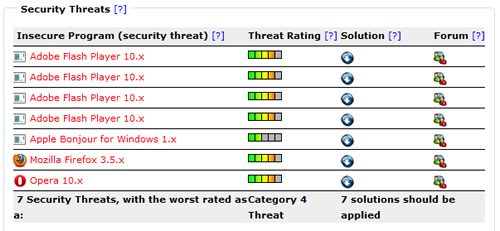
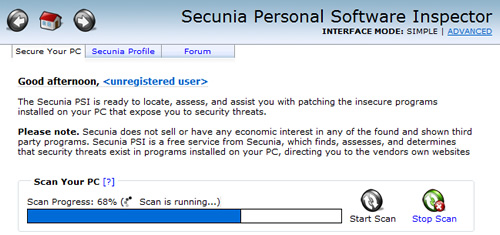
Keeping your operating system up to date is vital to having a malware-free computer. But even if you've got Windows fully patched, any one of your installed applications can be a potential point of entry for attackers should you forget or are just too lazy to grab the latest version. Enter Secunia PSI, a freeware security tool that makes it easy to find and fix old programs on your PC, even those that lack automatic update features.
Read the whole story
__________________
Jose Vilches
Managing Editor
  #2  
Old 10-29-2009
Newcomer, in training
 
Member since: Oct 2009, 22 posts
I'll give it a try this weekend. I love finding these freeware programs that are useful on TS.
  #3  
Old 10-29-2009
TechSpot Enthusiast
 
Location: Australia
Member since: Dec 2002, 209 posts
Interesting idea. Wonder how well supported it is?
  #4  
Old 10-29-2009
Newcomer, in training
 
Location: New Plymouth, New Zealand
Member since: Oct 2009, 9 posts
Interesting little program. It found 4 Flash player problems - versions 7 - 10 (I didn't even know that I had version 7!) and Quicktime. Once I applied the solution, all was OK. Cool.
  #5  
Old 10-29-2009
Ex-TechSpotter
 
Member since: Dec 2007, 18,354 posts
Secunia PSI > Advanced > Settings > PSI Settings
Remove the tick: "Start the Secunia PSI on boot"
Mine was running at a whopping 40+Meg of Ram
Generally the program is quite good though :)
  #6  
Old 10-29-2009
Guest
 
This software has been around for a while now..

It's paranoid BTW
  #7  
Old 10-29-2009
treeski's Avatar
TechSpot Booster
 
Location: Chicago, USA
Member since: Nov 2007, 444 posts
System specs
I feel tempted to give this software a try, but ultimately... it's just another bit of security that bogs down my machine. I haven't had any serious or even minor security problems (that I am aware of) in ages, so I think I'm doing a pretty good job taking care of my machine by myself.
  #8  
Old 10-29-2009
TechSpot Member
 
Member since: Oct 2009, 74 posts
I just want to say, Been there, Done that.....and then un-installed it, I don't think I need to install another software on my computer just so that it may alert me to install more
No need for this in any actual home or office environment, too many nags, memory usage and the update process isn't as smooth as it may look, in my opinion the most simple such utility is the FileHippo.com's Program Update Checker, which does the same, is portable and you can download and run it any time on any pc, its size is on 155kb and it does a very decent job of finding old software and giving links to downloads on one single webpage.

FileHippo.com Program Update Checker:
http://www.filehippo.com/updatechecker/
Download the stand-alone version without the installer, sun it, update your system and then forget about it..... :)
  #9  
Old 10-29-2009
Ex-TechSpotter
 
Member since: Dec 2007, 18,354 posts
Quote:
Originally Posted by zaidpirwani View Post
FileHippo.com Program Update Checker:
http://www.filehippo.com/updatechecker/
Download the stand-alone version without the installer, sun it, update your system and then forget about it.....
Thanks zaidpirwani
That program actually worked better (faster) than "Secunia PSI" and it found more things to update
Obviously its better
  #10  
Old 10-30-2009
Newcomer, in training
 
Location: Philippines
Member since: Dec 2007, 15 posts
A very nice and helpful software indeed.
  #11  
Old 10-30-2009
TechSpot Member
 
Member since: Oct 2009, 35 posts
Quote:
zaidpirwani said: FileHippo.com Program Update Checker:
http://www.filehippo.com/updatechecker/
Download the stand-alone version without the installer, run it, update your system and then forget about it..... :)
Thanks zaidoirwani.

Another free tool for the toolbox is always a good thing if its a manual tool and not a constantly-running tool.
  #12  
Old 10-30-2009
TechSpot Member
 
Location: Sunshine State
Member since: Dec 2007, 39 posts
System specs
I downloaded the program on my Vista 64bit laptop. The program was fast and takes up very little system resources when scanning. If you x out of the program, the program will still be running in the system tray.

How well it works is another question. I had my laptop scanned and it didn't find any threats.
  #13  
Old 10-30-2009
mattfrompa's Avatar
TechSpot Booster
 
Location: East Coast USA
Member since: Jul 2007, 441 posts
System specs
I love trying out these neat freeware programs. Even though I lack knowledge of Linux, I still love the idea of open source and freeware, and am excited to give this a try.
  #14  
Old 10-30-2009
BlindObject's Avatar
TechSpot Booster
 
Location: New Jersey
Member since: May 2007, 446 posts
The more free tools, the better. Have you guys featured UltraMon yet? Great tool if you have dual screens.
  #15  
Old 10-30-2009
Whiffen's Avatar
TechSpot Enthusiast
 
Location: Ottawa, ON
Member since: Dec 2007, 321 posts
System specs
Sweet, I'm going to get this right away. I've been looking for something just like this for awhile now.
  #16  
Old 10-30-2009
r3claimer's Avatar
TechSpot Member
 
Location: USA
Member since: Feb 2008, 81 posts
System specs
I like these weekly downloads, but I find that I end up using them about once, think "this is awesome", then forget they exist. lol
  #17  
Old 10-30-2009
TechSpot Member
 
Member since: Oct 2009, 30 posts
You know, whenever it comes to all these neat little freeware apps, I'll always just download it and find it awesome for like a week. After that it's normally just another app that I realize I never use so I remove it, but sometimes I end up keeping them; stuff like VistaSwitcher and RM-Clock, those things are pretty awesome.
  #18  
Old 10-30-2009
WinXPert's Avatar
TechSpot Booster
 
Location: Philippines
Member since: Oct 2009, 519 posts
System specs
I'll give it a try and see if it really worth installing.

Ok been there done that. Nice apps. This is what I got

Your Secunia System Score of 100% is 5% HIGHER than the average user from -, Philippines.

Last edited by WinXPert; 10-30-2009 at 04:24 AM.. Reason: Installed it
  #19  
Old 10-30-2009
Per Hansson's Avatar
TechSpot Server Guru
 
Location: Sweden
Member since: Feb 2002, 1,513 posts
System specs
I used to use an online service like this very long ago to scan manually
It is in my opinion very nice when you have many apps installed and want to find updates to them, granted I usually keep my system updated manually tho, I just prefer it that way

Oh,and another vote for UltraMon, I actually covered it here in TS long ago in our news but it deserves another mention
http://www.techspot.com/vb/topic7610.html
  #20  
Old 10-30-2009
limpangel's Avatar
TechSpot Member
 
Location: Romania
Member since: Oct 2009, 65 posts
System specs
Quote:
mattfrompa said:
I love trying out these neat freeware programs. Even though I lack knowledge of Linux, I still love the idea of open source and freeware, and am excited to give this a try.
Then first thing you should learn is that freeware is not necessarily open source, and open source is not necessarily free software (read GPL).

Little apps like this should make Microsoft consider stealing some ideas from the Ubuntu camp. The software updater more precisely. I like how Ubuntu updates almost 90% of all your installed software and this feature is definetly needed in Windows.
Windows made some progress with the third party drivers update feature in Windows Update for Vista/7, but Adobe, Apple and other Windows software are often more dangerous if not kept up to date. Of course some of the apps come with their own automatic update manager, but most not so knowledgeable people ignore those. And other updaters, like the silent Google Chrome Updater, are just scary.

One solution would be to implement a Ubuntu like third-party software system. When you install an app you get the option to add its repository address to your Windows Software Updater. Then the software updater works like the normal Windows Update and checks the repos of theese apps for updates at a chosen time interval.
Closed Thread
Page 1 of 2 1 2

Similar Topics
Topic Replies Forum
Download of the Week: LastPass 20 TechSpot News and Comments
Download of the Week: TrueCrypt 49 TechSpot News and Comments
Download of the Week: Recuva 14 TechSpot News and Comments
Download of the Week: ImgBurn 6 TechSpot News and Comments
Download of the Week: DownThemAll! 5 TechSpot News and Comments

Thread Tools Search this Thread
Search this Thread:

Advanced Search
All times are GMT -4. The time now is 04:45 AM.