Welcome to the TechSpot OpenBoards. Please read the FAQ if you have any questions. Sign up or Login to participate.
|
|||||||
Begin your free trial now
Pay-as-you-go options starting at $10/user/month
Advanced Virus Remover Hell
|
|
Thread Tools | Search this Thread |
|
#1
|
|||
|
|||
|
Advanced Virus Remover Hell
I have been having problems with this Advanced Virus Remover problem on my laptop. I have tried doing the 8 steps, then doing the fixit.zip fix because it wouldn't let me run malwarebytes, etc. Here is a synopsis of my problems.
1. I had Avast anti-virus and Spybot Search and Destroy prior to the infection. Avast has been rendered completely useless, but Spybot still asks my permission for registry changes, but will not perform a system malware scan. *I keep denying all changes to my registry I get from Spybot because I am not sure what are malicious 2. Along with shutting down my anti-virus, this thing will not allow me use Window's system restore through the system tools. It only has the current day highlighted, so I assume it deleted all my system restore data points. 2. I have been using another computer and flash drive to copy the malwarebytes program along with the fixit.zip file over to my infected computer. 3. When I went to install the malwarebytes program, it took forever to install. However, I left it running overnight and it finally completed. However, it would not run once installed so I moved on to the zipit.exe fix. I followed the instructions and malwarebytes finally started to run, for about 2 minutes, then the program crashed. When I went to run the runmbam.exe file again that was installed from the fixit.cmd file, the icon had lost it's malware graphic, and I had lost permission to access the file. 4. To top it all off, I said screw it and was going to do a complete reformat because I have an external hard drive that I back up my files to. This F'ing thing did something with my CD rom so that it is not recognized. I put in my Windows XP disk and the rom did not do anything. So I went into my BIOS to change my boot sequence, and I do not have a CD-rom listed. 5. I would really like to figure this out without a complete reformat. I am not a computer genius, but I am also not a novice. I have always been able to get rid of these trojans, but this one has me beating my head against the wall. |
|
#2
|
||||
|
||||
|
Have you tried to run the programs in Safe Mode?
|
|
#3
|
|||
|
|||
|
Yes, I have tried running everything in safe mode as well. It also informs me that I do not have permission to perform that function when I click on the runmbam.exe icon.
|
|
#4
|
||||
|
||||
|
See if this helps with the permissions issue:
FixPolicies.exe from Bill Castner:
When you have finished, reboot the computer- see if it resolved the permission problem so you can run the appropriate scans. |
|
#5
|
|||
|
|||
|
That still did not give me permission to run the runmbam.exe file...
|
|
|
|
#6
|
||||
|
||||
|
Download ComboFix from one of these locations:
Link 1 Link 2 * IMPORTANT !!! Save ComboFix.exe to your Desktop
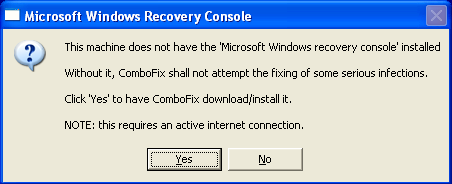
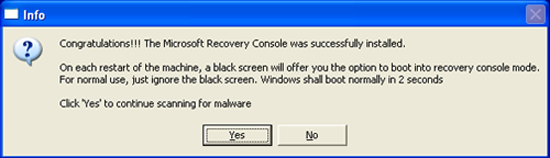
**Please note: If the Microsoft Windows Recovery Console is already installed, ComboFix will continue it's malware removal procedures. ![]() Once the Microsoft Windows Recovery Console is installed using ComboFix, you should see the following message: ![]() Click on Yes, to continue scanning for malware. When finished, it shall produce a log for you. Please include the C:\ComboFix.txt log in your next reply. |
|
#7
|
|||
|
|||
|
I went to a local specialty computer store and purchased a rocketfish 2.5" hard drive enclosure(http://www.rocketfishproducts.com/pc...enclosure.aspx). I installed my laptop drive into it, and it seems to be working great scanning with malwarebytes off my desktop. This enclosure is great BTW, nice and simple usb 2.0 plug and play with a Y-adapter for extra power. Only cost me 15 bucks. If this solves my issue with this advanced virus remover, I would recommend this method for others. However, I will re-post when the scan is done and installed back into my laptop to see if it worked.
This drive enclosure also has a 1-button complete pc backup feature with included software. Software that some sites are selling for 50 bucks or more. |
|
#8
|
|||
|
|||
|
Okay, so I ran Malwarebytes on my laptop hard drive using the enclosure, and it quarantined 37 infections that were located mainly in my system32 subfolder. However, when I re-installed the drive back into my laptop, it just re-installed the virus on my computer and is doing the same thing. Spybot getting bombarded with requests to change my registry.
I am now going to do the entire 8-step process on the drive using my desktop again, rather than just doing the malwarebytes. |
|
#9
|
||||
|
||||
|
Don't bother with the 8 steps, just do ComboFix
|
|
#10
|
|||
|
|||
|
Combofix will not run on my desktop, whatever this thing is has taken over the permission to run or delete this file as well. Just like with Malwarebytes. How can I re-format this drive with my original copy of windows XP? Can I put the XP disk in a desktop and install onto my laptop hard drive via this hard drive enclosure? I am just sick of trying to do these fixes to keep everything on my computer, when I really don't need everything on my computer at this point. I have tried everything on here, and I have decided that whoever made this virus has defeated me.
|
|
#11
|
||||
|
||||
|
Lets not give in just yet.
Please download exeHelper to your desktop. Double-click on exeHelper.com to run the fix. A black window should pop up, press any key to close once the fix is completed. Post the contents of exehelperlog.txt (Will be created in the directory where you ran exeHelper.com, and should open at the end of the scan) Note: If the window shows a message that says "Error deleting file", please re-run the program before posting a log - and post the two logs together (they will both be in the one file). |
|
#12
|
|||
|
|||
|
I actually think I have removed most of my problems. I uninstalled my original Avast file, and I had the setup file for Avast on my external hard drive. So I re-installed it and performed a boot-time scan. Did the same with spybot after updating spybot. All of this was made possible by the combofix though. However, during my boot-time scan there were two files that Avast would not let me quarantine because it said the permission flags were not compatible. The computer is now working pretty good, but it is acting up at times, so I know that those 2 files that it would not let me delete are there. I just have been avoiding going to my banking websites and things like that. I will post my Avast log on here so you guys can see how I can locate those 2 files that could not be deleted.
|
|
#13
|
||||
|
||||
|
No need for the antivirus log, run ComboFix for me post it's log here.
|
|
#14
|
|||
|
|||
|
Combofix log
I attached the log for combofix..
FYI, I don't know if this has anything to do with anything, but I can not access my gmail account. It says something is wrong with the security certificate. I think I have some sort of hijacker thing going on also, because when I go to use my back arrow, it goes to some page with "mfeed" title page. |
|
#15
|
||||
|
||||
|
1. Close any open browsers.
2. Close/disable all anti virus and anti malware programs so they do not interfere with the running of ComboFix. 3. Open notepad and copy/paste the text in the quotebox below into it: Quote:
![]() Refering to the picture above, drag CFScript into ComboFix.exe When finished, it shall produce a log for you at C:\ComboFix.txt which I will require in your next reply. |
|
#16
|
|||
|
|||
|
Combofix log
I attached the combofix log.
|
|
#17
|
||||
|
||||
|
Sorry for the delay, my internet died at the weekend.
Are you still being redirected? |
![]() |
| Similar Topics | ||||
| Topic | Replies | Forum | ||
Advanced Virus Remover infected my computer
|
1 | Virus and Malware Removal | ||
Advanced Virus Remover, rogue antivirus help? trojan-spy.html.visafraud.a
|
4 | Virus and Malware Removal | ||
Virus Malware - Fighting like hell but loosing
|
10 | Virus and Malware Removal | ||
im in virus-hell, please help a newby
|
6 | Introduce yourself | ||
ATI driver remover
|
1 | Audio and Video | ||
| Thread Tools | Search this Thread |
|
|
All times are GMT -4. The time now is 01:06 PM.


Advanced Virus Remover infected my computer