also @ TechSpot: Windows logo to get a Metro makeover in Windows 8
Welcome to the TechSpot OpenBoards. Please read the FAQ if you have any questions. Sign up or Login to participate.

Go Back   TechSpot OpenBoards > Hardware > Audio and Video

Download Now:

PNY 9800GT temps

Page 1 of 2 1 2
Thread Tools Search this Thread
  #1  
Old 11-17-2009
Tha General's Avatar
TechSpot Paladin
 
Location: California
Member since: Aug 2007, 1,200 posts
System specs
PNY 9800GT temps

I just bought a new card, a 9800gt green edition 30% cooler , etc, i notice when idle the temps are at 60%, is this normal?
should i change drivers?
using the 191.07 right now
  #2  
Old 11-17-2009
red1776's Avatar
Omnipotent Ruler of the Universe
 
Location: Minneapolis MN
Member since: Sep 2008, 5,668 posts
System specs
temps at 60% of what? or do you mean 60c at idle? or the fans are at 60%
  #3  
Old 11-17-2009
Tha General's Avatar
TechSpot Paladin
 
Location: California
Member since: Aug 2007, 1,200 posts
System specs
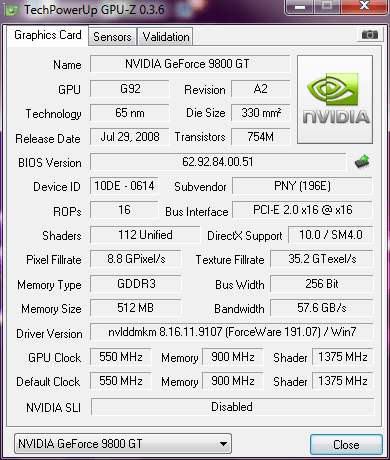
http://gpuz.techpowerup.com/09/11/17/bnw.png

Seems to stay at 60c at idle, i just played Jericho at max and Flatout ultimate carnage at max , and the temps stayed at 63c. So i guess this is normal right?
  #4  
Old 11-17-2009
red1776's Avatar
Omnipotent Ruler of the Universe
 
Location: Minneapolis MN
Member since: Sep 2008, 5,668 posts
System specs
well the idle temp is high, but if its only hitting 63c while gaming that's a great temp. I don't think the sensor is picking up the idle temp accurately, or your fan speed at idle is way to low. put the fan control on manual and set it at 80% and see what it does to your idle temps just to give you an idea of whats going on.
  #5  
Old 11-18-2009
Tha General's Avatar
TechSpot Paladin
 
Location: California
Member since: Aug 2007, 1,200 posts
System specs
I can't change the temps fan, and i really don't want too(by installing programs). Thanks tho, doesn't seem to go above 63 even when gaming.
cheers
  #6  
Old 11-18-2009
red1776's Avatar
Omnipotent Ruler of the Universe
 
Location: Minneapolis MN
Member since: Sep 2008, 5,668 posts
System specs
Quote:
Originally Posted by Tha General View Post
I can't change the temps fan, and i really don't want too(by installing programs). Thanks tho, doesn't seem to go above 63 even when gaming.
cheers
well 63C is a great temp under load
  #7  
Old 11-18-2009
Ritwik7's Avatar
TechSpot Evangelist
 
Location: Calcutta, India
Member since: Jan 2007, 2,195 posts
System specs
It's funny. I have the XFX 9800GT. Though I idle at lower temps, under load I'm anywhere between 10-20c more than Tha General.
  #8  
Old 11-18-2009
red1776's Avatar
Omnipotent Ruler of the Universe
 
Location: Minneapolis MN
Member since: Sep 2008, 5,668 posts
System specs
Quote:
Originally Posted by Ritwik7 View Post
It's funny. I have the XFX 9800GT. Though I idle at lower temps, under load I'm anywhere between 10-20c more than Tha General.
Tha General has the 'green edition' of the 9800GT, uses less power....also less performance
  #9  
Old 11-18-2009
Ritwik7's Avatar
TechSpot Evangelist
 
Location: Calcutta, India
Member since: Jan 2007, 2,195 posts
System specs
Quote:
Tha General has the 'green edition' of the 9800GT, uses less power....also less performance
That's why I was surprised over its idle temp.
  #10  
Old 11-18-2009
Tha General's Avatar
TechSpot Paladin
 
Location: California
Member since: Aug 2007, 1,200 posts
System specs
Quote:
Originally Posted by Ritwik7 View Post
That's why I was surprised over its idle temp.
Yea i am suprised too, but when gaming he only creeps up about 2%, so maybe thats where the green comes into play who knows lol
here are my specs:


whats yours?
  #11  
Old 11-19-2009
BlindObject's Avatar
TechSpot Booster
 
Location: New Jersey
Member since: May 2007, 446 posts
You can always mess around with your fan speed at the Nvidia control panel. No need to download anything, you can even overclock it there too.You also try to get better airflow in your case. Here's my 9600gt.

  #12  
Old 11-19-2009
TechSpot Chancellor
 
Member since: Aug 2005, 693 posts
System specs
I have an EVGA 9800GT and had to crank the fan up to 90% b/c the stupid thing was only putting the fan up to 40% even when it was under load and the temp was pushing 85c. Just increasing the fan speed kept it down to about 65c under load. Now have it in a new case, with better cooling and the card will rarely top 55c.
  #13  
Old 11-19-2009
Tha General's Avatar
TechSpot Paladin
 
Location: California
Member since: Aug 2007, 1,200 posts
System specs
Well i don't OC, and i am happy with stock settings on anything. But doesn't increasing your fan speed damage the card? i read about that somewhere.
Also, BlindObject, there are no options in nvidia control panel to increase the fan speed, i don't see any.
  #14  
Old 11-19-2009
red1776's Avatar
Omnipotent Ruler of the Universe
 
Location: Minneapolis MN
Member since: Sep 2008, 5,668 posts
System specs
increasing the fan speed does not damage your card...it makes things a bit louder is all.
  #15  
Old 11-20-2009
hellokitty[hk]'s Avatar
I'm a TechSpot Evangelist
 
Location: UT, U.S.
Member since: Mar 2008, 3,712 posts
System specs
Quote:
Well i don't OC, and i am happy with stock settings on anything. But doesn't increasing your fan speed damage the card? i read about that somewhere.
Also, BlindObject, there are no options in nvidia control panel to increase the fan speed, i don't see any.
No it doesn't hurt your card, it is a fan, it helps your card. I don't think the NVidia control panel can.
  #16  
Old 11-20-2009
teklord's Avatar
TechSpot Booster
 
Location: Houston, TX
Member since: Mar 2008, 523 posts
System specs
Manufacturers turn down the fan speed to help it last longer. Cranking it up full speed makes a big difference in keeping the card cool but puts more wear and tear on the fan in the big picture.
  #17  
Old 11-20-2009
red1776's Avatar
Omnipotent Ruler of the Universe
 
Location: Minneapolis MN
Member since: Sep 2008, 5,668 posts
System specs
Quote:
Originally Posted by teklord View Post
Manufacturers turn down the fan speed to help it last longer. Cranking it up full speed makes a big difference in keeping the card cool but puts more wear and tear on the fan in the big picture.
actually tek, the bigger reason they do it is to keep fan noise down. the average life span of the VC fans these days is 60k - 150k hours. keeping the chip cool outweighs preserving the fan. the damage from heat on the chip will destroy it before you wear out the fan. unless you plan to be using the same graphics card in 6-10 years, better to crank up the fan and keep it cool.
  #18  
Old 11-21-2009
BlindObject's Avatar
TechSpot Booster
 
Location: New Jersey
Member since: May 2007, 446 posts
On drivers 191 there should be OC and fan settings under Device Settings on the Nvidia Control Panel.
  #19  
Old 11-22-2009
Tha General's Avatar
TechSpot Paladin
 
Location: California
Member since: Aug 2007, 1,200 posts
System specs
Interesting, going back to some older drivers ( the ones that came with the disc ) 181.20, temps are about 3% cooler. But the real interesting thing, when playing say crysis warhead at all gamer settings, getting about 31-60 fps btw, at 1280x1024 the card fan increases to around 60 or 78% and temps drop to 55c when gaming.
  #20  
Old 11-22-2009
hellokitty[hk]'s Avatar
I'm a TechSpot Evangelist
 
Location: UT, U.S.
Member since: Mar 2008, 3,712 posts
System specs
Do those drivers also come up with a lower FPS?
Closed Thread
Page 1 of 2 1 2

Similar Topics
Topic Replies Forum
Upgraded to a 9800GT card, are my temps too high? 13 Audio and Video
I need help with my XFX 9800gt 18 Audio and Video
PSU with 9800gt SLI 3 Audio and Video
What do you think of the 9800GT? 5 Audio and Video
Odd Difference Between BIOS Temps and Program Temps 10 Overclocking, Cooling and Modding

Thread Tools Search this Thread
Search this Thread:

Advanced Search
All times are GMT -4. The time now is 05:06 PM.