Welcome to the TechSpot OpenBoards. Please read the FAQ if you have any questions. Login to participate.

Go Back   TechSpot OpenBoards > Hardware & Tweaking > Overclocking, Cooling and Modding

Bios is different, help with "Dynamic Overclocking" PICS!!

Reply
Bookmark / Share this page
Thread Tools
  #1  
Old 01-16-2005
Newcomer, in training
 
Member since: Jan 2005, 1 posts
Bios is different, help with "Dynamic Overclocking" PICS!!

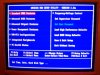
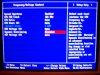
I am trying to do some overclocking on my new setup, i have a MSI KT6V KT600 FSB400 board, with sempron 2800+ cpu but it has a fsb333, via chipset, 128 mb g-force card, 768mb DDR400 pc3200. I have looked through the threads for sempron bios help and even the madshrimp article to overclock AMD's and my bios is different and I am not sure where to look for info on my specific bios setup, its probably very similar to the amd bios pics in madshrimps article but it is just different enough that it throughs me off can anyone help me out?? Some links to anything helpful would be great or threads with info that i might have overlooked, Pm me or post here or if someone would be real cool and let me call them on the phone and help walk me through a few settings shoot me a pm. My bios has this frequency/Voltage control on the right side when clicked it takes me to this other screen with dynamic overclocking feature you can kinda see in the pics, you can set the FSB, cpu ratio, cpu vcore, dynamic overclocking and agp voltage and ddr voltage, the dynamic overclocking is what i am a little confused on you can set it up 1%, 3%, 5%, 10%, also i dont see anything anywhere about any multiplyer?? Can anyone take a little time and help me out?? Thanks alot!!!
Attached Images
File Type: jpg Picture 026.JPG (45.5 KB, 16 views)
File Type: jpg Picture 015.JPG (41.9 KB, 12 views)
Reply With Quote
  #2  
Old 01-17-2005
Banned
 
Member since: Aug 2004, 25,948 posts
Hello and welcome to Techspot.

The correct FSB for you cpu is 166mhz(333mhz effective) the correct multiplier is X12 so 166mhz X 12 = 1992 mhz.

Go Here and check out your cpu specs.

Regards Howard
Reply With Quote
You can remove this banner by registering, join the TS Community for free.
  #3  
Old 01-17-2005
Didou's Avatar
TS Special Forces
 
Location: Brussels, Belgium
Member since: Feb 2002, 5,821 posts
System specs
As your CPU has a locked multiplier you are left with the FSB to overclock. Right now it is set to 166mhz & you will want to raise that speed a few MHz at a time. Every time you do so, run a few heavy programs & benchmarks & see if the system is stable. If it isn't, try raising the CPU's VCore (also by small increments). Once you really can't get the system stable anymore, revert to the last known good speed & you're set.

Set your memory to run in sync with the CPU's FSB & always keep an eye on the heat output of your components.
Reply With Quote
Reply
Thread Tools

Forum Jump

Similar Topics
Thread Thread Starter Forum Replies Last Post
Board no longer works after flashing BIOS (Need Help!) rkg456 CPUs, Chipsets and Mobos 9 10-16-2007 05:42 AM
updated to wrong bios :/ Moggz CPUs, Chipsets and Mobos 12 01-18-2005 08:05 AM
Bios upgrade Dr-Death Device Drivers 2 12-07-2003 05:34 PM
Can you kill your bios like this? puzzel CPUs, Chipsets and Mobos 3 12-04-2003 04:48 PM
CMOS/Checksum error continues after battery replacement somnamblst CPUs, Chipsets and Mobos 17 03-12-2003 02:51 PM


All times are GMT -4. The time now is 11:24 AM.