also @ TechSpot: Tech Tip: Turn Off your Display Using a Windows Shortcut and More
Welcome to the TechSpot OpenBoards. Please read the FAQ if you have any questions. Login to participate.

Go Back   TechSpot OpenBoards > Operating Systems & Software > Windows OS

WinXP Pro Recycle Bin always wants to delete 'Windows'

Closed Thread
Bookmark Thread Tools
  #1  
Old 03-12-2005
Newcomer, in training
 
Member since: Mar 2005, 3 posts
WinXP Pro Recycle Bin always wants to delete 'Windows'

I have a strange problem with the Recycle Bin in Windows XP Pro. It often shows itself having files when it is empty. When I click "Empty Recyle Bin" I am prompted with "Are you sure you want to delete 'Windows'?" The byte count for the Recycle Bin folder shows 0 bytes. I've made sure that hidden and system files are set to be shown, but nothing is revealed in the folder. Clicking OK to delete 'Windows' clears the icon of its filled status and doesn't seem to hurt my system in any visible way, but it is remains an disconcerting irritation.

I've run spyware scans with Ad-aware v6.0 and anti-virus scans with NOD32, and no evidence of any malware was found.

Attached is a screen shot of my problem.

Any ideas on what my be causing this behavior and how to correct it?

Thanks in advance for any help on this!
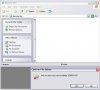
Attached Images
File Type: jpg AreYouSureYouWantToDelete'Windows'.jpg (39.7 KB, 22 views)
  #2  
Old 03-13-2005
TechSpot Evangelist
 
Location: has left the building
Member since: Aug 2003, 8,160 posts
Best picture I have seen in a long time!, YES, delete Windows XP!

A re-install-in-place or a Repair might be in order. See the sticky Read at the top of ths forum.
Do you have Norton/Symantec rubbishbin installed? Maybe that needs to be re-set.
To remove this ad, sign in. To register for a new account, click here.
  
  #3  
Old 03-13-2005
Newcomer, in training
 
Member since: Mar 2005, 3 posts
Thanks realblackstuff for your quick response.

I don't use anything made by Symantec on my PC, so no Norton.

I looked for your referenced "sticky Read" but could not find it. Can you give me some more specific directions to it?

Again, thanks!
  #4  
Old 03-13-2005
TechSpot Evangelist
 
Location: has left the building
Member since: Aug 2003, 8,160 posts
How to repair Windows XP/2000 if you are unable to boot into Windows
How to: Repair Windows XP/2000 if you are unable to boot into Windows.

Goes for any repair.
  #5  
Old 03-14-2005
HughJass's Avatar
TechSpot Member
 
Member since: Feb 2005, 145 posts
hello, and welcome to techspot,

i also have this problem from time to time, how every it has never affected me in an adverse way, i was thinking it may have something to do with windows washer. becasue it only ever appeared around the times when i did a wash.

do u have windows washer??
  #6  
Old 03-14-2005
Newcomer, in training
 
Member since: Mar 2005, 3 posts
HughJAss -- Thanks for your reply. I've never used Windows Washer.
  #7  
Old 06-30-2005
Newcomer, in training
 
Location: Philippines
Member since: Jun 2005, 2 posts
Formatting will of course fix the issue (temporarily) but the problem will return a few days after. I have formatted the computer at home and the problem did not appear until about 5 days after. The computer in the office has been formatted as well and the problem came back about a week after. No special programs installed except for drivers. The computer I have at home is an AMD Athlon XP with an ATI card and the one in the office is Pentium4 based with an Nvidia card. Both computers are running on WinXP ro sp2, firewall turned on before connecting to the internet. I don't think its a third party program issue since even with the computer at home which has no programs installed has this problem. Maybe another security hole like RPC perhaps...
  #8  
Old 06-30-2005
TechSpot Evangelist
 
Location: has left the building
Member since: Aug 2003, 8,160 posts
Someone solved it here:
http://forums.techguy.org/showthread...52#post1249752
  #9  
Old 07-01-2005
Newcomer, in training
 
Location: Philippines
Member since: Jun 2005, 2 posts
Thanks, I'll see if the fix lasts.
To remove this ad, sign in. To register for a new account, click here.
  
Closed Thread

Tip: Download Advanced SystemCare 3 Freeware - 1 Click A Day to Clean, Repair, Protect & Optimize your PC.

Thread Tools


Similar Topics
Topic Category Replies Last Post
Microsoft Jokes The Meeting Spot - Chat & Socialize 126 05-27-2008 08:45 PM
Weird Recycle Bin Problem Windows OS 22 02-20-2007 07:51 PM
Dual Boot to DOS partition Windows OS 27 02-03-2006 07:20 AM
I have Windows XP and when I delete files they are not in the recycle bin Windows OS 2 03-11-2005 05:53 PM
Multiple OS-XP + 2000-second system boots safe mode only Windows OS 9 01-23-2005 10:25 AM


All times are GMT -4. The time now is 06:39 PM.