also @ TechSpot: HP TouchPad running Android 4.0 Ice Cream Sandwich
Welcome to the TechSpot OpenBoards. Please read the FAQ if you have any questions. Sign up or Login to participate.

Go Back   TechSpot OpenBoards > Hardware > Overclocking, Cooling and Modding

Download Now:

Help With Overheating Problem

Thread Tools Search this Thread
  #1  
Old 03-30-2006
Newcomer, in training
 
Member since: Mar 2006, 23 posts
Help With Overheating Problem

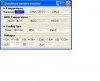
Hi, i downloaded Hmonitor to check my motherboard temperatures, and it seems all wrong, i was told to take out the CPU and heatsink and give it a clean i did that everything is clean when i took it out it wasnt TOO hot to hold but it was hot, ive got a print screen of the program, can you guys help me with this its slowing my PC down so bad

2.4Ghz Celeron CPU
768Mb PC2700 Ram
256Mb ATI 9550GE
400W PSU

here is the screenshot of the Program: hardware TEmps any help would be apreciated thanks
Attached Images
File Type: jpg Hardware Temps.JPG (25.2 KB, 12 views)
  #2  
Old 03-30-2006
MrGaribaldi's Avatar
TechSpot Ambassador
 
Location: Babylon 5, Grid Epsilon
Member since: Feb 2002, 2,802 posts
It seems the program has gotten the values switched around. If your motherboard were 70C, you'd have a very noticable problem. So it is much more likely that it's the CPU running at 70.
But that's still a bit hot. (though not too bad, if my memory serves correct)

The easiest way to do something about that is to use a more efficient HSF (heatsink). But before you run out and buy one, let's get into a bit more detail.

How is your pc slowing down? (And who told you to clean your HSF?)
Have you tried to overclock it, or? And have you done any changes to the hardware lately?
Last, what type of Celeron is it? And what is your motherboard?
If you don't know the celeron type, just give us which motherboard you are using, and aprox time of when you bought the cpu...
  #3  
Old 03-30-2006
Rik's Avatar
Rik Rik is offline
Banned
 
Location: UK-Maidenhead
Member since: May 2005, 4,987 posts
System specs
The motherboard temp is either wrong or your motherboard is about to die. Try speedfan from the downloads section and see what that says.
  #4  
Old 03-30-2006
Newcomer, in training
 
Member since: Mar 2006, 23 posts
Ok thanks for the reply's i read on this forum to clean the heatsink wen i took it off it was black and dirty from the bottom i cleaned that all up and replaced it the CPU is a 2.4ghz Celeron 02' 400mhz FSB 128kb Cache motherboard model is ASROCK M266A, my pc slows down while using Apps specialy games for example you guys are gonna laugh i tried playing Mafia the old game let me tell u the specs

500mhz needed i have 2.4ghz celeron
128mb needed i have 768mb ddr Ram
32mb Graphics Card NEeeded i have 256mb !!!
I mean i should be able 2 run this at REALLY high speed on high detail
i have to put it on Ultra Low detail and it STILL runs SLOW my old Pentium 3 500mhz use to run this game better i dont know whats wrong.

Only addons i have added is the ATI Radeon 9550GE 256 AGP card
Soundblaster 5.1 Live digital Sound card

I have made NO tries to overclock Anything at all

I cant use the Speed Fan Because it doesnt support my motherboard any other ways i can help you guys 2 help me thanks..

Oh yes and my PSU once BLEW it was a 350w then i added a 400W if that makes a difference

Last edited by insane001; 03-30-2006 at 01:00 PM..
  #5  
Old 03-30-2006
Rik's Avatar
Rik Rik is offline
Banned
 
Location: UK-Maidenhead
Member since: May 2005, 4,987 posts
System specs
Seeing as you have had a psu blow, its a good idea to visually inspect your mobo (motherboard) for any signs of damage. In particular, check the large capacitors for lifting from the board and doming on the top. Check all other components for discolouration and cracks. If there is anything you are unsure about then get a pic of it if u can.

Also, have you disabled and uninstalled the built in graphics card? There may be a bios setting to disable it. My advice would be to uninstall the new card then shut down and remove it, then boot up with the built in card and uninstall that. Then reboot into the bios and disable it. Then refit the new card and finally install the driver for it.

Hope that helps, Rik.
  #6  
Old 03-30-2006
Newcomer, in training
 
Member since: Mar 2006, 23 posts
I cant get a picture of it at the moment but i will as soon as i can, but i have looked through my self havnt found anything that looks weird everything is in place and looks ok too me, and i did go in Bios to disable the onboard graphics card well what i did was go in to Bios and it said "Onboard shared memory" i set it to "NONE" there are no drivers installed for the onboard card everything is unninstalled there looks like no sign of problem but there is a problem lol anything else that could be causing this, maybe a too less powered PSU?????
  #7  
Old 03-30-2006
Rik's Avatar
Rik Rik is offline
Banned
 
Location: UK-Maidenhead
Member since: May 2005, 4,987 posts
System specs
Im running an amd64 3000+ and an ati 9550 256meg on a 400watt psu so i shouldnt think its a lack of power (although i do think its a bit too close to my minimum requirement). May be worth downloading that speedfan i mentioned, its a pretty good bit of software and is capable of reading voltages and many other things.

Have you scandisked and defragged your hard drive recently? That can help.

Is any of your ram mismatched? That can cause lots of problems.
  #8  
Old 03-30-2006
Newcomer, in training
 
Member since: Mar 2006, 23 posts
Nope rams are both 2700 I have run both defrag and scandsk, both have completed there were some errors here and there but fixed, i have attached the Print screen of Speed fan tell me if u see something wrong i definatly see Something wrong check out the print screen thanks
Attached Images
File Type: jpg Speedfan Print.JPG (36.5 KB, 5 views)
  #9  
Old 03-30-2006
Rik's Avatar
Rik Rik is offline
Banned
 
Location: UK-Maidenhead
Member since: May 2005, 4,987 posts
System specs
Speedfan is showing a lot of cpu usage, does that reading stay like it or does it vary?
  #10  
Old 03-30-2006
Newcomer, in training
 
Member since: Mar 2006, 23 posts
Yeah it varies sometimes going up to 95% then back to 10 % keeps going up and down and all i am runing is MSN messenger windows media player and a firewall, could that be a problem? ive heard if your computer isnt running much a proceess called System idle process uses alot of a cpu usage, or back on the point why has it got a FLAME next to temp 1
  #11  
Old 03-30-2006
CMH CMH is offline
TechSpot Chancellor
 
Location: Aus
Member since: Jun 2005, 2,526 posts
Quote:
Originally Posted by insane001
Ok thanks for the reply's i read on this forum to clean the heatsink wen i took it off it was black and dirty from the bottom i cleaned that all up and replaced it
You cleaned all the gunk off the bottom of your HSF?

Good and bad move.

Good cos you can now add in some of your own better stuff (Arctic Silver 5 for a good example).

Bad cos you probably didn't. Or at least didn't mention it. Could be the source of your problem.
Closed Thread

Similar Topics
Topic Replies Forum
Overheating problem? 24 Other Hardware
Overheating Problem 36 Processors and Motherboards
Is overheating my problem? 15 Processors and Motherboards
pc overheating problem 1 Processors and Motherboards
Overheating problem (another one ;)) 20 Overclocking, Cooling and Modding

Thread Tools Search this Thread
Search this Thread:

Advanced Search
All times are GMT -4. The time now is 05:16 AM.