also @ TechSpot: Call of Duty: Modern Warfare 2 Graphics Card Performance
Welcome to the TechSpot OpenBoards. Please read the FAQ if you have any questions. Login to participate.

Go Back   TechSpot OpenBoards > Operating Systems & Software > Windows OS

Difficulty finding Log/Files

Closed Thread
Page 2 of 2 1 2
Bookmark Thread Tools
  #21  
Old 03-30-2002
Newcomer, in training
 
Location: Southern California
Member since: Feb 2002, 15 posts
Well, I think we're getting somewhere. Your suggestion worked, but only for the current session, as far as I can tell. After re-booting, there's the TRACE.LOG file, growning as usual. What a hassle, particularly because TRACELOG.EXE is a DOS program. In any event, I'd hate to think the only resolution was to turn off the logging only after the system finished booting each time. That's got to slow things down during the boot process.

I've heard that others have encountered the same problem after trying BOOTVIS from MS. I did that back in January, but it didn't work (told me I didn't have a hard drive, or something), so I deleted it. But, I suppose it's possible that it left something behind. I've used REGCLEANER, but it apparently didn't identify anything on automatic, and I wasn't able to identify anything visually on manual. Oh, well . . .

Any other ideas will be very welcome, though. You guys have been great.

Thanks again,
SRS
  #22  
Old 03-30-2002
lokem's Avatar
TechSpot Booster
 
Location: Assembled In Malaysia
Member since: Mar 2002, 773 posts
Still no luck huh? This is harder to track down than I expected. What keywords did you try to find when running RegCleaner?
To remove this ad, sign in. To register for a new account, click here.
  
  #23  
Old 04-06-2002
Newcomer, in training
 
Location: Southern California
Member since: Feb 2002, 15 posts
Actually, I didn't use any key words. I simply went through every single line in all sections looking for anything that might be relevant. Nada.

As before, any other suggestions will be most welcome.

Thanks,
SRS

P.S. By the way, I wonder if you might know how I can get into the system location where the command lines are stored for the options displayed when you right-click a file or folder in Windows Explorer? I switched to McAfee corporate edition, which doesn't provide a program file name I can use in other programs, like GetRight, to run a scan automatically when a file is downloaded. As a consequence, I have to remember to manually run a scan after I'm through with what I'm doing at the moment. Please let me know, when you have an opportunity, if this is something you're familiar with.

Thanks again for all your help.
SRS
  #24  
Old 04-07-2002
lokem's Avatar
TechSpot Booster
 
Location: Assembled In Malaysia
Member since: Mar 2002, 773 posts
Quote:
Actually, I didn't use any key words. I simply went through every single line in all sections looking for anything that might be relevant. Nada.
Gasp... You went through the ENTIRE registry? Wow... That's amazing! Perhaps you can try finding again. This time, use the search feature. You'll never know what you missed out. Try looking for something like:

tracelog.exe
trace.log

There's also a possibility that the program is started somewhere in the startup menu. Load up msconfig under the Run menu and click on the StartUp folder. See if there's any menu item which resembles the aformentioned tracelog items.

Quote:
P.S. By the way, I wonder if you might know how I can get into the system location where the command lines are stored for the options displayed when you right-click a file or folder in Windows Explorer? I switched to McAfee corporate edition, which doesn't provide a program file name I can use in other programs, like GetRight, to run a scan automatically when a file is downloaded. As a consequence, I have to remember to manually run a scan after I'm through with what I'm doing at the moment. Please let me know, when you have an opportunity, if this is something you're familiar with.
Are you referring to the file location of the program? Which in this case the McAffee's virus scan executable program file?
  #25  
Old 03-17-2003
Newcomer, in training
 
Member since: Mar 2003, 1 posts
trac.log

#Hi !
Guess, i found your problem with the huge trace.log file.
Did you use bootvis.exe from microsoft.
Yes?--> Start the programm and stop tracing, found in the menu
please let me know whether this solved your problem or not.
ciao -javagif-
  #26  
Old 03-31-2003
Newcomer, in training
 
Member since: Mar 2003, 1 posts
Fixed my prob

I had the same prob - the log file would fill the hard drive!

bootvis was something I was playing with and didn't even think about.

It worked!! Thanks a bunch!!

-Tyson
  #27  
Old 04-03-2003
Newcomer, in training
 
Member since: Apr 2003, 2 posts
I also had the 4 GB trace.log problem. I figured out that it is the following 'feature' of Windows XP that is causing this problem:

"System Restore"

Turn it off this way:

Start | Control Panel | System

Tab "System Restore"

Flag "Turn off system restore on all drives".

Apply / OK

Reboot

Go to %systemroot%\system32\LogFiles\WMI\

Delete trace.log

And be free again

Last edited by B@cchuz; 04-03-2003 at 06:43 PM..
  #28  
Old 04-04-2003
poertner_1274's Avatar
TS Special Forces
 
Location: Saint Louis, MO, USA
Member since: Feb 2002, 4,646 posts
System specs
Thanks for the help B@cchuz.

Welcome to TechSpot
All 3 of you for that matter
  #29  
Old 04-07-2003
Newcomer, in training
 
Member since: Apr 2003, 2 posts
Fix for your problem!!!

I had the exact same problem, and the fix is quite simple really.

In the windows registry, change the following key:
\HKEY_LOCAL_MACHINE\SYSTEM\CurrentControlSet\Control\WMI\GlobalLogger\

Start = 0

For less experienced users they can just double click on the fix.reg file in the attached zip.

Hope this helps everyone experienceing the problem.
I have seen the problem posted on a number of sites, but no one has posted the correct fix yet, so spread the word.

Regards,
Josh J.
Attached Files
File Type: zip fix.zip (405 Bytes, 6 views)
To remove this ad, sign in. To register for a new account, click here.
  
  #30  
Old 04-07-2003
poertner_1274's Avatar
TS Special Forces
 
Location: Saint Louis, MO, USA
Member since: Feb 2002, 4,646 posts
System specs
Thank you for the information jjarman. I checked the reg file and everything looked in order. If someone who is having htis problem would try this and let us know how it turns out.

[SIZE=3]Just remember to backup you registry before you do anything to it, so you can always revert back!!!!!!! [/SIZE]
  #31  
Old 04-07-2003
Newcomer, in training
 
Member since: Apr 2003, 2 posts
Well, this really wasn't the solution for my problem. Ofcourse I also did a search in regedit first to find a key/string containing "WMI", found it, changed the value from 1 to 0, but that didn't work. The trace.log file was still alive and growing.

The only way to stop this was to turn off system restore as described in my earlier posting.
  #32  
Old 04-08-2003
Newcomer, in training
 
Member since: Apr 2003, 2 posts
I have System Resotre running just fine.
This is a helpful OS feature and there is no need to disable it to resolve this issue.

My WMI\trace.log would grow to 4-5 gigs in under two days.
Changing this key turns of WMI global logging, but you have to reboot, as it is turned on and off after the kernal loads.

So i guess I should have added "reboot" to the instructions:


In the windows registry, change the following key:
\HKEY_LOCAL_MACHINE\SYSTEM\CurrentControlSet\Contr
ol\WMI\GlobalLogger\

Start = 0

Reboot


Everyone I have run into was able to resolve the problem following my previous instructions.

If after your reboot, the file WMI\trace.log is still locked and growing then you have another set of loggers assigned to the same value.

Perhaps in your specific case, these logs are associated with your System Restore. This is by no means a reason to disable your System Restore.

All you need to do in that case, is run:
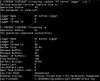
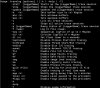
TraceLog
(This will list your current active logger sessions. In the following instructions replace "LoggerName" with the name of the logger associated with the NTKernal)
TraceLog -stop LoggerName
TraceLog -disable LoggerName
TraceLog -x
TraceLog -remove GlobalLogger

This should resolve any other growing log file issue.
If for some reason this doesn't work, then you probably have something unique going on and I'd have to see an export of your registry to help further.

Hope this helps.
Regards.
josh
  #33  
Old 04-13-2003
Newcomer, in training
 
Location: Northern Ireland
Member since: Apr 2003, 2 posts
Re. Tracelog & NT Kernel Logger

jjarman:

You're quite correct (and thanks BTW for saving me a sh*tload of time) with your posted registry key to disable gobal logging:

\HKEY_LOCAL_MACHINE\SYSTEM\
CurrentControlSet\Control\WMI\GlobalLogger\
Start Value = 0

My WMI\trace was growing overnight to fill all but 20mb's of my XP system partition.
It all started with BOOTVIS, and triggered NT Kernel Logger, even after Bootvis had been binned.

All-in-all, this is a little-known pain in the ****.

Thanks for posting sensible, concise advice - that actually works!
  #34  
Old 05-04-2003
rbudzinski's Avatar
Newcomer, in training
 
Location: Raleigh, NC
Member since: May 2003, 1 posts
Seems you got lucky with only 4-5 gigs of space. I hit 21gb of log file. Luckily I still had bootvis still on the computer and all it took was just to run it and then stop the tracing. much easier than turning off logging globally but would have done that if bootvis didn't stop it's mess.

A BIG THANK YOU TO EVERYONE!
  #35  
Old 07-15-2003
Newcomer, in training
 
Member since: Jul 2003, 2 posts
This may be of use to someone - I had this problem with trace.log, and couldn't get Bootvis.exe to solve the problem.

Here is what I did to solve it: - it's worked for me so far:

During boot, press F8 twice to get startup options.

Select safe mode, with command prompt

log -on as administrator

At the prompt, navigate to Windows\system32\logfiles\wmi\trace.log
(you still can't delete the file at this stage.)

use the command "attrib +r trace.log" without the quotes
(this stops windows altering this file anymore, by adding read only)

Restart windows normally

Go to the file in file-manager/explorer

Delete file

Create a new trace.log file (using notepad, and save it in the same directory where you deleted the original)

right click the file, and change attributes to read only
You should now have a file, sized 0 Kb, which can't be changed!

I hope this is helps.

Mark - former DOS user - bring back DOS!
  #36  
Old 07-15-2003
poertner_1274's Avatar
TS Special Forces
 
Location: Saint Louis, MO, USA
Member since: Feb 2002, 4,646 posts
System specs
Wow, that is a neat solution. I never even thought of doing something like that. But the way you explained it makes it seem as if it would work.

I hope this helps people in the future.

Great find Seligkram
  #37  
Old 07-15-2003
StormBringer's Avatar
TechSpot Guru
 
Location: USA
Member since: Apr 2002, 2,871 posts
umm, check MSKB, I'm not going to look it up. I remember seeing some other threads about a similar situation that may be relavent as well. Use the search feature.
  #38  
Old 09-15-2003
Newcomer, in training
 
Member since: Sep 2003, 1 posts
Inflated TRACE.LOG problem, how to fix.

After running the MS Bootvis utility, the file C:\WINDOWS\System32\LogFiles\WMI\trace.log becomes hugely inflated.

The file shrinks on reboting but may rapidly grow to a few gig's in size, to cure the problem run BootVis again and click Trace-->Stop Tracing, the file will now stop growing and may be safely deleted.
  #39  
Old 04-07-2004
Dovoc's Avatar
Newcomer, in training
 
Location: Lousy-Anna
Member since: Apr 2004, 1 posts
Thanks everyone

I had run bootvis (which managed to double my boot time......GRRRR). Trace.log was growing to more then 60 gigs.

I edited the registry, and am also going to do the read-only route. If I can find boot-vis again, I will turn that off also.

thanks again

Dovoc
Closed Thread
Page 2 of 2 1 2

Tip: Download Advanced SystemCare 3 Freeware - 1 Click A Day to Clean, Repair, Protect & Optimize your PC.

Thread Tools


Similar Topics
Topic Category Replies Last Post
Help with finding the right drivers Device Drivers 3 10-09-2004 01:42 PM
XP finding log error code info Windows OS 0 05-16-2004 12:58 AM
Legitiment IP Finding Software. Software & Utilities in General 3 04-12-2004 06:54 AM
difficulty find a y-junction/power suppy splitter cable... General Hardware 1 07-16-2003 11:35 AM
Help finding 1 GB DIMMs Processors, Chipsets and Motherboards 2 07-02-2002 09:16 AM


All times are GMT -4. The time now is 01:24 AM.