Welcome to the TechSpot OpenBoards. Please read the FAQ if you have any questions. Login to participate.

Go Back   TechSpot OpenBoards > OS & Software > Device Drivers

Problem detected and windows has shut down to prevent damage to pc

Reply
Bookmark / Share this page
Thread Tools
  #1  
Old 01-03-2007
Newcomer, in training
 
Member since: Sep 2006, 9 posts
Problem detected and windows has shut down to prevent damage to pc

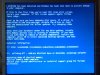
hi, i have a problem with my computer. A blue screen comes up telling me the following in the attachment.

This always comes up when i try to open a file, such as an mp3 for instance.

Please can someone help as this is bugging me. i have lost some important work which i needed, i didnt expect the error to occur at that point otherwise i would have saved my work ASAP. This error has now come up several times.

Help needed desperately.

Thank you.
Attached Images
File Type: jpg Windows Problem.jpg (44.6 KB, 14 views)
Reply With Quote
  #2  
Old 01-03-2007
Nodsu's Avatar
TS Special Forces
 
Location: Estonia
Member since: Feb 2002, 9,430 posts
System specs
ati3duag.dll is a part of your video drivers. Try updating these to the latest version.
Reply With Quote
You can remove this banner by registering, join the TS Community for free.
  #3  
Old 01-04-2007
Newcomer, in training
 
Member since: Sep 2006, 9 posts
Quote:
Originally Posted by Nodsu
ati3duag.dll is a part of your video drivers. Try updating these to the latest version.
which video driver is it? will i find it in device manager? if so, where will it be? will it be:

Other Devices>Multimedia Video Controller

Sound, video and game controllers>video codecs?

please can someone help.

thank you
Reply With Quote
  #4  
Old 01-04-2007
SNGX1275's Avatar
TS Special Forces
 
Location: Rolla, Missouri, USA
Member since: Feb 2002, 8,213 posts
System specs
Its under Display Adapters.

Get Drivers here: http://ati.amd.com/support/driver.html
Reply With Quote
  #5  
Old 01-05-2007
Newcomer, in training
 
Member since: Sep 2006, 9 posts
i downloaded the "Catalyst Software Suite", and i dont know what to do next. i dont know how to use this software.
Reply With Quote
  #6  
Old 01-05-2007
Nodsu's Avatar
TS Special Forces
 
Location: Estonia
Member since: Feb 2002, 9,430 posts
System specs
Just the Display Driver would have been enough..

Did you install the display drivers (you were asked to reboot)? If yes, then you don't have to do anything.
Reply With Quote
Reply
Thread Tools

Forum Jump

Similar Topics
Thread Thread Starter Forum Replies Last Post
Prevent infections by making windows more secure... Spike Guides and Solved Issues 35 10-15-2007 06:41 AM
CD/DVDROM drive - not detected by bios, detected by Windows? Nekrophetamine CPUs, Chipsets and Mobos 6 06-13-2006 02:45 PM
"Underclocked" CPU to prevent crashing, Power Supply problem? PearlRyde Other Hardware 4 01-18-2006 06:22 AM
HD not detected During Windows XP Pro install Duin Device Drivers 6 10-28-2005 12:27 AM
"A problem has been detected and Windows has been shut down..." Gurtmasta Windows OS 1 09-02-2005 09:07 PM


All times are GMT -4. The time now is 03:27 PM.