also @ TechSpot: Nortel's internal network "owned" by hackers for almost a decade
Welcome to the TechSpot OpenBoards. Please read the FAQ if you have any questions. Sign up or Login to participate.

Go Back   TechSpot OpenBoards > Software > Software Apps

Download Now:

probs with CMD

Thread Tools Search this Thread
  #1  
Old 02-27-2007
Yakob's Avatar
TechSpot Member
 
Member since: Nov 2006, 77 posts
probs with CMD

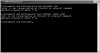
right, this isn't down to a virus as i've scanned it recently. But my CMD or COMMAND.COM will not accept commands like Ping or net etc. i'v eattached a pic to show that. i was wondering if it could be something has gone haywire in my registry. it's actually quite anoying because my friend makes batch files that cause flashy screen but anyway back-on-track, if anybody knows how to sort out my cmd then plz let me know. i will be going to school in about 20 mins so i cannot speak for too long.
Attached Images
File Type: jpg cmd.JPG (41.0 KB, 6 views)
  #2  
Old 02-27-2007
LNCPapa's Avatar
TechSpot Special Forces
 
Location: Duke University, North Carolina, USA
Member since: Feb 2002, 3,232 posts
System specs
Actually - it just looks like your path environment variable might be lost. Sometimes it's as easy as re-entering it or even just a reboot. I would open up the variable - paste it into notepad - save it empty - then open it back up and paste it back in.
  #3  
Old 02-27-2007
Yakob's Avatar
TechSpot Member
 
Member since: Nov 2006, 77 posts
will try that but it seems to stay like that no matter how many times i've reboot the pc. and it seems to have happened once i ran a batch file to remove a virus. all it did was removed a file using the simple DEL command. but since then it's not worked
  #4  
Old 02-27-2007
TechSpot Member
 
Location: Tampa, FL
Member since: Jun 2006, 37 posts
I had a similar problem, but it was with the "cd.." command. I was using the JVM for my Java class, and we compiled everything using the command line. I couldn't change directories, so I worked around the problem temporarily by moving all the project to the default folder.

Anyways, I don't know how I fixed it, but it seems to have been corrected somehow. It might involve downloading Windows updates, using a registry cleaner, or repairing the OS.

I can't help you much, but don't trash the computer because the problem CAN be FIXED.
  #5  
Old 02-27-2007
Nodsu's Avatar
TechSpot Evangelist
 
Location: Estonia
Member since: Feb 2002, 9,431 posts
System specs
In command prompt, run "set" and post the output here.
  #6  
Old 02-27-2007
Yakob's Avatar
TechSpot Member
 
Member since: Nov 2006, 77 posts
Quote:
Originally Posted by Nodsu
In command prompt, run "set" and post the output here.
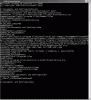
here you go.
Attached Images
File Type: gif cmdset.gif (96.3 KB, 7 views)
  #7  
Old 02-27-2007
Nodsu's Avatar
TechSpot Evangelist
 
Location: Estonia
Member since: Feb 2002, 9,431 posts
System specs
Your PATH variable is screwed up.
Take a close look at your screenshot - in the middle of the fouth line you see that the GTK and QuickTime entries have been merged.
Put a semicolon (;) between \bin and C: (You can edit the system variables in System Properties->Advanced->Environment Variables)
  #8  
Old 02-28-2007
Yakob's Avatar
TechSpot Member
 
Member since: Nov 2006, 77 posts
yay! thanks Nodsu, you have saved my life! ty
Closed Thread

Similar Topics
Topic Replies Forum
PSU probs? 2 Other Hardware
XP 64 probs 3 Windows OS
CPU probs i think.... 3 Processors and Motherboards
probs with icy box 2 Storage and Networking
new HD probs 2 Storage and Networking

Thread Tools Search this Thread
Search this Thread:

Advanced Search
All times are GMT -4. The time now is 10:44 PM.