also @ TechSpot: HDD supply to recover by Q3 2012, prices to remain high
Welcome to the TechSpot OpenBoards. Please read the FAQ if you have any questions. Sign up or Login to participate.

Go Back   TechSpot OpenBoards > Hardware > Mobile Computing

Collaborate in the cloud with Office, Exchange, SharePoint, and Lync

Acer 5920 pictures and upgrade info

Thread Tools Search this Thread
  #1  
Old 08-30-2007
TechSpot Member
 
Member since: Jun 2002, 44 posts
Acer 5920 pictures and upgrade info

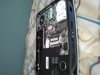
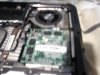
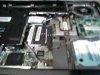
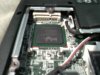
Hey all, having used Acer's 5920 for the last few weeks I decided to open the little guy up and take a few shots. I didn't have time to do a full tear down so here are the first few shots. And yes all I had at the time was the camera on my phone.

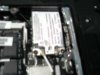
The shots to take not of are the ones showing the MXM type II graphics card. So a video upgrade is indeed possible. The other being the network card and the one empty slot that mirror's it on the motherboard. Expansion? Possible to add an "N" spec or others later on? Any thoughts? Also, I forgot to take one but the CPU is not soddered in, it's your standard Core 2 Duo socket. So yes, you can upgrade it, just be careful with your thermals.

The picture with the giant white label in it is the network card. Again, sorry for the crappy quality. I'll get new ones up when I've got time to take it apart again.
Attached Images
File Type: jpg SSPX0020.jpg (66.3 KB, 168 views)
File Type: jpg SSPX0022.jpg (61.0 KB, 163 views)
File Type: jpg SSPX0023.jpg (64.9 KB, 157 views)
File Type: jpg SSPX0024.jpg (68.9 KB, 150 views)
File Type: jpg SSPX0025.jpg (51.4 KB, 154 views)
  #2  
Old 09-04-2007
TechSpot Addict
 
Location: SEA
Member since: Oct 2006, 850 posts
System specs
icic....
it's good to see acer can be "halfway"opened like my old travelmate.

hence it's possible to clean CPU heatsink without doing full teardown..

some series of acer does not allow this, they only allow to open the RAM and HDD case. hence when it's time to clean the CPU heatsink and fan, big teardown must be done...

anyway 5920G is a nice laptop...
my housemate has one and it's one of the most impressive acer
bad thing is that it cant be 200* opened (screen) like old travelmate series
  #3  
Old 09-29-2007
Newcomer, in training
 
Member since: Sep 2007, 1 posts
I tried to lift up the bottom case lid after unscrewing all the bolts, but everytime i tried to lift it up it won't budge , how did guys removed the case lid? Many thanks in advance.
  #4  
Old 10-09-2007
mitomobo's Avatar
Newcomer, in training
 
Location: Malaysia
Member since: Oct 2007, 26 posts
System specs
hohohoho....nicely done..i wanna try it to my acer too(different model though)...
  #5  
Old 06-23-2008
Newcomer, in training
 
Member since: Jun 2008, 1 posts
Can't open case

Quote:
Originally Posted by rotk
I tried to lift up the bottom case lid after unscrewing all the bolts, but everytime i tried to lift it up it won't budge , how did guys removed the case lid? Many thanks in advance.
I have the same problem. After the screws are removed, there are still two plastic pegs holding the bottom cover on. I applied a little upward force on the cover, but I did not want to break the cover.

It would indeed be helpful to receive an answer to this question.

Thanks!
  #6  
Old 12-07-2008
Newcomer, in training
 
Member since: Dec 2008, 2 posts
Acer 5920 - How to half open

Hi I joined the community today and in finding some very interesting tech blogs.

Many had mentioned that after all the bottom half cover screws have been removed, they still could not open the cover fully. Actually there are 2 more screws in the middle which is actually masked by 2 small black round stickers. Remove them and you'll find the screws. You may save the stickers to stick them back as they were...not sure why acer masked those 2 screws...
  #7  
Old 12-07-2008
Newcomer, in training
 
Member since: Dec 2008, 2 posts
Hi I joined the community today and in finding some very interesting tech blogs.

Many had mentioned that after all the bottom half cover screws have been removed, they still could not open the cover fully. Actually there are 2 more screws in the middle which is actually masked by 2 small black round stickers. Remove them and you'll find the screws. You may save the stickers to stick them back as they were...not sure why acer masked those 2 screws...
  #8  
Old 01-25-2009
Newcomer, in training
 
Location: england...
Member since: Jan 2009, 2 posts
System specs
Hiya guys and girls newbie to up gradeing and i'm basically asking is it possible to upgrade me acer5920 so its more compatible for games like gta4 and war graft high demanding graphics and were do i look for the stuff to do it all???????please reply and thanks for the pics....interesting stufff...oh whats the best graphics card i could fit money no option??????????????
Closed Thread

Similar Topics
Topic Replies Forum
Acer Aspire 5920 keeps freezing out of the blue 5 Virus and Malware Removal
Upgrade Ram for Acer 5920 2 Mobile Computing
'Stuttering' audio Acer 5920 0 Audio and Video
No sound on brand new Acer Aspire 5920 2 Audio and Video
Acer Aspire 5920: Socket or solder? 0 Mobile Computing

Thread Tools Search this Thread
Search this Thread:

Advanced Search
All times are GMT -4. The time now is 06:32 AM.