also @ TechSpot: Motorola Droid 4 unboxing, hands-on video
Welcome to the TechSpot OpenBoards. Please read the FAQ if you have any questions. Sign up or Login to participate.

Go Back   TechSpot OpenBoards > Hardware > Overclocking, Cooling and Modding

Begin your free trial now Pay-as-you-go options starting at $10/user/month

Need a little help with overclocking

Thread Tools Search this Thread
  #1  
Old 01-22-2008
TechSpot Enthusiast
 
Member since: Jan 2008, 173 posts
System specs
Need a little help with overclocking

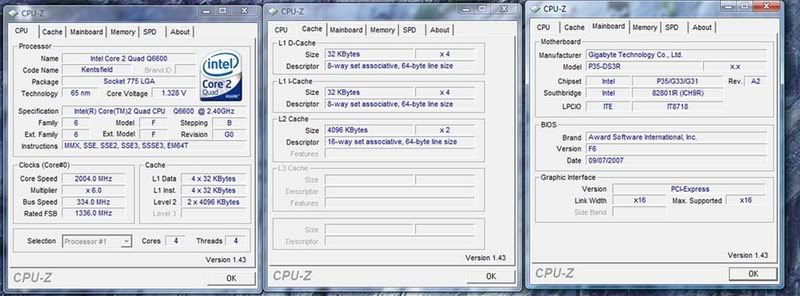
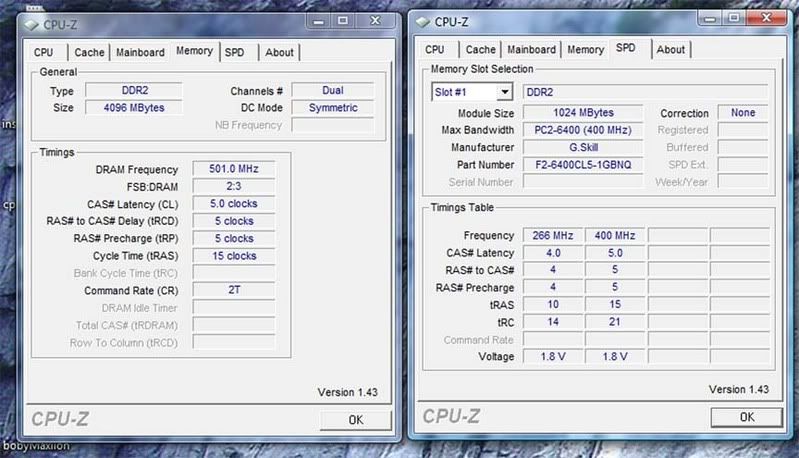
Alright I have been doing a few things to overclocking. First I started increasing my FSB by 25MHz increments then once I got close to 3.0GHz I increased the voltage to 1.38v. Everything boots fine but then I start CPUz and im looking at my multiplier and its fluctuating from 6.0x to 9.0x which also changes my core speed. What is causing this? Thanks in advance for your help.

  #2  
Old 01-24-2008
Tedster's Avatar
Techspot old timer.....
 
Location: Petersburg, VA
Member since: Feb 2005, 10,005 posts
System specs
http://www.techspot.com/vb/topic70998.html
  #3  
Old 01-25-2008
luvhuffer's Avatar
TechSpot Paladin
 
Location: Ciudad De Los Ángels Perdidos y Sueños Perdidos, Alta California
Member since: Feb 2005, 614 posts
System specs
Nice thread to point to Tedster. But I didn't see anything in there about the speed stepping. Maybe someone should tell CMH to add a speed step guide.

Ryan. What you are seeing is the speed step technology. It is a power saving feature that increases the CPU speed to handle heavier loads. Overclocking your CPU is in effect telling the system what the maximum speed on the sppeed step should be. To run the CPU wide open 24/7 you need to disable speed step. In your BIOS set C1E and EIST to disabled. Some info on speed step can be read here
  #4  
Old 01-25-2008
Mictlantecuhtli's Avatar
TechSpot Special Forces
 
Location: Finland
Member since: Feb 2002, 4,886 posts
System specs
Quote:
Originally Posted by luvhuffer
To run the CPU wide open 24/7 you need to disable speed step. In your BIOS set C1E and EIST to disabled.
Wide open?

I never disable SpeedStep, overclock, and run the PC usually 24/7. What's wrong with a little power saving?

I haven't seen SpeedStep or Cool'n'Quiet making CPUs any more crash-prone than without them, even with overclocking.
  #5  
Old 01-25-2008
luvhuffer's Avatar
TechSpot Paladin
 
Location: Ciudad De Los Ángels Perdidos y Sueños Perdidos, Alta California
Member since: Feb 2005, 614 posts
System specs
Ya my E6400 runs wide open all the time at 3.4. Of course my room doesn't have a heater so the sys exhaust fan helps warm it up. lol Besides with the speedstep enabled I see a noticable slow down when surfing. So why bother with overclocking if you are not gonna use it to optimize performance all the time? But then to each his own. I doubt I'm shortening the life of the CPU in anyway I'll ever see as the thing will be obsolete long before it dies.
Closed Thread

Similar Topics
Topic Replies Forum
Overclocking 1 Overclocking, Cooling and Modding
AMD 64 Overclocking 12 Processors and Motherboards
HP Overclocking 3 Processors and Motherboards
Does RAM have anything to do with overclocking? 8 Processors and Motherboards

Thread Tools Search this Thread
Search this Thread:

Advanced Search
All times are GMT -4. The time now is 02:10 AM.